3. Fundamentals of explicit dynamic FEA for
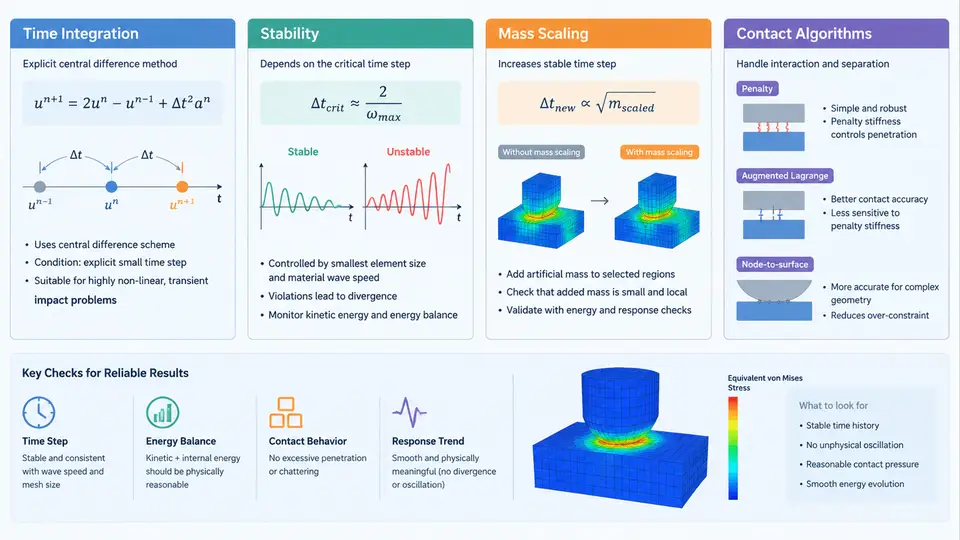
Virtual linear impactor validation rests on a numerical method that behaves very differently from the implicit static solvers most engineers learn first. In an impact event, the structure experiences large deformations, rapidly changing contact conditions, and stress waves that propagate through the mesh in microseconds. Explicit dynamic FEA was developed precisely for this class of problem. This section explains the four pillars that determine whether an impact model is trustworthy: time integration, stability, mass scaling, and contact algorithms.
3.1 Explicit Time Integration: The Central Difference Scheme
The explicit method advances the solution one small time increment at a time using the central difference scheme. For each node, acceleration is obtained directly from the equation of motion:
a_n = M⁻¹ (F_ext − F_int)

v_(n+1/2) = v_(n−1/2) + a_n · Δt
u_(n+1)   = u_n + v_(n+1/2) · Δt
Here M is the lumped (diagonal) mass matrix, F_ext is the applied external load, and F_int is the internal force assembled from element stresses. Because M is diagonal, no matrix inversion or linear system solve is required — each increment is computationally cheap. This is the defining advantage of explicit dynamics: cost per step is low, and the method handles contact and nonlinearity without iteration.
The trade-off is that the scheme is only conditionally stable. The time step must remain below a critical value, otherwise the solution diverges explosively. There is no equilibrium iteration, so any error introduced in one step propagates forward; accuracy therefore depends on keeping Δt small enough to resolve the stress wave as it crosses each element.
3.2 Stability and the Courant Condition
The stability limit is governed by the Courant–Friedrichs–Lewy (CFL) condition. For a linear elastic material, the critical step for a solid element is approximately:
Δt_crit = L_e / c_d

c_d = sqrt(E / ρ)          (wave speed, elastic bar)
L_e = characteristic element length
For a 3D solid element, L_e is typically taken as the minimum element dimension or the volume-to-largest-face-area ratio, depending on the element formulation. The physical meaning is intuitive: information (the stress wave) must not travel across more than one element in a single step. If Δt > Δt_crit, the numerical solution amplifies rather than propagates the wave, and the model "blows up."
In practice, solvers compute a stable step from the smallest element in the mesh and apply a safety factor, commonly 0.9:
Δt = 0.9 · min( L_e / c_d ) over all elementsThis is why mesh quality directly controls runtime. A single tiny or badly distorted element can force the entire model to run at a fraction of the step size the rest of the mesh could tolerate. Before running an impact model, always check the element quality report and the solver's reported stable time step.
3.3 Mass Scaling: Trading Mass for Time
Because Δt_crit ∝ sqrt(ρ), artificially increasing the density of small elements raises their critical step. This technique is called mass scaling. It is applied selectively — usually only to elements whose step is below a target value — so that the global stable step rises to a practical level.
Mass scaling is powerful but must be used with discipline. Adding mass changes the physics: it alters inertia, natural frequencies, and the momentum balance. The standard safeguard is to monitor the added mass. A common acceptance criterion is that the total added mass remain below 1–5% of the model's original mass, depending on how sensitive the response is to inertia.
| Parameter | Typical setting | Effect / risk |
|---|---|---|
| Target time step | Set to the step of the bulk mesh | Raises global Δt; too aggressive distorts wave timing |
| Added mass limit | 1–5% of total mass | Above this, inertia effects become non-physical |
| Scaling scope | Only elements below target | Global scaling over-massens already-fine regions |
| Verification | Compare kinetic energy and peak force | Large shifts indicate over-scaling |
For a linear impactor model, mass scaling is often unnecessary if the mesh is reasonably uniform. It becomes valuable when thin shell sections or small fillets force a tiny step. Always run a scaled and an unscaled (or less-scaled) case and compare peak force and energy histories before trusting the scaled result.
3.4 Contact Algorithms
Contact is where impact models most often fail. Explicit codes typically use a penalty method: when a slave node penetrates a master surface, a normal force proportional to the penetration depth is applied to push it back.
F_normal = k_contact · δ_penetrationThe contact stiffness k_contact is derived from the element stiffness and a scale factor. Too soft, and nodes penetrate visibly; too stiff, and the contact force oscillates and can destabilize the step. Most solvers auto-compute a stable stiffness, but the scale factor may need tuning.
Two algorithm families dominate:
- Penalty contact — allows small penetration, conserves energy well, and is robust for most impactor–target interfaces.
- Kinematic (constraint) contact — enforces zero penetration exactly, useful for rigid impactors, but can introduce energy errors and is less forgiving with complex geometry.
Additional controls matter for impactor work: friction (Coulomb model with a static/kinetic coefficient pair), contact thickness (critical for shell edges), and the choice of single-surface vs. node-to-surface tracking. For a rigid linear impactor striking a deformable panel, node-to-surface penalty contact with a friction coefficient around 0.1–0.3 is a common starting point.
3.5 How the Four Pillars Interact
These four elements are not independent. A finer mesh lowers Δt_crit, which increases runtime, which tempts the analyst to mass-scale, which changes inertia and therefore contact forces. A stiffer contact penalty can itself reduce the stable step. The figure below shows how a change in mesh or contact settings propagates through the model to affect runtime and result fidelity.
3.6 Practical Verification Checklist
Before accepting any explicit impact result, confirm the following observable quantities:
- Energy balance — total, kinetic, internal, and contact energy should sum consistently; hourglass energy should stay below roughly 5% of internal energy.
- Added mass — reported mass increase within the chosen limit (e.g., ≤3%).
- Stable time step — no warnings of step reduction during the run.
- Contact penetration — visually inspect the interface; penetration should be a small fraction of element size.
- Mesh convergence — refine the impact region and confirm peak force changes by less than an acceptable tolerance (e.g., 5%).
When these checks pass, the explicit model is a credible basis for comparing against physical linear impactor test data. When they fail, the cause is almost always traceable to one of the four pillars covered here — an over-fine element, an over-scaled mass, an unstable contact stiffness, or a time step that was never truly stable.