3. Test instrumentation for airbag correlat
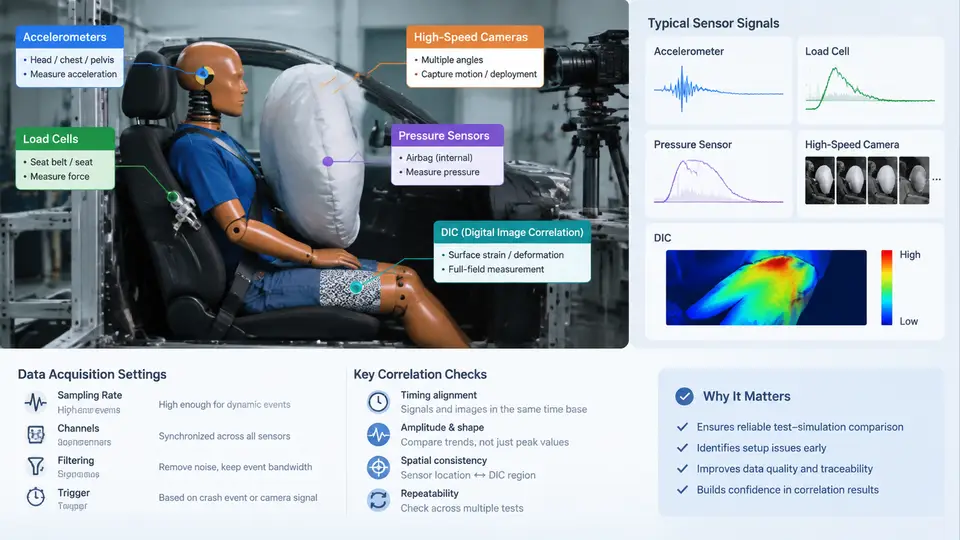
Correlation between a physical airbag test and its CAE model is only as trustworthy as the measurement chain that produced the test data. A sled or full-vehicle test can be executed perfectly and still yield a poor correlation if an accelerometer is under-ranged, a load cell is mounted on a non-rigid bracket, or the DAQ anti-alias filter is set inconsistently with the simulation output sampling. This section covers the sensor types used in airbag correlation testing, their placement and mounting requirements, and the data acquisition settings that must be aligned with the simulation to make a like-for-like comparison possible.
Sensor Set and Measurement Roles
Airbag correlation testing typically combines five measurement families, each answering a different question about the deployment event.
| Sensor | Primary measurand | Typical range | Correlation role |
|---|---|---|---|
| Piezoresistive accelerometer | Structural acceleration (vehicle, seat, dummy) | ±50 g to ±2000 g | Validates sled pulse, body deceleration, dummy kinematics |
| Load cell (seat belt, anchor, steering column) | Force / tension | 2 kN to 20 kN | Validates belt routing, retractor lock, column collapse |
| Pressure sensor (in-bag / tank) | Absolute or gauge pressure | 0–500 kPa | Validates inflator mass flow and bag fill curve |
| High-speed camera | Displacement, bag shape, dummy motion | 1000–10 000 fps | Validates deployment timing and bag geometry |
| DIC (stereo or single camera) | Full-field strain / displacement | Depends on FOV | Validates panel tear, fabric strain, trim deformation |
Each family has a distinct failure mode that corrupts correlation. Accelerometers are sensitive to mounting resonance; load cells to off-axis loading and bracket compliance; pressure sensors to thermal drift and tube lag; cameras to synchronization error; DIC to speckle pattern quality and out-of-plane motion. The instrumentation plan must address all five.
Accelerometer Selection and Mounting
For airbag correlation, accelerometers are usually piezoelectric (charge mode) for high-g events or piezoresistive (MEMS) for low-frequency, DC-coupled measurements such as seat track displacement. The choice matters because the simulation output is typically a nodal acceleration time history; if the test sensor has a high-pass corner above the simulation's lowest frequency of interest, the comparison will diverge at the tail of the event.
A practical rule: select a sensor whose frequency range covers at least 1.5× the highest frequency present in the simulation output, and whose full-scale range is at least 2× the expected peak. For a driver-side frontal sled test, a common configuration is a ±500 g piezoresistive accelerometer on the seat track and a ±2000 g piezoelectric unit on the B-pillar. Mounting must be rigid: a stud-mounted sensor on a machined boss is preferred over adhesive or magnetic mounts, which introduce a resonance typically between 2 kHz and 5 kHz that can alias into the measurement band.
Load Cells and Pressure Sensors
Seat belt load cells are inline tension links installed between the belt anchor and the vehicle structure. They must be aligned with the belt path; a misalignment of more than 5° introduces a cosine error and an off-axis bending moment that the cell reports as apparent tension. For a 10 kN range cell, a 5° misalignment produces roughly 0.4% error, which is acceptable, but 15° produces about 3.4% and is not.
In-bag pressure sensors are mounted through the bag fabric or via a short rigid port. The sensor diaphragm must be flush with the inner surface to avoid a stagnant volume that delays the pressure rise. For tank pressure, a 0–500 kPa absolute sensor with a 1 kHz minimum response is typical. The simulation counterpart is the inflator tank pressure curve, so the test sensor and the simulation output must use the same reference (absolute vs. gauge) and the same units.
High-Speed Cameras and DIC
High-speed cameras provide the spatial context that point sensors cannot. For airbag correlation, the critical views are: (1) a side view of the dummy and bag, (2) a front view of the bag deployment, and (3) a close-up of the module cover tear. Frame rates of 1000–2000 fps are sufficient for bag deployment; 5000–10 000 fps is needed for cover tear and fabric rupture.
DIC requires a stochastic speckle pattern applied to the region of interest, typically a black-and-white spray with a speckle size of 3–5 pixels. Stereo DIC uses two synchronized cameras to resolve out-of-plane displacement. The correlation between DIC-measured strain and simulation strain is only valid if the DIC facet size and the simulation element size are comparable; a facet much smaller than the element will show noise, while a facet much larger will average out the strain gradient.
Data Acquisition Settings for Correlation
The DAQ configuration determines whether the test data can be compared directly to simulation output. The key settings are sample rate, anti-alias filter, and synchronization.
- Sample rate: At least 10× the highest frequency of interest. For airbag events with content up to 2 kHz, a 20 kHz sample rate is a common minimum. Simulation output should be written at the same rate or resampled to it before comparison.
- Anti-alias filter: A low-pass filter with a corner at or below 0.4× the sample rate. The simulation output must be filtered with the same corner frequency and filter type (e.g., Butterworth, 4th order) before correlation, otherwise the test will appear smoother than the simulation.
- Synchronization: All channels, including cameras, must share a common time zero. A TTL trigger from the sled release or the fire signal is standard. Camera-to-DAQ synchronization error should be under 1 ms; for DIC, under 0.1 ms.
- Resolution: 16-bit minimum for accelerometers and pressure; 24-bit for load cells where the signal of interest is a small fraction of full scale.
Instrumentation Layout and Signal Chain
The following diagram shows a typical airbag correlation instrumentation layout, from sensors through signal conditioning and DAQ to the correlation dataset. It highlights the parallel paths for point sensors and imaging, and the common time base that makes the comparison valid.
Practical Correlation Checklist
Before releasing test data for correlation, verify the following. This checklist is written as a fillable record for a single test run.
| Item | Acceptance criterion | Recorded value |
|---|---|---|
| Accelerometer range vs. expected peak | Full scale ≥ 2× peak | ____ g / ____ g |
| Mounting resonance | > 5× highest frequency of interest | ____ Hz |
| Load cell alignment | Misalignment < 5° | ____ ° |
| Pressure reference | Absolute / gauge matches simulation | ____ |
| Camera frame rate | ≥ 1000 fps for bag, ≥ 5000 fps for tear | ____ fps |
| DIC speckle size | 3–5 pixels | ____ px |
| DAQ sample rate | ≥ 10× highest frequency of interest | ____ kHz |
| Anti-alias filter corner | ≤ 0.4× sample rate, matched to simulation | ____ Hz |
| Sync error | < 1 ms (point sensors), < 0.1 ms (DIC) | ____ ms |
When a correlation discrepancy appears, the instrumentation chain should be eliminated before adjusting the model. A useful diagnostic sequence is: (1) confirm time-zero alignment by comparing the trigger channel; (2) compare the frequency content of test and simulation using the same FFT window; (3) check whether the discrepancy is a phase shift (synchronization or filter issue) or an amplitude difference (model or sensor range issue); (4) verify sensor calibration against a shunt or known reference. In many programs, more than half of the initial "model errors" are resolved at step 1 or 2 without touching the CAE model.
The instrumentation settings described here are not independent of the simulation setup. The sample rate, filter corner, and time zero of the test must be mirrored in the simulation output request. Establishing this alignment before the first correlation run saves repeated re-processing and prevents the common trap of tuning a model to compensate for a measurement artifact.