3. Geometry and mesh quality gates
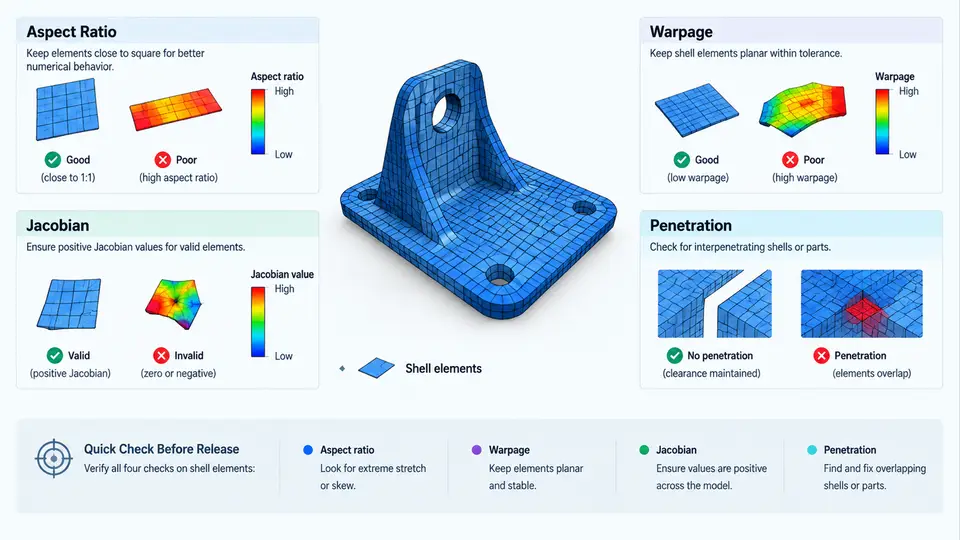
In a PAM-CRASH production workflow, a model that runs to termination is not automatically a model that can be released. Crashworthiness results are highly sensitive to shell element distortion: a badly warped quad can artificially stiffen a bending-dominated rail, a collapsed Jacobian can produce negative volumes and abort the run, and an unnoticed penetration between a barrier and a bumper can inject non-physical contact forces in the first milliseconds. The geometry and mesh quality gate is therefore a mandatory checkpoint that sits between "model assembled" and "model released for solver submission." This section defines the four core checks, gives defensible acceptance thresholds, and shows how to run them as a repeatable pre-release procedure.
Why Shell Quality Dominates Crash Results
PAM-CRASH shell formulations (type 1, type 2, type 101, and the Belytschko–Tsay family) integrate stresses at in-plane Gauss points and, for some formulations, at through-thickness points. The element's local coordinate system is derived from its corner nodes. When the four corners are not coplanar, the solver projects them onto a best-fit plane and the resulting local axes differ from the intended surface normal. The consequences are predictable:
- Excessive aspect ratio makes the element stiff in the long direction and soft in the short direction, biasing hourglass control and distorting the bending stiffness of the section.
- Warpage introduces spurious membrane-bending coupling; a warped element in a folding hinge can delay or suppress the fold, changing the energy absorption path.
- Poor Jacobian means the mapping from the reference element to the physical element is close to singular; the element may invert during large deformation and trigger a negative volume error.
- Penetration creates initial contact overlap, which the penalty or kinematic contact algorithm converts into a large initial force spike, corrupting the acceleration and intrusion history.
These four checks are complementary: aspect ratio and warpage describe shape, Jacobian describes mapping validity, and penetration describes spatial interference between parts. A release gate must pass all four.
Check 1 — Shell Element Aspect Ratio
Aspect ratio is the ratio of the longest edge to the shortest edge of a shell element. For a quad, compute the four edge lengths and take max/min. For a triangle, use the longest edge divided by the shortest altitude. The check is performed per element, then summarized as a distribution and a maximum.
Recommended acceptance bands for production crash models:
| Region | Target aspect ratio | Hard limit | Action if exceeded |
|---|---|---|---|
| Primary crush zones (rails, rockers, bumper beams) | < 3.0 | 5.0 | Re-mesh locally; split long edges |
| Secondary structure (floor, roof, pillars) | < 4.0 | 6.0 | Re-mesh or accept with documented justification |
| Non-structural trim, closures | < 6.0 | 10.0 | Accept if not in load path |
In practice, aspect ratio violations cluster near fillets, holes, and part boundaries where the mesher was forced to transition. The fix is usually a local re-mesh with a controlled edge seed, not a global refinement, because global refinement multiplies element count and stable time step cost.
Check 2 — Warpage
Warpage measures how far a quad deviates from planarity. A common definition: project the four corner nodes onto the best-fit plane, then compute the maximum out-of-plane distance divided by the average edge length, expressed as a percentage or a ratio. PAM-CRASH and most pre-processors report warpage in degrees or as a normalized value.
Acceptance guidance:
- Crush zones: warpage < 5° (or < 0.05 normalized).
- General body structure: warpage < 10°.
- Trim and non-structural: warpage < 15°.
Warpage is more damaging than aspect ratio in bending-dominated regions because it couples membrane and bending response. A useful diagnostic is to overlay the warpage contour on the intended fold lines: if a hinge line contains warped elements, the fold pattern will be non-physical.
Check 3 — Jacobian
The Jacobian determinant measures the local volume scaling of the isoparametric mapping. For a valid shell element, the Jacobian must be positive at every integration point. Values approaching zero indicate a near-degenerate element; negative values indicate inversion, which the solver will reject with a negative volume or negative Jacobian error.
Practical thresholds:
- Minimum Jacobian ratio > 0.6 for crush zones.
- Minimum Jacobian ratio > 0.4 for general structure.
- Any element with Jacobian ≤ 0 must be fixed before submission — there is no acceptable justification.
Jacobian problems usually originate from collapsed quads (two nodes coincident), highly skewed corners, or triangles with near-zero area. The remedy is to identify the offending elements by ID, inspect the local mesh, and either collapse the degenerate quad into a triangle or re-mesh the patch.
Check 4 — Penetration
Penetration checks detect initial geometric overlap between parts that will interact through contact. In a full vehicle model, the critical pairs are barrier-to-bumper, tire-to-wheelhouse, occupant-to-interior, and any self-contact within a folding structure. PAM-CRASH contact interfaces (type 1, type 2, type 7, type 11, type 13, type 24) will generate forces proportional to the initial penetration depth, so even a 2 mm overlap can produce a visible force spike at t = 0.
The check is performed by computing the minimum distance between node sets of adjacent parts and flagging any negative distance (overlap). Recommended tolerance: no penetration greater than 0.5 mm in contact-relevant regions, and zero penetration for rigid barrier surfaces.
Running the Gate as a Repeatable Procedure
The four checks should be executed in a fixed order, because fixing one can affect another. A practical sequence:
- Run a global element quality query and export a table of element ID, aspect ratio, warpage, and Jacobian.
- Filter elements exceeding the hard limits and group them by part and by region (crush zone vs. non-structural).
- Fix Jacobian violations first — they are binary failures.
- Re-mesh aspect ratio and warpage violations in crush zones, then re-run the query.
- Run the penetration check on all defined contact pairs and resolve overlaps by adjusting node positions or part offsets.
- Re-run the full gate and archive the quality report with the model revision.
The following SVG summarizes the gate logic and the decision path for each check.
Interpreting the Gate Report
A well-formed gate report contains, for each check, the number of violating elements, the maximum value, the part and region where violations concentrate, and the disposition (fixed, accepted with justification, or blocked). The report should be versioned alongside the model deck so that a reviewer can trace why a particular element was accepted.
Two practical notes. First, do not chase a perfect mesh: a model with zero violations everywhere is usually over-refined and will run slowly. The gate exists to catch violations that matter, not to achieve cosmetic uniformity. Second, always re-run the gate after any mesh edit, because local re-meshing can introduce new warpage or penetration elsewhere. The gate is a loop, not a one-time filter.
With the four checks defined, thresholded, and sequenced, the geometry and mesh quality gate becomes a defensible, auditable step in the production release process rather than an informal visual inspection.