3. Building a pedestrian protection model i
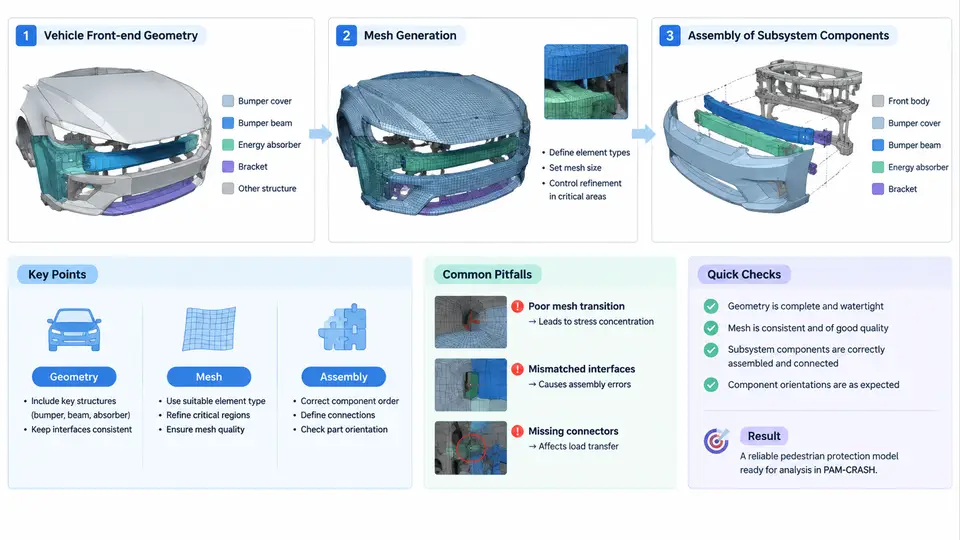
A pedestrian protection model in PAM-CRASH is not a single monolithic mesh; it is an assembly of several independently meshed subsystems that must share a consistent coordinate system, a consistent unit system, and a controlled set of contact interfaces. The quality of the final head-impact and leg-impact predictions depends far more on how the front-end geometry is simplified, how the mesh is generated, and how the subsystems are tied together than on the choice of solver settings. This section walks through the practical construction sequence: preparing vehicle front-end geometry, generating a shell mesh suitable for explicit simulation, and assembling the subsystem components into a runnable model.
3.1 Vehicle Front-End Geometry Preparation
Start from the CAD assembly of the vehicle front end. The relevant regions for pedestrian protection are the hood outer panel, hood inner panel and its reinforcements, hinges, latch and striker, fender-to-hood gap, cowl and wiper area, headlamp housings, bumper fascia, bumper beam, energy absorbers, grille, and the upper and lower leg-impact zones. Export these as a clean, watertight or near-watertight surface set, ideally in STEP or IGES, and import into ANSYS SpaceClaim or your preferred pre-processor.
Geometry simplification is the first engineering decision. Small features that do not influence the deformation path — bolt holes below roughly 8 mm diameter, embossed logos, trim clips, and thin decorative ribs — should be removed or replaced by equivalent mass. Features that do influence the result must be retained: hood inner-panel beads, hinge brackets, latch reinforcement, and the bumper beam's crush initiators. A practical rule is to keep any feature whose stiffness contribution exceeds roughly 5% of the local panel stiffness, and to represent removed mass as distributed non-structural mass on the nearest shell elements.
Define the coordinate system explicitly before meshing. In this course we adopt the vehicle coordinate system: X positive toward the rear of the vehicle, Y positive toward the left side, Z positive upward, with the origin at the front axle centerline on the ground plane. All subsystem meshes, the pedestrian impactor models, and the impactor release positions must use this same convention. If a supplier delivers a subsystem in a different frame, transform it before assembly and document the transformation.
3.2 Mesh Generation for the Front End
Pedestrian protection models are dominated by shell elements because the relevant structures are thin-walled panels. Use a target element size of 5–8 mm on the hood outer and inner panels, 4–6 mm on hinges and latch, and 8–10 mm on the bumper beam and fascia. Refine to 3–4 mm in the head-impact zones identified from the grid points defined by the regulation (for example, the child and adult headform grid on the hood).
Element quality targets for explicit simulation are stricter than for implicit analysis. Keep the following as acceptance criteria before proceeding:
| Metric | Target | Action if exceeded |
|---|---|---|
| Jacobian | > 0.6 | Remesh local region |
| Warpage | < 15° | Split or smooth element |
| Aspect ratio | < 5 | Adjust edge lengths |
| Min. angle (quad) | > 45° | Local remesh |
| Trias in critical zone | < 5% | Convert to quads |
Assign thickness per component rather than per element. The hood outer is typically 0.65–0.80 mm, the inner panel 0.60–0.75 mm, hinges 2.0–3.0 mm, and the bumper beam 1.5–2.5 mm depending on material. Use *PART and *SECTION_SHELL cards to carry these values, and keep a component-to-thickness mapping table in the model documentation.
Material models should reflect the actual grades. For steel hood panels, use *MAT_024 (piecewise linear plasticity) with the true stress–strain curve from the material card, and add strain-rate scaling via *DEFINE_CURVE if rate data is available. For aluminum hoods, *MAT_037 or *MAT_024 with appropriate hardening is common. For plastic bumper fascia, *MAT_024 with a low yield stress and high failure strain is a reasonable first approximation.
3.3 Assembly of Subsystem Components
Assemble the model in a defined order so that contact definitions and connections remain traceable. A workable sequence is: body-in-white reference → hood assembly → fender and front-end module → bumper system → underbody and suspension reference → pedestrian impactors.
Connections between subsystems are the most common source of non-physical results. Use the following guidance:
- Spot welds on the hood inner-to-outer and hinge-to-hood joints: represent with
*CONSTRAINED_SPOTWELDor a beam element with*MAT_100. Match the weld pitch from the CAD weld map, typically 25–40 mm. - Adhesive bonds on hemmed hood edges: use
*CONSTRAINED_INTERPOLATIONor a thin solid adhesive layer with a cohesive material if failure is of interest. - Bolted joints at hinges and latch: rigid body constraints (
*CONSTRAINED_NODAL_RIGID_BODY) are acceptable when bolt failure is not being studied. - Bumper-to-body attachments: model the energy absorber as solid or thick shell elements and tie it to the beam and fascia with shared nodes or tied contacts.
Contact definitions must be declared before the impactor is released. The essential contacts are: hood outer to headform, hood inner to hood outer (self-contact after deformation), bumper fascia to legform, bumper beam to legform, and hood to engine-bay components. Use *CONTACT_AUTOMATIC_SURFACE_TO_SURFACE with a friction coefficient of 0.2–0.3 for painted steel-to-impactor contact, and *CONTACT_AUTOMATIC_SINGLE_SURFACE for hood self-contact. Set the penalty stiffness scale factor to 0.1–0.5 initially and increase only if penetration exceeds 10% of the local element size.
3.4 Verifying the Assembled Model
Once the subsystems are assembled, perform three checks before running any impact scenario. First, check the model's total mass and center of gravity against the CAD reference; a deviation above 2% usually indicates missing non-structural mass or an incorrect thickness assignment. Second, check the initial penetration report from the solver; any contact with initial penetration greater than 0.5 mm must be corrected by adjusting geometry or contact thickness. Third, run a modal or static check on the hood assembly to confirm that the first bending mode is in a plausible range (typically 25–45 Hz for a production hood) — a large deviation signals incorrect connections or material data.
The SVG below summarizes the assembly structure and the key interfaces that must be controlled between subsystems.
3.5 Practical Notes on Model Build
Two failure modes dominate early model builds. The first is initial penetration between the hood inner panel and engine-bay components, which produces spurious contact forces at t = 0 and corrupts the head-impact acceleration curve. Inspect the solver's initial penetration output and resolve by moving the offending component or reducing its contact thickness. The second is mass inconsistency, usually caused by omitting non-structural mass such as paint, sealant, and trim. Reconcile the model mass against the CAD bill of materials before proceeding.
Keep the model modular. Store each subsystem in its own include file (hood.k, front_end.k, bumper.k, impactor.k) and drive the assembly from a master file that defines units, control cards, and include order. This makes it straightforward to swap a hood variant or update a material card without rebuilding the entire model, and it keeps the assembly traceable when results are reviewed.