3. PAM-CRASH model setup for correlation
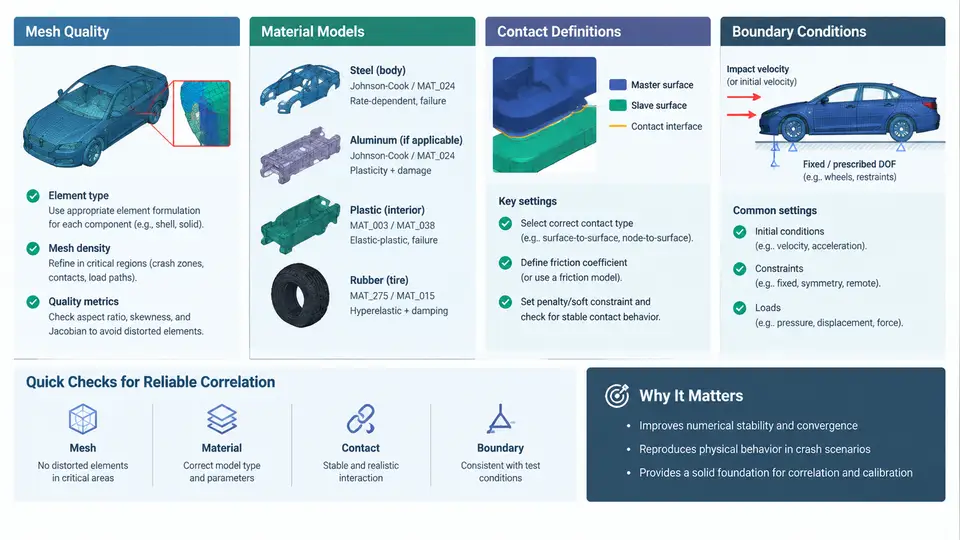
Correlation between a PAM-CRASH simulation and a physical crash test is only as trustworthy as the model that produced it. Before any curve-matching or parameter-tuning begins, the finite element model must be built so that its numerical behavior is defensible: the mesh must resolve the deformation physics, the material cards must reproduce the correct constitutive response, contacts must transmit loads without spurious penetration or leakage, and boundary conditions must mirror the test fixture. This chapter treats these four pillars as a single, interdependent setup problem rather than four isolated checklists.
Mesh Quality: Resolution, Aspect Ratio, and Hourglass Control
In explicit crash analysis, mesh quality directly controls both accuracy and stable time step. The stable time step for a shell element scales with its characteristic length, so a single undersized element can dominate the cost of the entire model. A practical target for body-in-white and closure panels is a nominal element size of 5–8 mm in regions of interest (intrusion zones, hinge lines, spot-weld neighborhoods) and 10–15 mm in non-critical areas. Refine only where strain gradients are steep; uniform global refinement is wasteful and rarely improves correlation.
Key quality metrics to enforce before running:
- Jacobian ratio ≥ 0.6 for shells and ≥ 0.7 for solids; distorted quads produce inaccurate bending stiffness.
- Aspect ratio ≤ 5:1 in deformation zones; long thin elements lock in bending.
- Warpage ≤ 15° for quads; excessive warpage corrupts the element's normal and its contact search.
- Trias limited to transition regions; keep the tria fraction below roughly 5–10% of the total shell count.
- Free edges and duplicates eliminated; unmerged nodes create artificial hinges and contact gaps.
Hourglassing is the classic explicit-analysis failure mode for reduced-integration shells. PAM-CRASH offers several hourglass control options; for crash models, the physically-based stiffness form (type 4 or equivalent) with a coefficient around 0.05–0.10 is a common starting point. Monitor the hourglass energy in the global energy balance: if hourglass energy exceeds roughly 5% of the internal energy, the mesh or the control coefficient needs attention. This is a diagnostic, not a tuning knob to be pushed arbitrarily.
Material Models: Choosing and Calibrating the Constitutive Law
Material selection must match the alloy, the strain-rate regime, and the failure mode observed in the test. For mild and high-strength steel body panels, an elastoplastic model with isotropic hardening and strain-rate sensitivity (e.g., a Johnson–Cook or Cowper–Symonds formulation) is standard. For aluminum extrusions and castings, the same family applies but with different rate parameters and, often, a ductile damage criterion to capture fracture. For polymers and foams, crushable foam or low-density foam models with a defined plateau stress are required.
The critical discipline is that the material card must be populated from coupon data, not from handbook defaults. A typical calibration sequence for a DP590 steel:
- Obtain quasi-static tensile curves at 0.001 s⁻¹ and dynamic curves at 1, 10, and 100 s⁻¹.
- Fit the hardening law to the quasi-static curve to extract yield stress and hardening modulus.
- Fit the rate-sensitivity parameter by matching the dynamic curves' flow-stress offsets.
- Define failure strain from the fracture elongation, adjusted for element size using a regularization length if a damage model is active.
A common pitfall is using failure strain from a coupon without accounting for mesh-size dependence. A 5 mm shell element will localize strain differently than a 1 mm element; without regularization, the coarser mesh will predict later fracture. Always document the element size at which the failure strain was calibrated.
Contact Definitions: Penalty Stiffness, Thickness, and Friction
Contact in PAM-CRASH is typically penalty-based, meaning penetration is resisted by a stiffness proportional to the slave node mass and the time step. The penalty stiffness must be high enough to prevent visible penetration but low enough to avoid instabilities. A practical rule is to set the penalty scale so that the maximum penetration stays below about 10% of the shell thickness in the contact region.
Contact thickness matters more than many analysts expect. Shell elements have zero physical thickness in the contact algorithm unless a thickness offset is defined. For a 1.5 mm steel panel, the contact thickness should be set to the actual sheet thickness, not left at the default. Omitting this causes early contact and artificially stiff response.
Friction should reflect the test interface. Steel-on-steel sliding in a crash test typically uses a Coulomb friction coefficient of 0.1–0.15; painted surfaces and coated fasteners may differ. Self-contact must be defined for any region that can fold onto itself, such as a collapsing rail or a door inner panel. Use single-surface contact for these regions and verify that the contact thickness is consistent with the shell offset.
Boundary Conditions: Replicating the Test Fixture
Boundary conditions in a correlation model must reproduce the physical test setup, not an idealized abstraction. For a sled test, this means constraining the sled rails in the same degrees of freedom as the fixture, applying the measured acceleration pulse as a prescribed velocity or acceleration history, and including the mass of the sled and fixtures. For a full-vehicle frontal impact, the ground plane, the barrier, and the vehicle's initial velocity must all be defined consistently.
Two frequent errors deserve emphasis. First, over-constraining: fixing nodes that are free in the test adds artificial stiffness and suppresses the deformation mode being studied. Second, under-constraining: leaving a component free that is bolted in the test allows it to fly off and absorb energy incorrectly. The correct approach is to review the test fixture drawings and the high-speed video, then constrain exactly the degrees of freedom that the fixture constrains.
Initial velocity must be applied to the entire model, including any added masses, and the direction must match the test's coordinate system. If the test is run in a different orientation than the model, transform the pulse or the model, but document the transformation. A sign error in the velocity direction is one of the most common causes of a simulation that "looks wrong" from the first frame.
Bringing the Four Pillars Together
These four setup domains are not independent. A coarse mesh changes the effective strain rate seen by the material model. A missing contact thickness changes the load path and therefore the boundary condition reaction forces. An over-constrained boundary condition can mask a contact penetration that would otherwise be visible. The practical workflow is to build the model, run a short initialization or settling phase, and inspect the energy balance before committing to a full correlation run.
A useful pre-correlation checklist, derived from the pillars above:
| Check | Acceptance Criterion | Typical Symptom if Violated |
|---|---|---|
| Minimum element size | ≥ 3 mm in critical zones | Time step collapse, excessive cost |
| Hourglass energy | < 5% of internal energy | Spurious deformation modes, noisy curves |
| Contact penetration | < 10% of shell thickness | Artificial stiffening, early force rise |
| Contact thickness | Equal to physical sheet thickness | Delayed contact, missed load path |
| Boundary DOF | Matches fixture drawing | Wrong deformation mode, energy mismatch |
| Initial velocity | Correct magnitude and direction | Entire response shifted or reversed |
Once the model passes these checks, the correlation process can proceed with confidence that discrepancies between simulation and test reflect genuine modeling or calibration issues rather than a broken setup. The next stage—comparing response curves and tuning parameters—depends entirely on the foundation established here.