3. Crash model quality metrics and acceptan
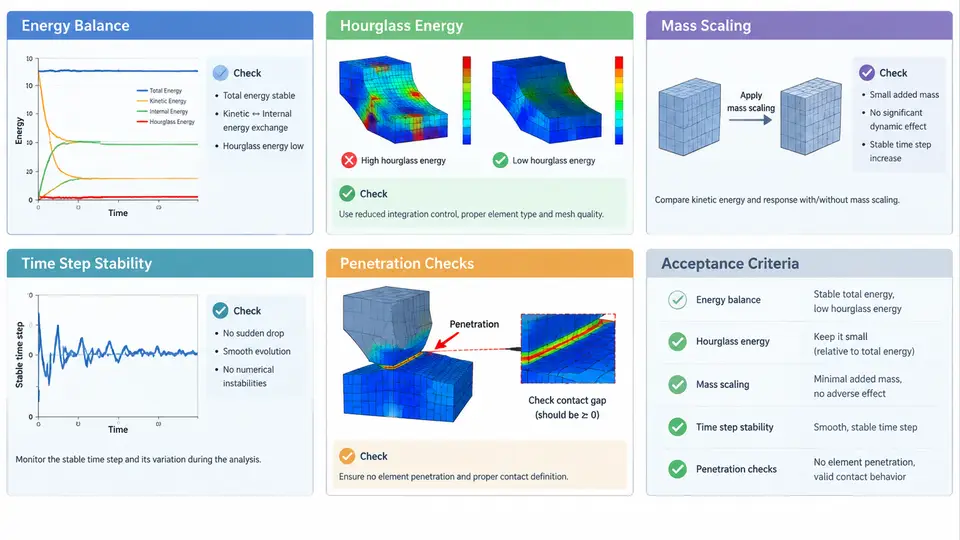
A PAM-CRASH model can be geometrically perfect, correctly meshed, and properly connected, yet still produce results that are physically meaningless. The reason is almost always numerical: the explicit solver's internal bookkeeping has drifted away from the physics it is supposed to represent. This section defines the five core quality metrics that govern explicit crash simulation fidelity — energy balance, hourglass energy, mass scaling, time step stability, and penetration — and establishes practical acceptance criteria for each. These metrics are not independent; they form an interlocking system where a violation of one frequently manifests as degradation in another.
Energy Balance: The Global Conservation Check
In an explicit dynamic analysis, the total energy of the system must remain conserved. PAM-CRASH tracks several energy components: kinetic energy (KE), internal energy (IE, comprising elastic strain energy and plastic dissipation), hourglass energy (HE), sliding interface energy (SIE), and external work (EW). The fundamental balance relationship is:
E_total = KE + IE + HE + SIE - EW ≈ constantThe critical diagnostic is the energy ratio, defined as the total energy at any time divided by the initial total energy (or, in some conventions, the ratio of energy error to peak internal energy). A well-behaved model maintains this ratio within 1.0 ± 0.05 throughout the simulation. When the ratio drifts beyond ±5%, the model is either gaining or losing energy through numerical artifacts.
Energy gain typically originates from:
- Incorrect contact stiffness causing artificial energy injection at interfaces
- Negative volume elements that invert and produce spurious forces
- Improperly constrained rigid bodies that accumulate unrealistic kinetic energy
Energy loss is usually caused by excessive hourglass control damping, overly aggressive mass scaling, or elements being deleted without accounting for their energy. In PAM-CRASH, the energy summary is available in the THSHELL and THSOLID time-history outputs, and the global energy balance can be monitored through the ENERGY card in the output control block. A practical workflow is to plot the energy ratio against time and inspect where the drift initiates — this timestamp usually points directly to the offending component or contact definition.
Hourglass Energy: Detecting Spurious Modes
Reduced-integration shell and solid elements are computationally efficient but susceptible to hourglassing — non-physical deformation modes that produce zero strain energy at the integration point yet manifest as zigzag or checkerboard patterns in the mesh. PAM-CRASH offers several hourglass control formulations (types 1 through 6 for shells, with type 4 being the default stiffness-based formulation).
The hourglass energy ratio is defined as:
HE_ratio = HE / (IE + HE)This ratio should remain below 5% for shells and below 10% for solid elements in typical automotive crash models. When hourglass energy exceeds these thresholds, the results are contaminated by artificial stiffness that does not correspond to any physical deformation mechanism.
Common causes of excessive hourglass energy include:
- Insufficient mesh refinement in regions of high bending or twisting
- Inappropriate hourglass control type for the deformation mode (e.g., using a stiffness-based control where viscous damping is needed)
- Incorrect hourglass coefficient — the default value of 0.1 is suitable for most cases, but soft materials may require reduction to 0.03–0.05
- Single-element-thick structures that cannot resist hourglass modes geometrically
In PAM-CRASH, hourglass energy is reported per part in the GLSTAT and MATSUM outputs. A part-by-part review is essential because a global hourglass ratio below 5% can still mask a single component with 40% hourglass energy that dominates the local response.
Mass Scaling: The Time Step Trade-off
The stable time step for an explicit solver is governed by the Courant-Friedrichs-Lewy (CFL) condition:
Δt_critical = L_min / cwhere L_min is the smallest element characteristic length and c is the material sound speed. For steel with c ≈ 5000 m/s and a minimum element size of 1 mm, the critical time step is approximately 0.2 μs. A 100 ms crash simulation would require 500,000 increments — computationally expensive but feasible. However, a single 0.1 mm element would reduce the time step to 0.02 μs, increasing the cost tenfold.
Mass scaling artificially increases the density of small elements to raise their critical time step. PAM-CRASH provides two approaches:
- Fixed mass scaling: A target time step is specified, and masses are scaled accordingly. This is applied consistently throughout the simulation.
- Adaptive mass scaling: Mass is added only when the time step falls below a threshold, and removed when it recovers. This is more selective but introduces transient inertial effects.
The added mass ratio is the key metric:
Mass_added_ratio = (Total_mass_scaled - Total_mass_original) / Total_mass_originalFor full-vehicle crash models, the added mass should remain below 1% of the total model mass. For component-level models, a threshold of 3–5% may be acceptable if the added mass is distributed in non-critical regions. The danger is that added mass changes inertia, which directly affects deceleration pulses, occupant kinematics, and structural collapse modes.
A practical check is to compare the kinetic energy of the scaled model against the unscaled model at the same initial velocity. If the KE difference exceeds 2%, the mass scaling is too aggressive. In PAM-CRASH, the DT/NODA card controls mass scaling, and the GLSTAT output reports the percentage of added mass at each time step.
Time Step Stability: Monitoring the Solver's Pulse
Beyond the initial time step calculation, PAM-CRASH continuously monitors the actual time step used during the simulation. The time step can shrink dynamically due to element distortion — as an element compresses or shears, its characteristic length decreases, and the stable time step decreases proportionally.
The time step ratio is:
TS_ratio = Δt_current / Δt_initialA healthy simulation maintains this ratio above 0.5. When the ratio drops below 0.3, the simulation is spending excessive time on a small number of distorted elements. When it drops below 0.1, the solver may terminate with a negative volume or time step error.
PAM-CRASH reports the minimum time step and the element ID responsible in the GLSTAT output. The standard diagnostic workflow is:
- Identify the element causing the time step reduction from the
GLSTAToutput. - Check whether the element is in a region of expected high compression (e.g., a crash box) or an unexpected location (e.g., a rigid body attachment).
- If the element is in a non-critical region, consider local mesh refinement or element deletion criteria.
- If the element is in a critical region, review the material model — excessive softening or unrealistic failure strains can cause premature distortion.
Penetration Checks: Interface Integrity
Contact interfaces in PAM-CRASH use penalty-based methods where penetration is resisted by a stiffness force proportional to the penetration depth. Small penetrations (on the order of the element thickness) are normal and acceptable. Large penetrations indicate that the contact stiffness is insufficient or that the time step is too large to resolve the contact force.
The penetration ratio is typically assessed as:
Penetration_ratio = Max_penetration_depth / Shell_thicknessAcceptance criteria vary by contact type:
| Contact Type | Acceptable Penetration Ratio | Action Threshold |
|---|---|---|
| Shell-to-shell (single surface) | < 0.5 | > 1.0 requires stiffness increase |
| Shell-to-solid | < 0.3 | > 0.5 requires review |
| Rigid body-to-shell | < 0.2 | > 0.4 indicates insufficient stiffness |
In PAM-CRASH, penetration is monitored through the SLEOUT (sliding interface energy output) and the contact force output. A sudden spike in sliding interface energy often correlates with a penetration event. The PENCHK option in the contact definition enables explicit penetration checking and reporting.
When penetration exceeds acceptable limits, the remedies are:
- Increase the contact stiffness factor (
FACparameter on theCONTACTcard) — typical values range from 0.1 to 1.0, with 0.5 being a common starting point. - Reduce the time step to better resolve contact forces.
- Refine the mesh in the contact region to distribute contact forces over more nodes.
- Switch from a penalty-based contact to a kinematic contact formulation if available.
Integrated Acceptance Workflow
These five metrics should not be evaluated in isolation. A model that passes energy balance but has 15% hourglass energy in a critical rail is not acceptable. Conversely, a model with 2% added mass but a time step ratio of 0.15 is computationally unstable and its results cannot be trusted.
The recommended verification sequence for a PAM-CRASH crash model is:
- Pre-run check: Verify initial time step, estimated added mass from mass scaling, and contact definitions. Ensure no initial penetrations exist.
- Early simulation (0–10 ms): Monitor energy ratio and hourglass energy. These should stabilize quickly. A rising hourglass ratio in the first few milliseconds indicates a fundamental mesh or material issue.
- Mid-simulation (10–60 ms): Watch for time step degradation and penetration events. Correlate any energy drift with specific contact interfaces or element groups.
- Post-run: Generate a summary table of all five metrics at peak loading and at the end of the simulation. Compare against the acceptance criteria defined above.
A model that satisfies all five criteria provides a defensible basis for engineering decisions. A model that fails any one criterion should be treated as diagnostic — the failure itself often reveals the most important physical insight about the structure's behavior.
GLSTAT, MATSUM, and SLEOUT outputs provide all necessary data. Automating the extraction and plotting of these metrics reduces the risk of overlooking a violation in a large batch of simulations.