3. Crash simulation model building fundamen
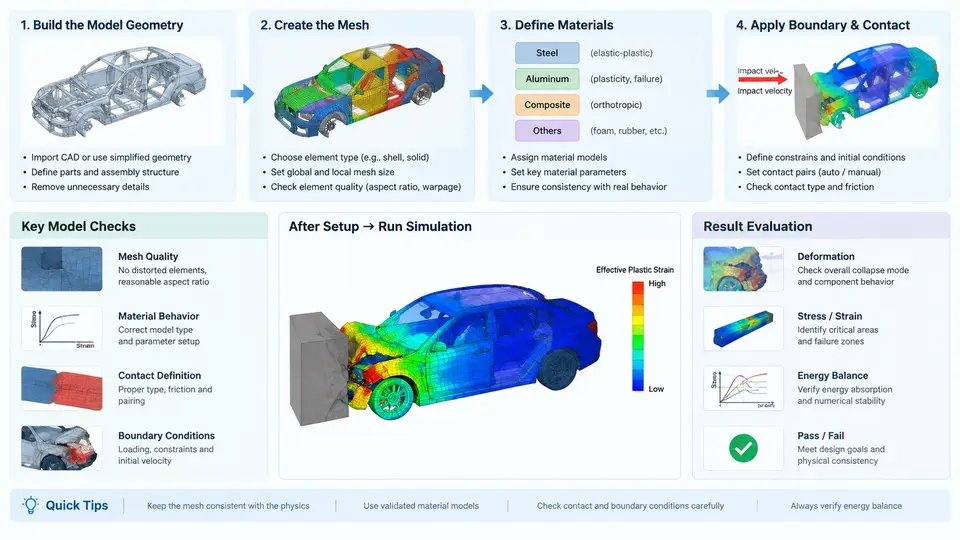
In PAM-CRASH, the quality of a crash model is decided long before the first explicit time step is taken. A full-vehicle frontal impact model typically contains 1.5–3 million shell elements, and every one of them inherits its geometry from CAD, its topology from midsurface extraction, and its numerical behavior from mesh quality. This chapter walks through the complete model-building chain: importing geometry, extracting midsurfaces from thin-walled parts, choosing a meshing strategy, and enforcing mesh quality criteria that keep the explicit solver stable.
3.1 Geometry Import and Cleanup
PAM-CRASH does not mesh CAD directly; it meshes a cleaned, defeatured representation. The standard workflow is to import the native CAD (CATIA, NX, STEP, or IGES) into the pre-processor (ANSA, HyperMesh, or PAM-CRASH's own Visual-Environment), then repair the geometry before any meshing begins.
Typical import defects that must be fixed first:
- Free edges and gaps — adjacent surfaces that should share an edge but are separated by 0.01–0.5 mm. These produce disconnected meshes and artificial hinges.
- Duplicate surfaces — overlapping faces from mirrored or copied bodies. They create coincident elements and spurious contact.
- Sliver surfaces — faces narrower than the target element size. They force degenerate elements.
- Missing fillets and holes — small features that are irrelevant to crash energy absorption but consume element budget.
A practical cleanup tolerance for automotive body-in-white (BIW) geometry is 0.05 mm for edge stitching and 0.1 mm for gap closure. Features smaller than 5 mm (bolt holes, trim slots, small embosses) are normally removed unless they are explicitly part of the crash load path.
3.2 Midsurface Extraction
Automotive structures are thin-walled: sheet metal panels are 0.6–2.5 mm thick, while their in-plane dimensions reach hundreds of millimeters. Modeling them as solid elements would require an impractical number of elements through the thickness. Instead, PAM-CRASH uses shell elements placed on the midsurface of each panel, with the thickness assigned as a section property.
Midsurface extraction takes a pair of offset surfaces (or a solid) and generates a single surface midway between them. The key parameters are:
| Parameter | Typical Value | Effect |
|---|---|---|
| Thickness tolerance | 0.1–0.3 mm | Maximum allowed variation between paired faces |
| Offset tolerance | 0.05 mm | Deviation of generated midsurface from true mid-plane |
| Minimum thickness | 0.5 mm | Faces thinner than this are rejected |
| Merge tolerance | 0.1 mm | Coincident midsurface edges are stitched |
After extraction, verify that the midsurface preserves the original panel boundaries. A common failure is a midsurface that drifts at flanges and hemmed edges, producing a mesh that no longer matches the weld locations. For hemmed flanges (outer panel folded over inner panel), extract the midsurface of each layer separately and offset each by half its own thickness.
3.3 Meshing Strategy
PAM-CRASH crash models are dominated by quadrilateral shell elements (ELFORM 1, 2, 16, or 24 depending on the formulation). The meshing strategy must balance three competing demands: geometric fidelity, element count, and solver stability.
Target element size. For a full-vehicle frontal impact, a global target of 5–8 mm is common. Critical energy-absorbing components — front rails, bumper beam, crash boxes, B-pillar, rocker — are refined to 3–5 mm. Non-structural closures and interior trim may use 10–15 mm.
Element type selection. Use fully integrated shells (ELFORM 16) in regions dominated by bending and buckling, and reduced-integration shells (ELFORM 2) with hourglass control in large, lightly loaded panels. Avoid mixing formulations arbitrarily across a load path.
Mesh flow. Align element edges with the principal stress direction. In a front rail, this means longitudinal edges running along the rail axis. In a B-pillar, edges should follow the vertical axis. Misaligned meshes introduce artificial shear stiffness and can delay buckling.
Connection zones. Spot welds, adhesive bonds, and bolted joints require mesh continuity. Place at least two element rows between adjacent spot welds, and use a minimum of four elements around a weld nugget if the weld is modeled as a cluster of solid or beam elements.
3.4 Mesh Quality Criteria
Poorly shaped elements cause negative Jacobians, hourglassing, and premature termination. PAM-CRASH's explicit solver is tolerant but not immune. The following criteria are widely used in automotive crash meshing:
| Criterion | Target | Acceptable Limit | Failure Symptom |
|---|---|---|---|
| Warpage | < 5° | < 15° | Spurious bending stiffness |
| Aspect ratio | < 3 | < 5 | Reduced stable time step |
| Skew angle | < 30° | < 60° | Shear locking |
| Jacobian | > 0.7 | > 0.3 | Negative volume, termination |
| Quad interior angle | 45°–135° | 30°–150° | Poor load transfer |
| Trias in quads | < 5% | < 10% | Overly stiff triangles |
The stable time step in an explicit solver is governed by the smallest element. A single 1 mm element in a 5 mm mesh can reduce the global time step by a factor of five, turning a 20-hour run into a 100-hour run. Always run a quality check and fix the worst 1% of elements before submission.
3.5 A Worked Example: Front Rail Section
Consider a front rail with a hat section, 1.8 mm thick, 120 mm wide, 80 mm deep, and 600 mm long. The workflow is:
- Import the rail CAD, stitch the hat and closing plate into a single shell pair.
- Extract the midsurface with thickness tolerance 0.2 mm. Verify the flange edges align.
- Mesh with 4 mm quads, edges aligned along the rail axis. The hat section yields roughly 30 elements around the perimeter and 150 along the length, giving about 4,500 elements per rail.
- Check quality: warpage < 8°, aspect ratio < 4, Jacobian > 0.6. Refine any element failing these limits.
- Assign thickness 1.8 mm as a shell section property, and define the material as elastic-plastic steel with strain-rate dependence (Cowper-Symonds: C = 40, p = 5).
After meshing, the rail should be checked for mass consistency: the computed shell mass should match the CAD mass within 2%. A larger discrepancy usually indicates missing or duplicated surfaces.
3.6 Common Pitfalls and How to Detect Them
Disconnected mesh. If two panels that should be welded are meshed independently, the weld definition will fail or create a free hinge. Detect by running a free-edge check: any edge shared by only one element in a region that should be continuous is suspect.
Thickness mismatch. Assigning 1.8 mm to a panel that is actually 1.5 mm changes the bending stiffness by a factor of (1.8/1.5)³ ≈ 1.73. Always cross-check section properties against the CAD bill of materials.
Element distortion during initialization. PAM-CRASH performs an initial geometry check. If elements are already distorted at t = 0, the solver may report negative volume within the first few cycles. Fix the mesh, not the time step.
Hourglassing. Reduced-integration shells can develop zero-energy modes. Monitor the hourglass energy; it should remain below 5% of the internal energy. If it exceeds 10%, refine the mesh or switch to fully integrated elements in the affected region.