3. Airbag geometry creation and meshing
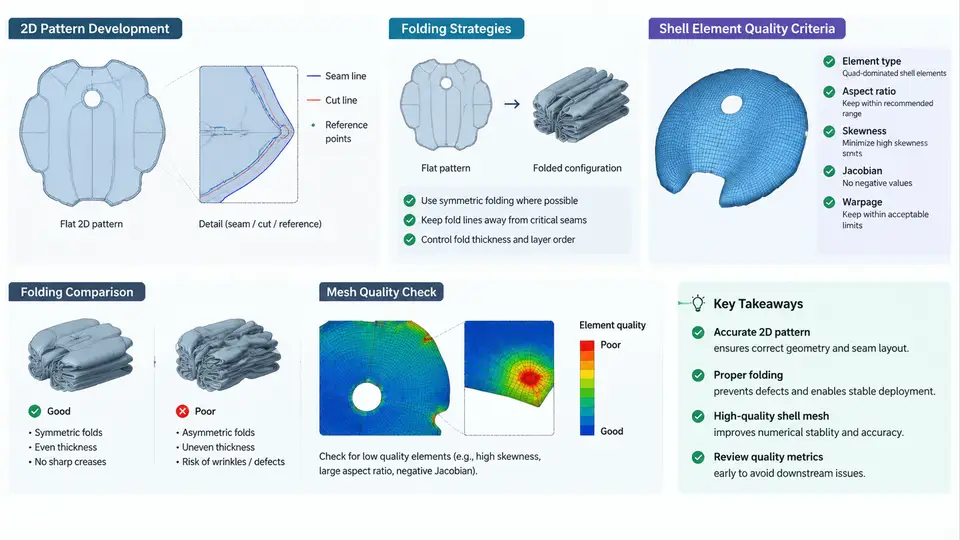
An airbag model in PAM-CRASH is only as reliable as the mesh it is built on. Unlike a structural panel, an airbag is a thin, highly compliant membrane that undergoes extreme deformation — from a flat, folded package to a fully inflated cushion in tens of milliseconds. This means the mesh must satisfy two conflicting demands: it must be fine enough to capture the fabric's local wrinkling and the gas flow behavior, yet coarse enough to keep the explicit time step stable. This section covers the complete workflow from a 2D flat pattern to a validated folded shell mesh, including the quality criteria that determine whether the model will run or diverge.
From 3D Cushion to 2D Flat Pattern
The starting point is the inflated cushion geometry, typically provided as a CAD surface or an STL from the supplier. Because airbag fabric is woven and nearly inextensible, the correct modeling approach is to unfold the 3D cushion into a 2D flat pattern, mesh it in the plane, and then map it back onto the 3D surface. This preserves the material's in-plane stiffness and avoids artificially stretching the mesh during inflation.
In practice, the flat pattern is developed using a geometric flattening algorithm. For a driver-side airbag with a nominal diameter of 650 mm, the 3D cushion is first split along its seam lines into individual fabric panels. Each panel is then flattened by minimizing the change in edge lengths and angles. The result is a set of 2D patches that, when sewn together along their boundaries, reproduce the 3D shape. The seam lines become the shared edges between patches, and these edges must be meshed identically on both sides to ensure node-to-node connectivity.
A practical check at this stage is the area ratio between the 3D panel and its 2D flat pattern. For a typical nylon 6.6 fabric, this ratio should stay between 0.95 and 1.05. If a panel flattens to more than 5% larger area, the flattening algorithm has introduced artificial stretch; if it flattens to less than 95%, the panel is likely over-constrained and will wrinkle excessively when mapped back.
Meshing the Flat Pattern
Once the 2D patches are available, they are meshed with shell elements. PAM-CRASH uses four-node quadrilateral shell elements (type 1 or type 2 in the PAM-CRASH element library) as the default for airbag fabric, with three-node triangles reserved for transition zones. The target element size depends on the cushion size and the gas flow resolution required:
- Driver airbag (650 mm diameter): 8–12 mm target edge length, giving roughly 8,000–12,000 elements per side.
- Passenger airbag (900 × 600 mm): 12–15 mm target edge length, giving roughly 15,000–20,000 elements per side.
- Side curtain airbag (1,800 mm long): 15–20 mm target edge length, with local refinement near the inflator and tether attachment points.
The mesh must be structured along the seam lines. This means the element edges should run parallel and perpendicular to the seam, not at arbitrary angles. A structured mesh along the seam ensures that the seam elements share nodes cleanly and that the seam stiffness is not artificially softened by skewed elements. In PAM-CRASH, this is typically achieved by meshing each panel with a mapped or paved mesher, then using the EDGE and NODE merge tools to stitch adjacent panels.
/MESH/CHECK command reports free edges, duplicate nodes, and element normal inconsistencies. A clean pattern should show free edges only along the outer boundary and seam lines.
Folding Strategies
Folding is the step that transforms the flat, meshed cushion into the compact package that sits inside the module. The folding strategy directly affects the deployment kinematics: a poorly folded airbag may deploy asymmetrically, tear at the seam, or fail to unfold in the required time window. PAM-CRASH supports two main approaches:
1. Explicit folding (geometric). The mesh is physically folded by defining fold lines and rotating the mesh about them. This is the most accurate method because it preserves the actual fabric geometry. A typical driver airbag is folded in a star pattern: the cushion is first flattened, then folded inward along radial lines, then compressed axially. Each fold step is defined by a rotation axis and an angle. For example, a 12-point star fold uses 12 fold lines at 30° intervals, each rotated 180° inward, followed by a final axial compression of 60 mm.
2. Implicit folding (mapping). The flat mesh is mapped directly onto a pre-defined folded geometry, often a simple cylindrical or rectangular package. This is faster to set up but less accurate for the early deployment phase. It is acceptable for side curtain airbags where the folded package is a simple rolled cylinder, but not recommended for driver or passenger airbags where the fold pattern dominates the first 10–15 ms of deployment.
Regardless of the method, the folded mesh must be checked for self-penetration. In PAM-CRASH, the /CONTACT card with the TYPE=7 (self-contact) option is used to detect and resolve interpenetration between fabric layers. A folded model with unresolved penetrations will typically show negative volume errors or excessive contact forces in the first few milliseconds of the simulation.
Shell Element Quality Criteria in PAM-CRASH
After folding, the mesh must be checked against the quality criteria that govern explicit simulation stability. The most important criteria for airbag fabric are summarized in the table embedded in the SVG above. The two that most frequently cause divergence are Jacobian and minimum edge length.
The Jacobian measures the distortion of a quadrilateral element from its ideal rectangular shape. A value of 1.0 represents a perfect rectangle; values below 0.6 indicate severe skewing. In PAM-CRASH, the Jacobian is computed at each integration point, and a negative Jacobian at any point will trigger an immediate error. For airbag fabric, the target is to keep the Jacobian above 0.7 in the flat pattern, because folding will further distort the elements. If a folded element drops below 0.6, the simulation will either abort or produce unreliable results.
The minimum edge length controls the stable time step. In an explicit solver, the time step is proportional to the smallest element dimension divided by the wave speed in the material. For nylon fabric with a wave speed of approximately 1,500 m/s, a 3 mm edge gives a time step of roughly 1.3 × 10⁻⁶ s. If the mesh contains a 1 mm edge, the time step drops to 4.4 × 10⁻⁷ s, tripling the simulation cost. Therefore, the mesh should be as uniform as possible, with local refinement only where absolutely necessary (e.g., near the inflator inlet).
/MESH/CHECK output and remesh that local region. Reducing the time step only delays the divergence and increases runtime.
Verification Before Running the Full Simulation
Before committing to a full deployment simulation, run a short inflation-only check. In PAM-CRASH, this is done by applying a uniform pressure ramp to the folded cushion over 5 ms and monitoring three quantities: the maximum element Jacobian, the total internal energy, and the contact force at the module cover. A healthy model shows a smooth pressure rise, no negative Jacobians, and a contact force that peaks and then decays as the cover tears. If the Jacobian drops below 0.5 or the internal energy spikes discontinuously, the mesh or fold strategy needs revision.
This verification step typically takes 10–15 minutes on a standard workstation and can save hours of debugging on a full 100 ms deployment run. It is the single most effective quality gate between mesh generation and production simulation.