3. MADYMO model setup for seatbelt simulati
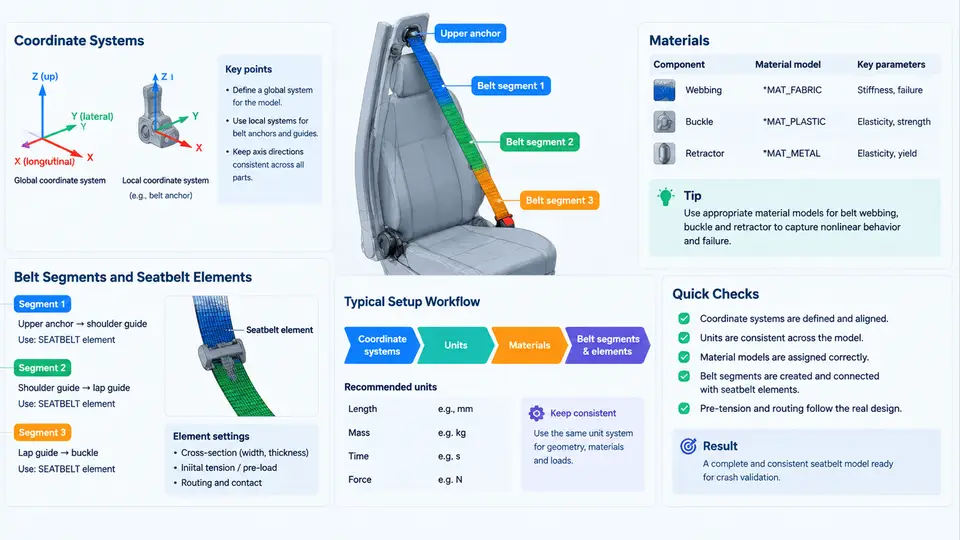
Before any belt element can be defined, the model must be anchored in a consistent spatial and physical framework. MADYMO does not enforce a single global convention; it inherits whatever coordinate system, unit set, and material library the analyst establishes. Errors introduced here propagate silently through the entire restraint simulation, so this section treats the setup as an engineering task with explicit inputs, verifiable intermediate states, and observable failure symptoms.
3.1 Coordinate Systems and Reference Frames
MADYMO uses a right-handed Cartesian system. The standard automotive convention places the X-axis pointing forward (direction of vehicle travel), the Y-axis pointing left (toward the driver's left side), and the Z-axis pointing upward. Rotations follow the right-hand rule: a positive rotation about Y pitches the nose down, a positive rotation about Z yaws the vehicle to the left. Every rigid body, belt segment, and contact surface is positioned relative to a parent frame, so the model is a tree of nested coordinate systems rather than a flat set of absolute coordinates.
Two frames matter most for belt work. The vehicle reference frame is fixed to the occupant compartment and carries the seat, D-ring, buckle, and retractor anchor points. The occupant frame is attached to the dummy or human body model and moves with it. Belt segments are defined in the vehicle frame but interact with the occupant through contact, so a mismatch between the two frames produces a belt that appears correctly placed in the undeformed state yet slides off the shoulder during the crash pulse.
When a subsystem model is imported from a full-vehicle deck, verify that the imported frame's origin and orientation match the local convention. A common symptom of a frame mismatch is a belt that penetrates the dummy's chest in the initial state or a retractor that pays out belt in the wrong direction. Check the initial belt path visually and confirm that the shoulder segment passes over the clavicle, not through the neck.
3.2 Units and Consistent Scaling
MADYMO is unit-agnostic: it computes with whatever numbers are supplied, so the analyst must choose and document a single consistent set. The recommended set for crash restraint work is millimetres, kilograms, milliseconds, and kilonewtons. In this system, force is kN, stress is GPa, acceleration is mm/ms² (equivalent to 1000 m/s²), and density is kg/mm³. Mixing metres with milliseconds, or newtons with millimetres, produces accelerations that are wrong by factors of 10³ or 10⁶ and is one of the most frequent causes of a simulation that runs to completion but yields physically meaningless belt forces.
| Quantity | Recommended unit | Common mistake |
|---|---|---|
| Length | mm | m mixed with mm in anchor coordinates |
| Mass | kg | g used for belt element mass |
| Time | ms | s used in the crash pulse table |
| Force | kN | N used in retractor limit load |
| Acceleration | mm/ms² | m/s² entered directly |
Belt element stiffness is entered as force per unit strain, so its numeric value depends on the unit system. A webbing stiffness of 200 kN at 10 % strain in the mm-kg-ms-kN system becomes 200 000 if forces are entered in N. Always record the unit set in the model header comment and re-check it whenever a material card is copied from another project.
3.3 Materials for Belt Elements
Seatbelt webbing is modelled with a belt material that defines a force–strain curve rather than a conventional elastic modulus. MADYMO's belt material type (MATERIAL.BELT) accepts a piecewise linear loading curve and an optional unloading curve, which is essential because webbing is highly hysteretic: it absorbs energy during extension and returns only part of it when the load is removed.
A representative webbing card for a 48 mm polyester belt might use the following loading points, expressed as engineering strain versus force per unit width:
MATERIAL.BELT / 1
  LOAD_CURVE
    0.00   0.0
    0.02   4.0
    0.04   8.5
    0.06  13.0
    0.08  17.5
    0.10  21.0
    0.12  23.5
  UNLOAD_CURVE
    0.12  23.5
    0.08  12.0
    0.04   4.5
    0.00   0.0
  DAMPING  0.05
  FAIL_STRAIN  0.20
The values above are illustrative and must be replaced with coupon-test data for the specific webbing. The DAMPING coefficient adds rate dependence, and FAIL_STRAIN triggers element deletion when the webbing ruptures. For a pretensioning retractor, the belt material is paired with a retractor element that applies a pull-in stroke and a load-limiting force; the two must be tuned together, because a retractor that pulls in faster than the webbing can extend will generate a force spike that does not appear in the physical test.
3.4 Defining Belt Segments with Seatbelt Elements
A belt segment is a chain of belt elements connected node-to-node along the webbing path. Each element carries the belt material, a cross-sectional area or width, and an initial length. The path is defined by a sequence of nodes placed at the anchor points and at intermediate points that follow the occupant's surface.
The practical workflow is:
- Place nodes at the retractor, D-ring (or shoulder anchor), buckle stalk, and lap anchor. These are fixed to the vehicle frame.
- Add intermediate nodes along the shoulder and lap paths so that each element is short enough to conform to the occupant contour. A typical shoulder segment uses 8–15 elements; the lap segment uses 6–10.
- Assign the belt material and the webbing width to every element in the segment.
- Define a slip ring at the D-ring so the belt can slide through the anchor as the occupant moves forward. Without a slip ring, the shoulder belt behaves as if it were glued to the D-ring and the lap belt will not tighten correctly.
- Define a retractor at the retractor node with the pull-in stroke, locking time, and limit load.
Element length affects both accuracy and stability. Elements longer than about 30 mm cannot follow the shoulder curvature and will bridge across the chest, reducing the contact area and under-predicting chest deflection. Elements shorter than about 5 mm increase contact search cost and can cause the belt to chatter against the dummy surface. A 10–20 mm target length is a reasonable starting point for a 50th-percentile occupant.
After the belt is defined, run a short initialization (typically 5–10 ms with gravity only) and inspect the belt path. The shoulder segment should lie flat on the chest and clavicle, the lap segment should sit low across the pelvis, and the buckle should be engaged with no initial slack. If the belt floats above the shoulder or cuts into the neck, adjust the intermediate node positions rather than the material card.
3.5 Verification Before Running the Crash Pulse
A belt model that is geometrically correct can still fail during the crash pulse for reasons that are visible in the first few milliseconds. Run a short initialization and check three things. First, confirm that the belt tension at rest is near zero; a nonzero initial tension means the belt path is shorter than the physical webbing length and the occupant will be pre-loaded. Second, confirm that the slip ring allows the expected amount of belt to pass through the D-ring when the occupant moves forward; if the belt does not slide, the slip ring friction coefficient is too high or the ring is not connected to the correct segment. Third, confirm that the retractor pays out or pulls in the commanded stroke within the specified time window.
Typical failure symptoms and their causes are summarized below.
| Symptom | Likely cause | Corrective action |
|---|---|---|
| Belt penetrates chest at t = 0 | Intermediate nodes placed inside occupant surface | Move nodes outward along the surface normal |
| Shoulder belt slides off during pulse | Missing or over-frictioned slip ring | Add slip ring, reduce friction coefficient |
| Force spike at retractor lock | Retractor pull-in faster than webbing extension | Reduce pull-in rate or soften limit load |
| Belt force far too high | Unit mismatch in material card | Re-check force and strain units |
| Element deletion at low strain | FAIL_STRAIN entered as percentage | Convert to fractional strain |
Once the initialization is clean, the model is ready for the crash pulse. The belt definition established here—frames, units, material, segment topology, and anchors—is the foundation that the validation work in later sections will exercise. Keeping a short setup log with the unit set, frame origin, and material source makes it possible to trace any discrepancy back to a specific input rather than re-deriving the entire model.