3. MADYMO model setup for occupant safety
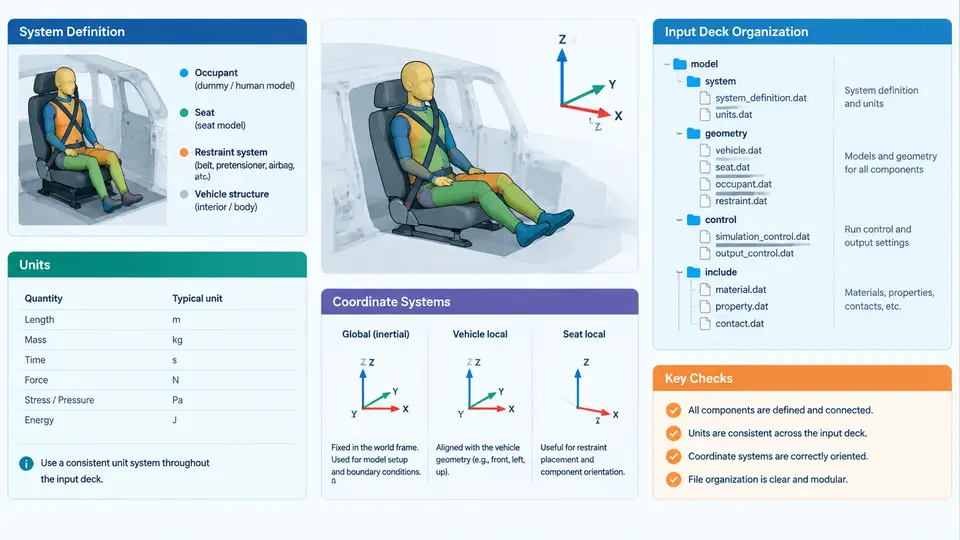
A MADYMO occupant-safety model is only as trustworthy as the conventions it is built on. Before a single restraint element is tuned, the analyst must fix three things that silently govern every later result: the system definition (what is rigid, what is flexible, and how the two worlds are coupled), the unit system (which must be internally consistent across every input file), and the coordinate systems (global, local, and the sign conventions that connect them). This chapter establishes those foundations and shows how a clean input deck is organized so that a model can be read, reviewed, and modified by someone other than its author.
3.1 System definition: multibody, FE, and coupled models
MADYMO is a hybrid solver. It supports three model classes, and a real occupant-safety deck almost always mixes them:
- Multibody (MB) systems — rigid bodies connected by kinematic joints and force-deformation contacts. Ideal for the dummy skeleton, seat structure, and belt routing where deformation is characterized by curves rather than meshes.
- Finite element (FE) systems — deformable meshes for airbags, instrument panels, knee bolsters, and structural rails where stress distribution and folding matter.
- Coupled MB–FE systems — the FE mesh is attached to an MB body or interacts with MB bodies through contact, so a deploying airbag (FE) can push a multibody dummy.
The practical rule is: use MB where the physics is already captured by a force–deflection curve, and use FE only where geometry and material nonlinearity genuinely change the answer. Every additional FE part increases runtime and contact-search cost, so the system definition is also a performance decision.
3.2 Units: pick one consistent set and never mix it
MADYMO does not enforce a unit system; it only enforces consistency. The two common working sets are the mm–tonne–s–N set and the m–kg–s–N set. Mixing them is the single most frequent cause of a model that runs but produces nonsense.
| Quantity | mm–tonne–s–N set | m–kg–s–N set |
|---|---|---|
| Length | mm | m |
| Mass | tonne (10³ kg) | kg |
| Time | s | s |
| Force | N | N |
| Stress / pressure | MPa | Pa |
| Acceleration | mm/s² | m/s² |
| Density | tonne/mm³ | kg/m³ |
Note the trap in the mm–tonne set: density is tonne/mm³, which is numerically 10¹² times larger than kg/m³. Steel at 7.85 × 10⁻⁹ tonne/mm³ is correct; entering 7850 will make the part behave like a black hole. Similarly, gravity in the mm–tonne set is 9810 mm/s², not 9.81.
mass × acceleration yields the force unit you expect. A 75 kg dummy (0.075 tonne) under 9810 mm/s² must produce a weight near 736 N. If your number is off by 10³ or 10⁶, a unit is wrong somewhere in the deck.
3.3 Coordinate systems and sign conventions
MADYMO uses a right-handed Cartesian system. The vehicle convention adopted throughout this course is:
- X — positive forward (direction of vehicle travel).
- Y — positive to the driver's left (vehicle left).
- Z — positive upward.
Rotations follow the right-hand rule about each axis: roll about X, pitch about Y, yaw about Z. A frontal impact therefore produces a predominantly negative X acceleration on the occupant, while a far-side lateral event drives motion in −Y for a driver.
Three coordinate layers must be distinguished and kept consistent:
- Global (inertial) frame — the reference for the vehicle body and the crash pulse.
- Local body frames — each MB body carries its own origin and orientation; joints and initial positions are defined relative to these.
- FE node frames — mesh nodes are defined in the FE part frame, which is itself positioned by a reference body.
When a local frame is rotated, the sign of every downstream force and displacement flips with it. The safest practice is to define all local frames with axes parallel to the global frame at time zero, and to introduce rotation only where the physical part is genuinely inclined (for example, a reclined seat back).
3.4 Input deck organization
A MADYMO input deck is a sequence of named data blocks. The solver reads them in order, and later blocks reference entities declared earlier. A disciplined layout makes the model reviewable and reusable. The canonical order is:
CONTROL     ! units, time step, simulation end time, output interval
SYSTEM      ! MB bodies, joints, initial positions, gravity
FE_MODEL    ! nodes, elements, materials, part definitions
CONTACT     ! MB–MB, MB–FE, FE–FE contact definitions
LOAD        ! crash pulse, belt pretensioner, airbag inflator
OUTPUT      ! requested time histories and animations
In practice, the deck is split into include files so that a dummy model, a seat model, and a restraint model can be swapped independently. A typical project directory looks like this:
project/
  main.xml          ! CONTROL + SYSTEM + include statements
  dummy_hybrid3.xml ! dummy MB definition
  seat.xml          ! seat structure and foam
  belt.xml          ! belt routing, retractor, pretensioner
  airbag.xml        ! FE bag + inflator
  pulse.xml         ! crash pulse table
belt_retractor_L, seat_foam_cushion, ab_driver_main. When a contact definition fails, the error message names the entity, and a consistent prefix tells you immediately which file to open.
3.5 A worked setup example
Consider a driver-side frontal model in the mm–tonne–s–N system. The steps below show the concrete inputs and the checks that confirm the setup is sound.
- Declare units and time control. Set the simulation end time to 0.120 s and the output interval to 0.001 s, giving 120 animation frames — enough to resolve airbag deployment and belt loading without excessive file size.
- Place the vehicle frame. Define the global origin at the vehicle centerline, at the floor, at the front axle. The seat reference point (SRP) is then placed at, for example, X = 1200 mm, Y = 0 mm, Z = 300 mm.
- Position the dummy. The Hybrid III 50th percentile dummy is placed so its H-point coincides with the SRP, with the torso reclined 22° from vertical. Because the dummy local frame is rotated, all belt contact forces are resolved in that rotated frame — this is intentional and must be documented.
- Define the seat and belt. The seat cushion is an MB body with a force–deflection curve; the belt is routed through four points with a retractor and a pretensioner that fires at 0.015 s.
- Add the airbag. The FE bag is attached to the steering wheel body, with an inflator mass-flow curve peaking at 0.030 s.
- Apply the crash pulse. A deceleration pulse is applied to the vehicle body, peaking at −350 m/s² (in the mm–tonne set, −350000 mm/s²) at 0.045 s.
After the run, verify three things before trusting any occupant response: the dummy settles onto the seat without penetrating it, the belt engages the chest and pelvis at the intended points, and the airbag contacts the face and chest without passing through the steering wheel. If the dummy sinks through the seat, the contact stiffness or the seat body position is wrong. If the belt slides off the shoulder, the routing points or the friction coefficient need review.
- One unit set declared in CONTROL and used in every include file.
- Global axes: +X forward, +Y left, +Z up; all local frames documented.
- Every entity named with a subsystem prefix.
- Gravity applied in the correct unit (9810 mm/s² or 9.81 m/s²).
- Output interval short enough to resolve the fastest event (airbag deployment).
- Initial positions checked visually in the pre-processor before running.
With the system definition, units, and coordinate frames locked down, the model becomes a stable platform for restraint tuning. The next step is to populate the deck with the dummy, seat, belt, and airbag definitions that this chapter has only outlined — and to do so knowing that every number entered will be interpreted in exactly the frame and unit you intended.