1. MADYMO in passenger restraint engineerin
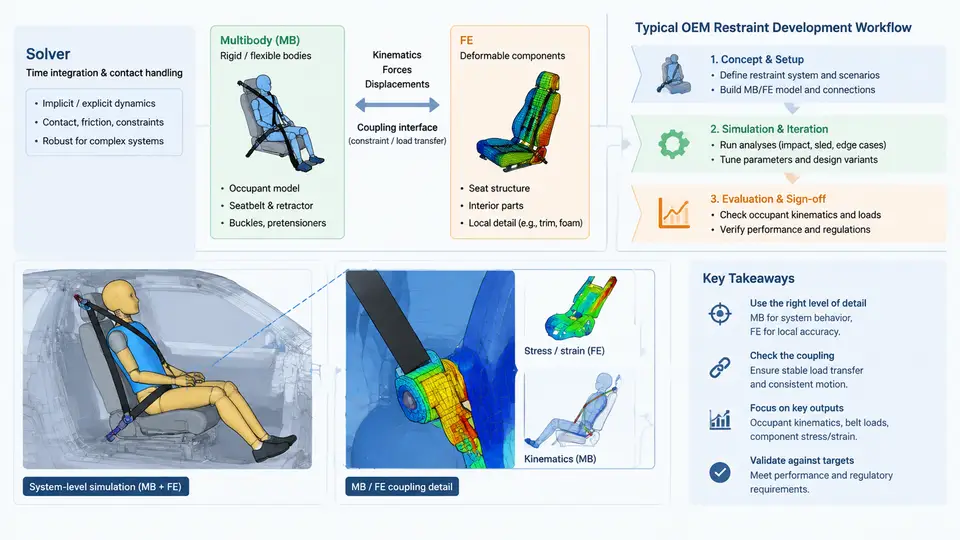
MADYMO (Mathematical Dynamic Model) is a dedicated explicit dynamics solver developed by TASS International (now part of Siemens) for occupant safety simulation. Unlike general-purpose FEA codes such as LS-DYNA or Abaqus, MADYMO was designed from the ground up around the specific physics of crash occupant protection: large rigid-body motion, belt and airbag interaction, contact-dominated kinematics, and the need to evaluate injury criteria within milliseconds of simulated time. Understanding what the solver is, how its two modeling paradigms interact, and where it sits in an OEM restraint development process is the foundation for every subsequent chapter in this course.
1.1 What the Solver Actually Solves
MADYMO integrates the equations of motion for a coupled system using an explicit time-stepping scheme. The time step is governed by the smallest characteristic time in the model — typically the stiffest contact or the smallest FE element — and the solver advances the state forward without assembling a global stiffness matrix. This is the same explicit philosophy used in crash FEA, but MADYMO adds a specialized multibody formulation on top.
Two solver kernels coexist in a single simulation:
- Multibody (MB) kernel: Bodies are rigid, connected by kinematic joints (revolute, translational, spherical, universal, bracket, etc.). Motion is described by a small number of generalized coordinates. Contact is handled through ellipsoid–ellipsoid and ellipsoid–plane interactions, which are computationally cheap and numerically robust.
- Finite Element (FE) kernel: Deformable structures — airbag fabrics, seat frames, instrument panel substrates, steering column components — are discretized with shell, membrane, solid, or belt elements. The FE kernel uses the same explicit integration but resolves stress and strain fields.
The coupling between these two kernels is the defining feature of MADYMO. A hybrid model might represent the occupant as a multibody dummy (fast, stable, well-validated) while the airbag is a full FE model (needed to capture fabric folding, venting, and gas dynamics). The interface between them is the contact surface: MB ellipsoids on the dummy interact with FE shell segments on the airbag through a penalty-based contact algorithm. This lets engineers choose the cheapest representation that still captures the physics they care about.
1.2 Coupling Mechanisms and Their Consequences
Three coupling modes are available and each has distinct numerical behavior:
| Mode | How it works | When to use | Watch out for |
|---|---|---|---|
| MB → FE (one-way) | MB body loads FE structure; FE does not feed back | Prescribed occupant motion onto a deformable panel | Unrealistic if the panel should push back |
| FE → MB (one-way) | FE deformation drives MB contact geometry | Airbag deployment pushing a rigid dummy | Dummy cannot deform the bag |
| Two-way (fully coupled) | Forces and displacements exchanged each time step | Standard occupant–airbag–belt interaction | Time-step mismatch, contact instability |
In a typical frontal restraint model, the belt is modeled with FE belt elements (membrane or 1D seatbelt elements) that slide over MB dummy ellipsoids. The retractor and pretensioner are MB joints with force–displacement characteristics. The airbag is FE. The dummy is MB. All three coupling modes appear simultaneously in one model, and the solver must reconcile them at every time step.
The most common numerical failure is contact penetration or "tunneling" when the time step is too large relative to the relative velocity between an MB ellipsoid and an FE segment. The symptom is a sudden spike in contact force followed by solver termination. The fix is usually to reduce the time step (via CONTROL_TIMESTEP), increase contact stiffness, or refine the FE mesh locally at the contact patch.
1.3 Where MADYMO Sits in the OEM Restraint Workflow
Restraint development at an OEM follows a V-model that spans concept, design, verification, and validation. MADYMO occupies a specific and well-defined band within that V.
At the concept stage, engineers build a simplified MADYMO model — often a sled model with a generic dummy and a lumped restraint representation — to size the airbag volume, belt geometry, and pretensioner force. These models run in minutes and allow dozens of design variants to be screened before any CAD exists.
At the design stage, the model is refined with actual CAD geometry: the airbag is meshed from the folded pattern, the seat frame is imported as FE, the steering column is represented with its collapse characteristic. This is where two-way coupling becomes essential, because the occupant's interaction with the deforming structure determines the injury outcome.
At the verification stage, the MADYMO model is correlated against physical sled tests. The correlation targets are typically dummy injury responses: head acceleration (HIC), chest deflection, femur load, and neck injury criteria (Nij). A model is considered correlated when the peak values and the timing of peaks fall within a defined tolerance band — commonly ±15% on peak and ±2 ms on timing for a frontal sled test.
At the validation stage, the correlated model is used to predict performance in configurations that were not tested — different occupant sizes (5th percentile female, 95th percentile male), different impact speeds, different seat positions. This is where MADYMO's speed advantage over full FE occupant models becomes decisive: a validated MADYMO model can evaluate a matrix of 20 configurations in the time it takes a full FE model to run one.
1.4 A Concrete First Model: Frontal Sled with Hybrid Restraint
To make the workflow tangible, consider a driver-side frontal sled model at 56 km/h (35 mph) with a 50th percentile male dummy. The model contains:
- Dummy: MB ellipsoid model (e.g., Hybrid III 50th) with 32 bodies and 30 joints. Head, chest, pelvis, and limbs are rigid ellipsoids with validated inertial properties.
- Belt: FE membrane belt elements routed from the retractor (MB) through the D-ring (MB) across the chest and lap. Belt slip is modeled with a friction coefficient of 0.3–0.5 on the dummy surface.
- Airbag: FE shell model of the folded bag, with a uniform pressure (UP) or gas-flow (FV) inflator model. The bag is meshed with ~8,000 shell elements and a fabric permeability of 0.5–2.0 L/dm²/min at 500 Pa.
- Steering column: MB translational joint with a collapse force of 2–4 kN, representing the energy-absorbing column.
- Seat: Rigid MB body with a defined cushion stiffness curve.
The simulation runs for 120 ms of physical time. The time step is typically 1–5 µs, set by the smallest FE element in the airbag. On a modern workstation, this model completes in 15–40 minutes depending on the number of FE elements and the contact complexity.
Key outputs to inspect after the run:
| Output | Typical target (frontal, 50th male) | Where to look |
|---|---|---|
| HIC36 | < 700 (US FMVSS 208) / < 1000 (Euro NCAP) | Head CG acceleration vs. time |
| Chest deflection | < 50 mm (FMVSS 208) / < 42 mm (Euro NCAP) | Chest displacement transducer |
| Femur load | < 10 kN per leg | Femur force element |
| Nij | < 1.0 | Neck force/moment at occipital condyle |
| Belt force | 3–6 kN shoulder, 4–8 kN lap | Belt element force output |
1.5 Why This Matters for the Rest of the Course
Every subsequent chapter builds on the three pillars introduced here: the MB formulation (Chapter 2–4), the FE formulation and coupling (Chapter 5–8), and the OEM workflow context (Chapter 9 onward). When you later tune a pretensioner force curve or mesh an airbag, you are working within the coupled system described above. The solver does not care whether a body is MB or FE — it cares about the contact forces, the time step, and the energy balance. Keeping that mental model will make debugging faster and correlation more systematic.
The next chapter begins with the multibody formulation in detail: how bodies, joints, and ellipsoids are defined, how the equations of motion are assembled, and how to verify that a multibody model is numerically sound before adding FE complexity.