3. Building a baseline occupant model
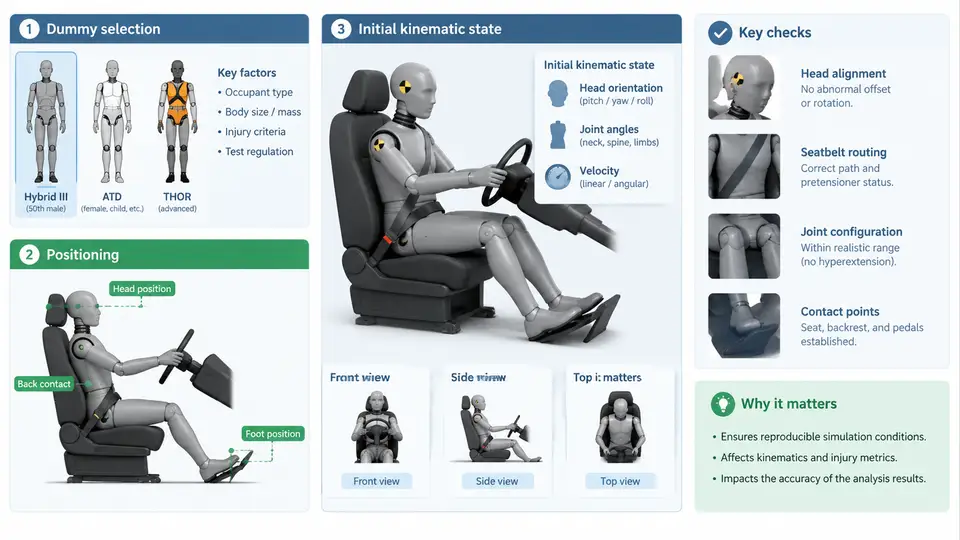
A baseline occupant model is the reference configuration against which every restraint variation, sled pulse, and design change is compared. If the baseline is inconsistent, all downstream comparisons inherit that inconsistency. This chapter covers the three decisions that define the baseline: which dummy model to use, where to place it, and what initial kinematic state to assign before the solver starts. The focus is on MADYMO-specific implementation, but the reasoning applies to any explicit occupant simulation environment.
3.1 Dummy Selection: Matching the Model to the Question
Dummy selection is driven by the injury criterion you intend to evaluate, not by convenience. MADYMO ships with several validated facet and ellipsoid dummy models, and each carries a specific biofidelity envelope.
| Dummy model | Representation | Primary use | Key limitation |
|---|---|---|---|
| Hybrid III 50th | Facet (FE) or multibody | Frontal impact, driver/passenger baseline | Stiff thorax; poor for oblique loading |
| Hybrid III 5th | Facet / multibody | Small female occupants, out-of-position | Scaled geometry, limited validation data |
| THOR 50th | Facet | Advanced frontal, chest deflection detail | Higher computational cost; fewer corridors |
| WorldSID 50th | Facet | Side impact, pole and barrier | Not intended for frontal loading |
| Q-series (Q6, Q10) | Multibody / facet | Child occupants, CRS evaluation | Age-specific scaling assumptions |
For a frontal driver baseline, the Hybrid III 50th percentile male in facet form is the conventional starting point because its response corridors are the most thoroughly documented. If the study targets chest deflection under oblique loading, THOR is the better choice despite the added cost. Selecting a dummy whose validation envelope does not cover your loading direction produces numbers that cannot be defended, regardless of how well the model converges.
3.2 Positioning: From H-Point to Settled Posture
Positioning is not a single translation. It is a sequence: place the dummy at the target H-point, orient the pelvis and torso to the seat back angle, set limb angles, then let the model settle against the seat and restraint before the pulse is applied.
The H-point is defined in the vehicle coordinate system. MADYMO uses a right-handed system where X points forward, Y points left, and Z points up, with the origin typically at the vehicle datum. The dummy reference point is positioned by specifying its coordinates in this system. A typical driver baseline places the H-point at approximately X = 1200 mm, Y = 380 mm, Z = 300 mm relative to the vehicle datum, but these values must come from the actual seat geometry, not from a default.
After translation, apply the seat back angle. For a baseline frontal model, a 25° seat back angle from vertical is common. The pelvis is rotated first, then the torso is aligned to the seat back. If you rotate the whole dummy as a rigid body, the limbs will not contact the seat correctly and the settling step will produce an unrealistic posture.
Limb positioning follows the posture you intend to study. For a nominal driving posture, the upper arms are angled forward and down, the forearms rest near horizontal toward the steering wheel, and the feet rest on the pedals or floor. Each joint angle is set explicitly. A common error is leaving the arms in a neutral hanging position, which places the hands far from the wheel and changes airbag interaction entirely.
3.3 Initial Kinematic State: Velocity, Gravity, and Pre-Tension
The initial kinematic state defines what the solver knows at t = 0. Three quantities matter: gravity, initial velocity, and any pre-existing restraint tension.
Gravity is applied as a body force in the negative Z direction, typically −9.81 m/s². In MADYMO this is set through the gravity load card. If gravity is omitted, the dummy does not settle into the seat and the baseline posture is wrong.
Initial velocity is assigned to the entire model as a rigid-body translation. For a frontal sled simulation, the dummy and vehicle interior are given an initial velocity equal to the sled impact speed, for example 56 km/h (15.56 m/s) in the +X direction, while the pulse decelerates the vehicle. Alternatively, the model can be run in the vehicle-fixed frame with the pulse applied as an acceleration field. The two approaches are equivalent only if the reference frame is stated explicitly and applied consistently to every component.
Pre-tension is the initial tension in the seat belt. A baseline model typically starts with a small pre-tension, for example 50–100 N, to remove slack before the pulse. This is set in the belt definition, not as an initial condition on the dummy. If pre-tension is too high, the dummy is pulled into the seat before impact; if it is zero, the belt engages late and the chest deflection trace shows a delayed rise.
3.4 Verifying the Baseline Before Running the Pulse
A baseline that has not been verified is a liability. Before applying the sled pulse, run a short settling simulation and inspect three things.
- Contact penetration. Check the seat cushion and seat back contact forces. If penetration exceeds a few millimeters, the dummy is positioned too low or too far back. Adjust the H-point Z coordinate or the seat cushion stiffness.
- Belt fit. Inspect the belt path against the dummy. The belt should lie flat across the chest and lap without gaps or crossing the neck. A belt that crosses the neck indicates the shoulder anchor is too high or the torso is rotated incorrectly.
- Posture stability. Confirm the dummy does not drift during settling. If the head or arms move more than a few millimeters, the joint stiffness or the initial limb angles need adjustment.
Once the settling run is clean, save the settled state as the baseline restart file. Every subsequent run — belt pretensioner timing, airbag deployment, seat position variation — should start from this same restart file. This guarantees that differences in the output traces come from the parameter you changed, not from a different starting posture.
- Dummy model name, version, and file path recorded in the model header.
- H-point coordinates match the actual seat geometry, not a default.
- Seat back angle applied to pelvis and torso separately.
- Gravity active during settling.
- Belt pre-tension set to 50–100 N.
- Settling run shows no penetration, no belt gap, no posture drift.
- Settled state saved as restart file and reused for all variants.
The baseline model is not a formality. It is the control condition for the entire study. A dummy selected outside its validation envelope, positioned by default coordinates, or started without settling will produce traces that look plausible but cannot be compared to anything. Spending the time to verify the baseline before the first pulse run saves far more time than debugging inconsistent results later.