3. Driver occupant model setup
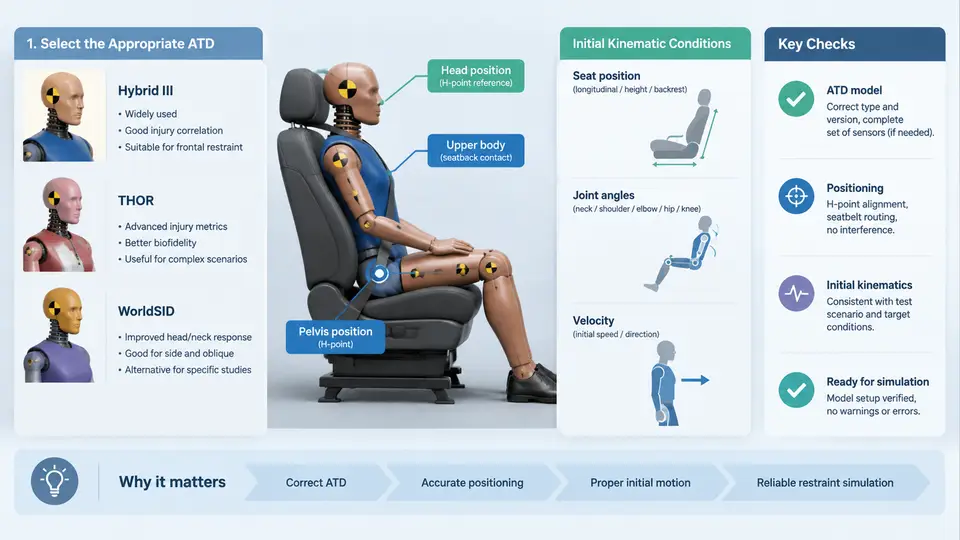
Before any restraint performance can be predicted, the driver must be represented in MADYMO by a validated multibody or finite element occupant model. This chapter covers the three decisions that dominate the credibility of every downstream result: which Anthropomorphic Test Device (ATD) to use, where to place it in the vehicle interior, and what initial kinematic state to assign. Errors introduced here propagate directly into belt routing, airbag interaction timing, and injury criteria, so the setup deserves the same rigor as the restraint hardware itself.
Selecting the Correct ATD
MADYMO ships with a family of validated dummy models, each tied to a specific regulation or consumer test protocol. The choice is not a matter of preference; it is dictated by the certification target of the program.
| ATD Model | Primary Application | Key Characteristics |
|---|---|---|
| Hybrid III 50th percentile male | FMVSS 208, ECE R94, Euro NCAP frontal | Baseline driver; well-validated belt and airbag interaction |
| Hybrid III 5th percentile female | FMVSS 208 out-of-position, small-occupant protection | Shorter torso, different belt geometry, higher chest deflection sensitivity |
| THOR 50th percentile male | Advanced frontal protocols, Euro NCAP 2020+ | More biofidelic thorax and abdomen; additional injury channels |
| WorldSID 50th percentile male | Side impact (FMVSS 214, Euro NCAP side) | Used when the restraint study includes lateral loading |
For a frontal driver restraint study, the Hybrid III 50th percentile male remains the default starting point. If the program targets Euro NCAP 2020 or later, THOR must be substituted, and the restraint model must be re-tuned because THOR's chest deflection measurement locations and abdomen response differ substantially. A common mistake is to run the Hybrid III model first and then simply swap in THOR without re-checking belt fit; the belt path that satisfies Hybrid III often produces excessive abdomen penetration on THOR.
Positioning the Occupant in the Vehicle Environment
Positioning in MADYMO is a two-stage process: first establish the vehicle coordinate reference, then place the dummy relative to the seat.
MADYMO uses a right-handed coordinate system. For a typical vehicle model, X points forward (direction of travel), Y points to the driver's left, and Z points upward. All dummy positioning is expressed relative to this global frame through the seat and floor reference points. Before moving the dummy, verify that the seat model's H-point matches the vehicle CAD H-point within a few millimeters; a seat that is 10 mm too high will shift the entire belt geometry and invalidate the shoulder belt routing.
The dummy is positioned using the INITIAL.JOINT_POS and INITIAL.FREE_JOINT cards for joint angles, combined with a rigid-body translation of the dummy's root. The standard procedure is:
- Place the dummy so its H-point coincides with the seat H-point in X and Z, and its centerline aligns with the seat centerline in Y.
- Set the pelvis angle to match the seat cushion angle (typically 20–25° for a production seat).
- Adjust the torso angle to the design back angle, commonly 23–25° from vertical for a nominal driving posture.
- Set the head angle to maintain a neutral neck orientation, usually within 0–5° of the torso axis.
- Position the upper and lower limbs to match the steering wheel and pedals.
For the upper limbs, the hands should contact the steering wheel rim at the 9 and 3 o'clock positions for a standard grip. In MADYMO this is achieved by driving the shoulder and elbow joint angles until the hand contact points coincide with the wheel rim. The lower limbs are positioned so the right foot rests on the accelerator or brake pedal and the left foot on the footrest. These contacts matter because they constrain the dummy during the crash pulse and influence knee excursion and femur loading.
Initial Kinematic Conditions
Initial kinematic conditions define the dummy's state at t = 0. For a standard frontal restraint simulation, the dummy starts at rest in the vehicle frame, and the crash pulse is applied to the vehicle structure. The dummy's initial velocity relative to the vehicle is therefore zero, and the absolute velocity is the impact velocity.
In MADYMO, this is configured through the INITIAL.VELOCITY and INITIAL.ACCELERATION cards. For a 56 km/h frontal impact (15.56 m/s), the vehicle model receives the deceleration pulse, and the dummy inherits the initial velocity through the system's rigid-body kinematics. The key parameters are:
INITIAL.VELOCITY
  BODY  = dummy_root
  VX    = 15.56    ! m/s, forward direction
  VY    = 0.0
  VZ    = 0.0

INITIAL.ACCELERATION
  BODY  = dummy_root
  AX    = 0.0
  AY    = 0.0
  AZ    = -9.81    ! gravity, m/s^2
Gravity must always be included. Omitting it is a frequent oversight that causes the dummy to float and the belt to lose pre-tension contact before the crash pulse begins. The gravity vector is applied in the global frame, so no transformation is needed if the vehicle is level.
For pre-crash or out-of-position (OOP) studies, the initial conditions become more complex. The dummy may start with a nonzero relative velocity, a braced posture, or a displaced position. In these cases, the initial velocity must be specified relative to the vehicle, and the vehicle pulse is applied on top of the pre-crash motion. MADYMO handles this through a separate pre-crash phase or by directly assigning the relative velocity in the initial conditions.
Verification Before Simulation
Before committing to a full run, perform a static check of the assembled model. The following SVG summarizes the key verification points and the relationships between the ATD, seat, belt, and initial conditions.
Run the model for a few milliseconds with zero crash pulse. The dummy should settle into the seat under gravity without drifting, the belt should remain in contact, and no joint should snap to a limit. If the dummy slides forward or the belt loses contact, the initial position or the belt routing is wrong. If the dummy oscillates, check for initial penetration or an incorrect joint stiffness.
Once the static check passes, apply the crash pulse and monitor the first 10–15 ms. The dummy should begin moving forward relative to the vehicle as the pulse develops, and the belt should engage the pelvis and chest in the expected sequence. Any delay in belt engagement or unexpected rotation indicates a positioning or initial-condition error that must be corrected before interpreting injury values.