3. MADYMO model setup for curtain airbags
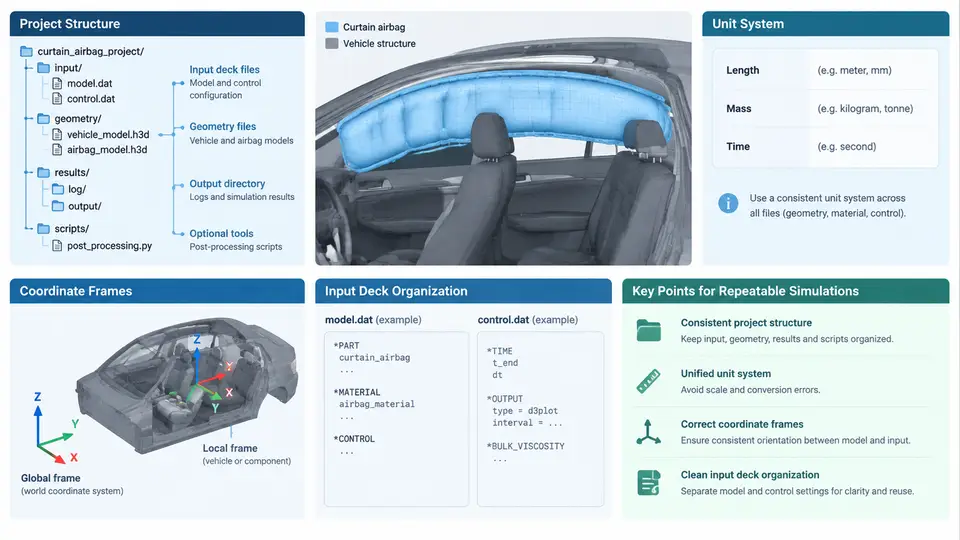
A curtain airbag simulation is only as trustworthy as the model foundation beneath it. Before a single gas-flow parameter or fabric property is tuned, the analyst must commit to a project layout, a consistent unit system, an explicit coordinate convention, and an input deck structure that another engineer can reopen six months later and reproduce exactly. This section establishes those foundations for MADYMO curtain airbag models, with the goal of repeatable, reviewable simulations rather than one-off runs.
Project directory structure
MADYMO itself does not impose a directory convention, but repeatable work benefits from a fixed, shallow tree. A practical layout separates the input deck, include files, material data, and outputs so that version control and batch execution remain clean:
curtain_airbag_project/
├── run/
│   └── run_curtain.xml          # top-level input deck (main file)
├── include/
│   ├── inc_units.xml            # unit system declaration
│   ├── inc_frames.xml           # coordinate frames and orientations
│   ├── inc_materials.xml        # fabric, gas, contact definitions
│   └── inc_output.xml           # time-history and animation requests
├── data/
│   ├── fabric_420d_weave.dat    # material test data
│   └── tank_pressure.csv        # inflator tank test data
├── geometry/
│   └── curtain_mesh.inc         # FE mesh for the cushion
└── results/
    └── run_001/                 # MADYMO output directory
The top-level deck in run/ should contain only the simulation control block, include statements, and the model assembly. Everything reusable lives in include/. This separation means a material update touches one file, not the main deck, and a reviewer can diff the include files independently.
Unit system: choose once, declare explicitly
MADYMO is unit-agnostic: it performs no automatic conversion. Every quantity must be expressed in a self-consistent system. For occupant safety work, the millimetre–tonne–second (mm–t–s) system is the de facto standard because it yields force in newtons and pressure in megapascals without scaling factors. The consistent derived units are:
| Quantity | Unit | Derived from |
|---|---|---|
| Length | mm | base |
| Mass | tonne (t) | base |
| Time | s | base |
| Force | N | t·mm/s² = 10³ kg·10⁻³ m/s² |
| Stress / pressure | MPa | N/mm² |
| Density | t/mm³ | e.g. 7.85e-9 for steel |
| Energy | mJ | N·mm |
Declare the system once in inc_units.xml and never mix systems inside a model. A common failure mode is importing a fabric modulus in GPa while the mesh is in mm, producing a cushion that is a thousand times too stiff. If a supplier provides data in SI (m–kg–s), convert it at the boundary and record the conversion in a comment. For example, a fabric areal density of 0.235 kg/m² becomes 2.35e-7 t/mm² in mm–t–s.
Coordinate frames and orientation conventions
Curtain airbag models involve at least three frames: the global vehicle frame, the cushion local frame, and the inflator frame. MADYMO uses right-handed Cartesian systems, and the vehicle frame convention for occupant safety is typically X forward, Y to the left, Z upward, with the origin at the vehicle reference point. The cushion is usually modelled in a local frame attached to the roof rail, then positioned via a SYSTEM or BODY definition with an orientation matrix or Euler angles.
Two conventions must be fixed and documented:
- Euler angle sequence. MADYMO's default is a specific rotation order; if you supply a direction cosine matrix instead, state it. Ambiguity here rotates the cushion into the occupant space.
- Normal direction of the cushion plane. For a side curtain, the deployed plane is roughly the Y–Z plane, with the outboard normal pointing in −Y (toward the door). Contact definitions and fabric normals depend on this.
When the cushion is folded and stowed, its local frame may be rotated relative to the deployed state. Define the stowed and deployed configurations as separate SYSTEM entries with an explicit transformation, and verify by plotting the cushion in the initial state before adding gas.
Input deck organization
A MADYMO input deck is an XML file. The top-level structure for a curtain airbag run typically contains a CONTROL block, a SYSTEM hierarchy, and one or more INCLUDE statements. The include mechanism is the key to repeatability: it lets you swap material data or output requests without editing the main deck.
<?xml version="1.0"?>
<MADYMO>
  <CONTROL>
    <TITLE>Curtain airbag - baseline run</TITLE>
    <TIME> TEND="0.120" />
    <OUTPUT> ... </OUTPUT>
  </CONTROL>

  <INCLUDE FILE="include/inc_units.xml"/>
  <INCLUDE FILE="include/inc_frames.xml"/>
  <INCLUDE FILE="include/inc_materials.xml"/>
  <INCLUDE FILE="include/inc_output.xml"/>

  <SYSTEM NAME="curtain">
    <!-- cushion FE mesh, gas inflow, contacts -->
  </SYSTEM>
</MADYMO>
Keep the CONTROL block minimal: title, end time, time step, and output flags. The SYSTEM block should reference named entities defined in the includes rather than embedding raw numbers. This makes parameter studies tractable: a script can rewrite inc_materials.xml and rerun without touching the model topology.
Repeatability checklist
Before the first run, verify the following. Each item maps to a concrete failure it prevents.
| Check | How to verify | Failure if skipped |
|---|---|---|
| Unit system declared and consistent | Hand-calculate cushion mass from areal density × area; compare to model mass | Cushion 10³× too stiff or too soft |
| Euler sequence documented | Plot initial cushion orientation against CAD | Cushion rotated into occupant space |
| Outboard normal direction fixed | Check contact normal sign in a static contact check | Fabric self-penetration or missed contact |
| Includes resolve relative to run directory | Run from run/; confirm no missing-file errors | Silent use of stale material data |
| Output requests in a separate include | Diff inc_output.xml between runs | Inconsistent post-processing between analysts |
With the project structure, unit system, coordinate frames, and deck organization fixed, the model is ready for the cushion mesh, gas inflow definition, and contact setup that follow. The discipline established here is what makes those later steps comparable across runs and reviewable by the wider team.