4. CAE simulation workflow for occupant res
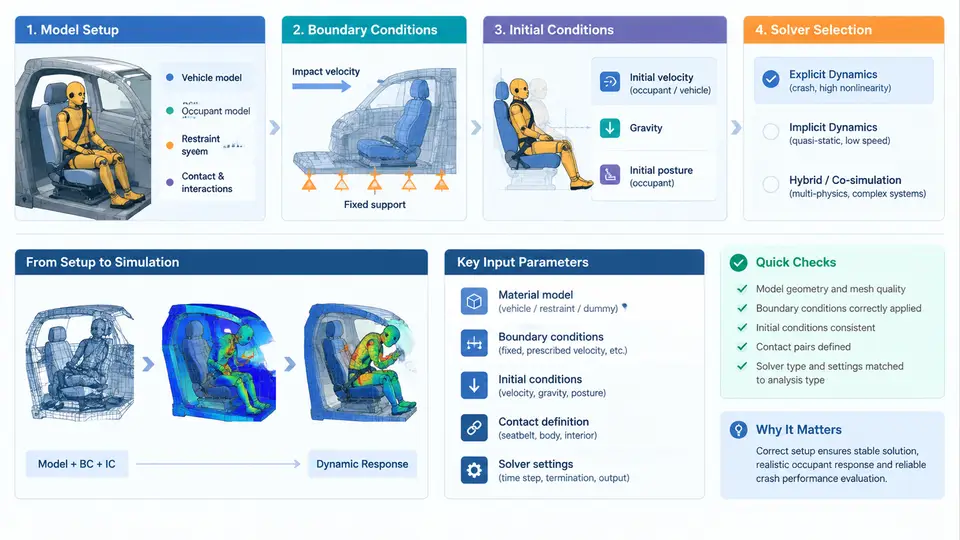
An occupant restraint simulation is only as trustworthy as the workflow that produces it. The same sled pulse, the same dummy, and the same airbag model can yield belt forces that differ by 20% if the model setup, boundary conditions, or solver configuration are handled inconsistently. This chapter walks through the complete CAE workflow for a frontal impact occupant restraint case — from assembling the restraint model to selecting and configuring the solver — with the goal of producing a run that is both physically defensible and repeatable.
Model assembly: what belongs in the occupant restraint model
A typical frontal occupant restraint model contains four subsystems that must be assembled with consistent units and coordinate conventions. Establish the unit system first — the most common convention in occupant safety CAE is mm–ms–kg–N–MPa (sometimes tonne–mm–s–N). Mixing millimetres with metres, or milliseconds with seconds, is the single most frequent cause of nonsensical results such as a 10× gravity field or a belt that stretches like rubber.
- Restraint system: seat belt (webbing, retractor, pretensioner, load limiter, buckle, anchor points), airbag (folded geometry, inflator, venting), and steering column or knee bolster where relevant.
- Occupant: a validated dummy model (e.g., Hybrid III 50th percentile male, THOR, or a human body model) positioned per the intended test setup.
- Interior environment: seat structure and cushion, dashboard, footwell, door trim — the surfaces the occupant can contact.
- Vehicle motion input: the sled or full-vehicle deceleration pulse applied to the environment.
Seat belt modelling deserves particular attention. The webbing is usually represented by membrane or seatbelt elements with a defined force–strain curve; the retractor is modelled with a spool that pays out webbing and a locking mechanism; the pretensioner applies a pyrotechnic retraction over a short time window (typically 10–30 ms after trigger); and the load limiter is a force-limiting element in the retractor or buckle that caps belt force at a design value (for example, 4 kN). Each of these must be represented with the correct constitutive behaviour, not just geometry.
Positioning and contact definition
Dummy positioning follows the test procedure being correlated — for a frontal sled test this usually means the H-point located per the vehicle seat design position, torso angle set by the seat back, and limbs placed according to the dummy seating procedure. Small positioning errors propagate directly into belt routing and airbag interaction, so the positioning should be documented and checked against the physical test setup before running.
Contact definitions must cover every credible interaction path: belt-to-dummy, belt-to-seat, dummy-to-seat cushion, dummy-to-airbag, dummy-to-knee bolster, and dummy-to-steering wheel. Use a consistent contact thickness and friction coefficient; belt-to-clothing friction is often set around 0.3, while dummy-to-seat friction may be higher. Contact stiffness should be checked so that penetration remains small relative to element size — visible penetration in the chest or pelvis region is a signal that contact parameters need review, not a result to be accepted.
Boundary conditions: constraining the model correctly
Boundary conditions define what the model is allowed to do. In a sled-based occupant model, the seat and interior structures are typically rigid or deformable bodies constrained to follow the prescribed pulse; the dummy is free to move and is restrained only by the belt, airbag, and contacts. Common boundary condition elements include:
- Prescribed motion: the deceleration pulse applied to the sled base or to a rigid body representing the vehicle environment.
- Fixed constraints: anchor points, seat mounting points, and any structure treated as non-deforming.
- Symmetry: only where the physical setup is genuinely symmetric — a full frontal occupant model is usually not symmetric because the dummy and belt routing are not.
- Initial velocity: the pre-impact velocity applied to the whole model, typically 50 km/h (13.89 m/s) for a frontal crash pulse.
Initial conditions
Initial conditions set the state of the model at t = 0. The essential ones are the initial velocity field (uniform pre-impact velocity in the direction of travel), the initial position of every part (dummy seated, belt routed, airbag folded), and the initial stress state of pre-loaded components such as the belt webbing and seat cushion. If the belt is modelled with an initial tension, that tension must be applied consistently; otherwise the dummy will "settle" into the belt in the first few milliseconds and the belt force history will show an artificial transient.
Airbag initial conditions also matter: the folded bag must be in its stowed geometry, the inflator mass flow and temperature curve must be defined, and the trigger time must be set relative to the pulse. A typical frontal trigger is around 10–20 ms after impact, but this is a calibration parameter that should be matched to the physical test.
Solver selection and configuration
Occupant restraint simulations are overwhelmingly explicit dynamic problems: large deformation, contact-dominated, and short duration (100–200 ms). LS-DYNA is the de facto standard, with PAM-CRASH and Radioss also used in industry. The solver choice is less important than the configuration:
- Time step: controlled by the smallest element; a stable explicit time step for occupant models is typically on the order of 0.1–1 µs. Use mass scaling only with caution — excessive added mass changes the dynamics and invalidates correlation.
- Hourglass control: reduced-integration elements need hourglass control (e.g., stiffness-based with a coefficient around 0.1) to prevent zero-energy modes.
- Contact algorithms: penalty-based contact with a defined penalty stiffness; check for excessive penetration and for contact energy that is a significant fraction of total energy.
- Energy balance: monitor hourglass energy, sliding interface energy, and added mass energy. These should remain small relative to internal energy — a common acceptance threshold is under 5% each.
Verification before correlation
Before comparing against physical test data, run a set of sanity checks. Confirm that the total energy is conserved and that hourglass, sliding interface, and added-mass energy each stay below roughly 5% of internal energy. Check that the dummy's head and chest accelerations are physically plausible — a chest acceleration that spikes to several hundred g within the first millisecond usually indicates a contact or time-step problem, not a real occupant response. Verify that belt force reaches the load limiter plateau rather than oscillating wildly, and that the airbag deploys and contacts the dummy at the expected time.
Only after these checks pass should the model be used for correlation. The workflow described here — consistent units, complete restraint representation, single application of the crash pulse, controlled initial conditions, and a configured explicit solver with monitored energy — is what makes the difference between a simulation that can be defended in a correlation study and one that merely produces colourful animations.