4. CAE model build for crash simulation
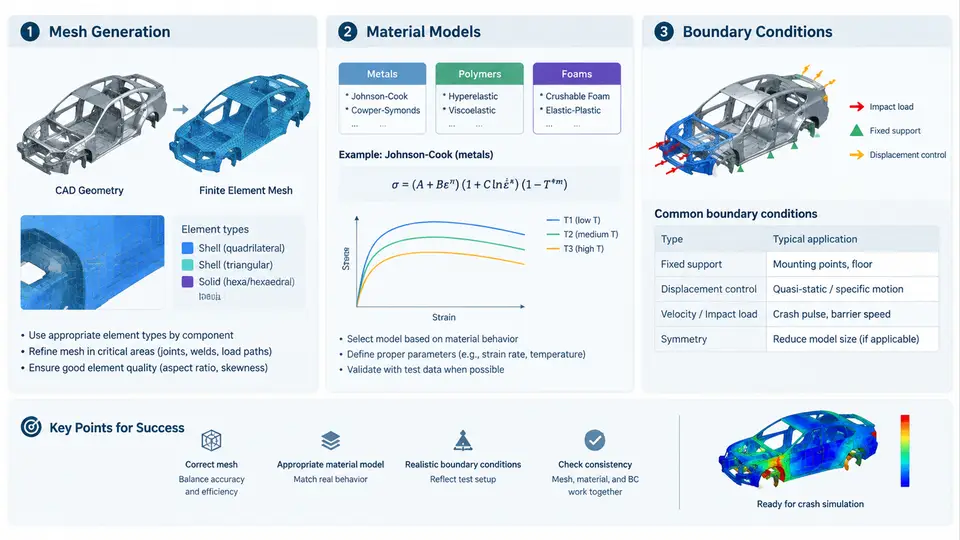
A crash simulation model is only as trustworthy as the three pillars it stands on: a mesh that can carry the deformation physics, material models that reproduce how each grade of steel, aluminum, or polymer actually behaves at high strain rates, and boundary conditions that mirror the real test setup. In a correlation study, these three elements are the dominant sources of divergence between CAE and physical results. This section walks through how each is built in practice, using a frontal offset deformable barrier (ODB) sled-to-full-vehicle example as the running case.
Mesh Generation: Element Type, Size, and Quality
Crash models are dominated by shell elements for thin-walled body structures and solid elements for thick castings, battery enclosures, and foam. The first decision is element formulation. For sheet metal that will fold and wrinkle, fully integrated shell elements (e.g., ELFORM 16 in LS-DYNA) with five through-thickness integration points are standard; reduced-integration elements (ELFORM 2) are faster but prone to hourglassing and are usually reserved for regions that stay mostly rigid. Solid elements for castings typically use ELFORM 1 or −1 depending on whether shear locking is a concern.
Target element size is a trade-off between cost and fidelity. A common baseline for a full vehicle is 5–7 mm in the front structure, 8–10 mm in the occupant compartment, and 10–15 mm in non-structural closures. The critical rule is that the smallest feature that must fold — a spot-weld flange, a bead, or a trigger — needs at least three elements across it. If a bead is 12 mm wide and the mesh is 8 mm, the bead will not form a stable fold and the model will over-predict stiffness.
Mesh quality metrics that matter most in crash are:
- Jacobian ≥ 0.6 for shells, ≥ 0.3 for solids — negative Jacobians abort the run.
- Warpage ≤ 15° for shells; higher values cause artificial stiffening.
- Aspect ratio ≤ 5:1 in deformation zones.
- Minimum length ≥ 2 mm to keep stable time step above ~0.5 µs.
The stable time step is set by the smallest element: Δt = Lmin/c, where c is the sound speed in the material. For steel, c ≈ 5,000 m/s, so a 2 mm element gives Δt ≈ 0.4 µs. Mass scaling is often applied to elements below the target step, but it must be logged and kept under 5% added mass in the deformation zone, otherwise the inertia of the model no longer matches the physical test.
Material Models: Rate Dependence and Failure
Steel grades in a body-in-white are not linear-elastic. A typical DP780 or HSLA340 undergoes strain rates of 10²–10³ s⁻¹ during a 50 km/h impact, which raises yield strength by 30–80% compared to quasi-static values. The material card must therefore include rate-dependent plasticity. In LS-DYNA, MAT_024 (*MAT_PIECEWISE_LINEAR_PLASTICITY) with a defined LCSS (strain-rate curve) is the workhorse for mild and high-strength steels. For advanced high-strength steels that exhibit bake hardening and anisotropic yield, MAT_037 or MAT_125 with Hill or Barlat yield surfaces is preferred.
Failure modeling is where correlation most often breaks down. A simple plastic strain limit (e.g., EPS = 0.25) will predict tearing at the wrong location because it ignores stress triaxiality. For critical joints and castings, a damage-based model such as MAT_ADD_EROSION with a triaxiality-dependent failure curve, or GISSMO (MAT_ADD_DAMAGE_GISSMO), is used. The failure strain is calibrated from coupon tests — not guessed — and the calibration curve is part of the model documentation.
Foam and honeycomb energy absorbers use MAT_063 (*MAT_CRUSHABLE_FOAM) or MAT_026 (*MAT_HONEYCOMB), where the stress–strain curve is defined in the loading direction and the model handles the plateau and densification. For battery enclosures, aluminum extrusions use MAT_024 with rate data, while the cell modules are often represented as a homogenized crushable foam with a calibrated plateau stress.
Boundary Conditions and Initial Conditions
Boundary conditions in a crash model fall into four groups: constraints, initial velocity, contacts, and output requests. Getting them wrong is the most common cause of a model that runs but does not correlate.
Constraints. The vehicle is typically constrained at the rear structure to prevent rigid-body motion, but the constraint must not stiffen the structure. A common approach is to apply a prescribed motion or a concentrated mass at the rear bumper beam via *CONSTRAINED_EXTRA_NODES, allowing the rear to move naturally. For a sled test, the sled rails are constrained to the prescribed pulse.
Initial velocity. The entire vehicle is given an initial velocity via *INITIAL_VELOCITY_GENERATION. For a 64 km/h ODB test, this is 17.78 m/s in the −X direction (with X defined as the vehicle longitudinal axis, positive forward). The barrier is either modeled as a rigid wall with the ODB honeycomb, or as a deformable barrier with its own material card. The sign convention must be consistent: if the vehicle moves in −X, the barrier is stationary, and contact is detected at the interface.
Contacts. *CONTACT_AUTOMATIC_SINGLE_SURFACE is the default for self-contact of the body structure. *CONTACT_AUTOMATIC_SURFACE_TO_SURFACE is used for barrier-to-vehicle and tire-to-ground. Friction coefficients are typically 0.1–0.3 for metal-to-metal and 0.6–0.8 for tire-to-ground. Penetration must be checked in the first few milliseconds; if the barrier penetrates the bumper, the contact thickness or the mesh is wrong.
Output requests. At minimum, the model should output nodal displacements, element stresses and strains, contact forces, and section forces at the firewall and B-pillar. These are the channels that will be compared against accelerometer and strain gauge data in the correlation phase.
Putting It Together: A Reproducible Build Sequence
The following sequence reflects a typical full-vehicle ODB model build. It is not a rigid template, but it captures the order in which decisions must be made so that later steps do not invalidate earlier ones.
- Define the coordinate system and units. Use mm–tonne–s–N consistently. X forward, Y left, Z up. Document this in the model header.
- Mesh the body-in-white. Start from CAD, mid-surface the panels, and mesh with the target sizes. Check Jacobian, warpage, and aspect ratio before proceeding.
- Assign material cards. Map each part to a material ID. Attach the rate-dependent curve and failure criterion. For joints, use *CONSTRAINED_SPOTWELD or *MAT_SPOTWELD with a calibrated failure force.
- Define contacts. Set up single-surface self-contact for the body and surface-to-surface for the barrier. Set friction and contact thickness.
- Apply initial velocity and constraints. 17.78 m/s in −X. Constrain the rear via extra nodes to a mass element, not a fixed boundary.
- Request output. Nodal acceleration at the B-pillar, section forces at the firewall, and element strain at the front rails.
- Run a short check. Simulate 5 ms and inspect for negative Jacobians, initial penetration, and hourglass energy above 5% of internal energy.
Verification Before Correlation
Before comparing against physical test data, verify the model against itself. Check that the total mass matches the physical vehicle within 2%, that the initial kinetic energy equals ½mv² (for 1,500 kg at 17.78 m/s, KE ≈ 237 kJ), and that the energy balance closes: internal + kinetic + hourglass + sliding ≈ initial kinetic. A model that loses or gains energy will not correlate regardless of how good the material cards are.
Once these checks pass, the model is ready for the correlation phase. The mesh, material, and boundary condition decisions made here determine the ceiling of achievable correlation accuracy — no amount of post-processing can recover from a mesh that cannot fold or a material card that ignores strain rate.