4. CAE toolchain for crash pulse analysis
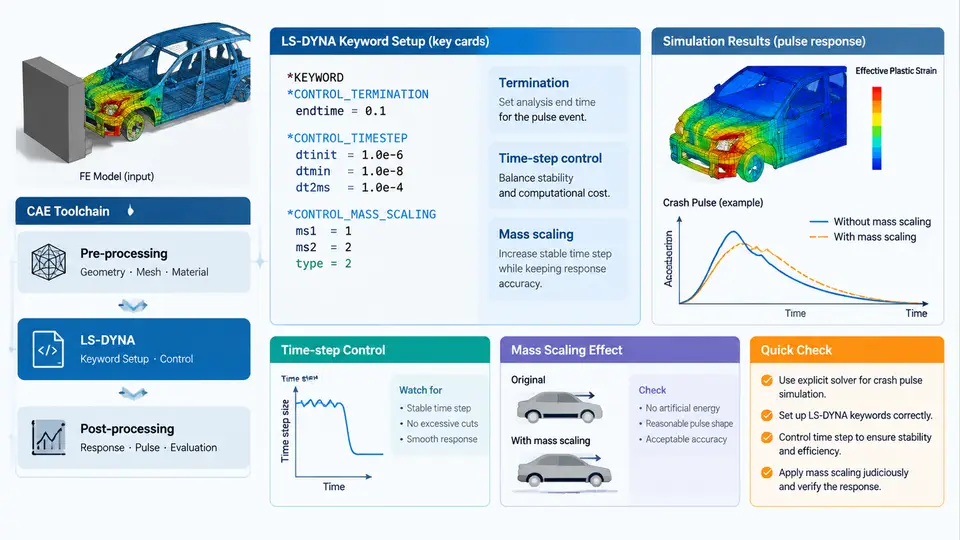
Crash pulse analysis sits at the intersection of vehicle-level crashworthiness and occupant restraint design. The pulse itself is a deceleration–time history measured at a structural reference point (typically the B-pillar base or rocker), and it drives everything downstream: airbag firing time, seatbelt load limiter tuning, and occupant injury metrics. To predict that pulse before a physical test, engineers rely on explicit finite element (FE) solvers, and LS-DYNA remains the de facto industry standard for this class of problem. This section walks through the practical toolchain: how an explicit solver advances the solution, how an LS-DYNA keyword deck is structured for a frontal or offset crash model, how the critical time step is computed and controlled, and how mass scaling is applied to keep the simulation tractable without corrupting the pulse.
Why Explicit Integration Dominates Crash Simulation
Crash events are short (80–150 ms), highly nonlinear, and dominated by contact, large deformation, and material failure. The explicit central-difference scheme solves the equations of motion without forming or inverting a global stiffness matrix, which makes each increment cheap and robust for contact-heavy models. The trade-off is conditional stability: the time step must stay below the Courant limit, so the number of increments is large. The governing stability condition for a solid element is:
Δt_critical = L_e / c
c = sqrt(E / ρ)          (elastic wave speed)
L_e = characteristic element length
For a steel element with E = 210 GPa and ρ = 7.85e-9 tonne/mm³, the wave speed is roughly 5.17 mm/ms. A 5 mm characteristic length therefore gives Δt ≈ 0.97 µs. Over a 120 ms event that is about 124,000 increments — which is exactly why time-step control and mass scaling matter so much.
LS-DYNA Keyword Deck Structure for a Crash Model
A crash deck is organized as a sequence of keyword blocks. The essential ones for pulse simulation are:
*CONTROL_TERMINATION— setsENDTIM(e.g. 0.120 s).*CONTROL_TIMESTEP— setsDTINIT,TSSFAC(default 0.9), and optionalDTMIN.*DATABASE_BINARY_D3PLOT— output interval for animation and pulse extraction.*DATABASE_ASCII_*— accelerometer and section-force output.*MAT_*— material cards (e.g.*MAT_PIECEWISE_LINEAR_PLASTICITYfor mild steel,*MAT_024).*SECTION_SHELL/*SECTION_SOLID— element formulation and thickness.*CONTACT_AUTOMATIC_SINGLE_SURFACE— self-contact for folding structures.*INITIAL_VELOCITY— initial barrier or vehicle velocity.*RIGIDWALL_PLANAR— rigid barrier for frontal impact.*ELEMENT_MASSor*CONTROL_TIMESTEPwithDT2MS— mass scaling.
A minimal termination and time-step block looks like this:
*CONTROL_TERMINATION
$  ENDTIM   ENDCYC   DTMIN   ENDENG   ENDMAS
   0.120             0.0
*CONTROL_TIMESTEP
$  DTINIT  TSSFAC   ISDO   TSLIMT   DT2MS   LCTM   ERODE   MSIST
   0.0     0.9      0      0.0     -1.0e-6  0      0       0
Here DT2MS = -1.0e-6 activates mass scaling only for elements whose natural step is below 1 µs; elements already above that threshold are untouched. The negative sign is the standard LS-DYNA convention meaning "scale only if needed."
Time-Step Control in Practice
The solver computes the critical step from the smallest element in the model. A single collapsed or sliver element can drag the global step down by an order of magnitude. Practical controls:
- Set
TSSFAC = 0.9(or 0.8 for models with severe contact). - Set
DTMINto a floor (e.g. 1e-7 s); if the step falls below it, LS-DYNA terminates with an error rather than running indefinitely. - Use
*CONTROL_TIMESTEPwithISDO = 1to base the step on shell mid-surface rather than nodal geometry. - Monitor the
d3hspfile for the reported "smallest timestep" and the element ID responsible.
If the reported step is far below expectation, inspect the flagged element for zero Jacobian, inverted geometry, or an unrealistically thin shell. Fixing the mesh is always preferable to scaling mass around a bad element.
Mass Scaling: Purpose, Methods, and Limits
Mass scaling adds non-physical mass to small elements so their wave speed drops and the global step rises. The added mass is:
m_added = ρ * V * ( (Δt_target / Δt_natural)² - 1 )Two strategies exist. Selective mass scaling (negative DT2MS) targets only elements below the threshold and is the default recommendation for crash models. Global mass scaling (positive DT2MS) adds mass everywhere and is rarely acceptable for pulse work because it alters inertia and therefore the pulse itself.
The discipline is to track the added mass fraction. LS-DYNA reports it in the d3hsp and in the glstat file as "added mass." A common acceptance criterion is that total added mass stays below 1–2% of the model mass, and that the added mass is not concentrated in the primary load path (front rails, rocker, B-pillar). If the pulse shifts earlier or the peak deceleration rises after scaling, the scaling is too aggressive.
DT2MS in steps and compare the B-pillar pulse. If the peak and timing move by more than a few percent, back off.
Extracting and Validating the Pulse
After the run, the pulse is extracted from an accelerometer defined with *DATABASE_ASCII_ACCELEROMETER or from nodal acceleration at the B-pillar base. The raw signal is noisy and must be filtered per SAE J211 (CFC 60 for structural pulse, CFC 180 for occupant). The filtered pulse is then compared against the target corridor. Key checks:
- Peak deceleration and time-to-peak.
- Pulse duration and the zero-crossing point.
- Area under the curve (velocity change) — must match the initial velocity.
- Energy balance: hourglass energy below 5% of internal energy, added mass below 2%.
The SVG below summarizes the toolchain from deck setup through time-step control, mass scaling, and pulse validation, showing where each control acts and what to monitor.
Practical Workflow Summary
A reproducible pulse simulation follows a disciplined sequence. First, build the deck with correct material and contact definitions, and set ENDTIM to cover the full event plus margin. Second, run a short baseline (e.g. 20 ms) with DT2MS = 0 to identify the natural critical step and the elements driving it. Third, repair any degenerate elements, then apply selective mass scaling with a conservative DT2MS. Fourth, run the full event and extract the pulse. Fifth, compare against the target corridor and the energy checks. If the pulse deviates, reduce scaling or refine the mesh in the load path rather than accepting a numerically convenient but physically wrong result.
DT2MS, added mass percentage, smallest time step, and peak pulse value for each iteration. This makes the scaling decision auditable and reproducible across the team.
The toolchain is only as good as its weakest input. A well-controlled time step and a conservative mass-scaling strategy preserve the physical fidelity of the pulse, while a careless DT2MS can silently shift the peak by 10–15% and mislead every downstream restraint decision. Treat mass scaling as a last resort, monitor it continuously, and validate the pulse against both the target corridor and the global energy balance.