4. Efficient large-file I/O
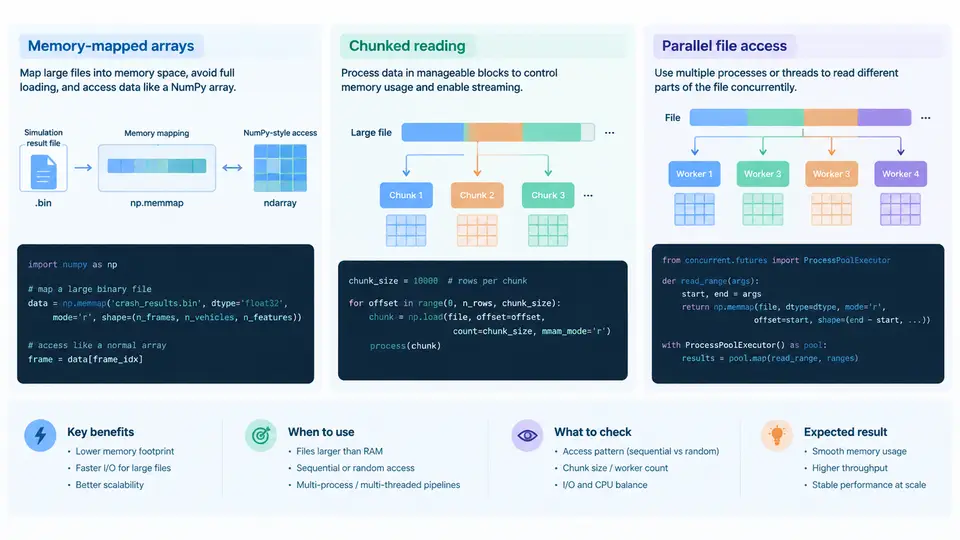
A single full-vehicle crash simulation can produce tens to hundreds of gigabytes of result data. A typical LS-DYNA d3plot family for a 60 ms frontal impact at 1 ms output intervals may contain 60–120 states, each holding nodal coordinates, velocities, accelerations, and element stresses for several million nodes and elements. Reading such a dataset naively — for example, calling numpy.loadtxt on a text export or loading an entire binary file into a Python list — will either exhaust memory or take minutes per state. This chapter focuses on three complementary techniques that make large-file access practical: memory-mapped arrays, chunked reading, and parallel file access.
Why Naive Reading Fails
Consider a binary results file of 8 GB stored on an NVMe SSD. A naive approach such as data = open(path, 'rb').read() allocates 8 GB of RAM immediately, and any subsequent slicing creates additional copies. On a workstation with 32 GB RAM, processing several such files concurrently becomes impossible. The core problem is that crash result processing is usually selective: you rarely need every node and every state at once. You may need the peak acceleration at a specific sensor location, or the time history of von Mises stress for a subset of elements. Efficient I/O means reading only what is needed, when it is needed.
Memory-Mapped Arrays
A memory-mapped file maps a disk file directly into the process address space. The operating system pages data in on demand, so the array appears as a normal NumPy array while physical memory holds only the pages actually touched. This is ideal for random access into large binary result files.
import numpy as np

# Assume a raw binary file of float32 nodal displacements,
# shape (n_states, n_nodes, 3), written in C order.
n_states, n_nodes = 120, 2_500_000
shape = (n_states, n_nodes, 3)

disp = np.memmap(
    "d3plot_disp.f32",
    dtype=np.float32,
    mode="r",
    shape=shape,
    order="C",
)

# Read only state 45, all nodes, Z component — no full-file load.
z_state45 = disp[45, :, 2]
peak_z = float(np.abs(z_state45).max())
print(f"peak |Z| at state 45: {peak_z:.4f} m")
Key points when using np.memmap:
- dtype and shape must match the on-disk layout exactly. A mismatch silently produces garbage values rather than an error. Always confirm endianness; LS-DYNA binary output is typically little-endian on x86 platforms.
- mode="r" is read-only and safest for shared result files. Use
"r+"only when you intend to modify data in place. - Access is lazy. The first touch of a page triggers a page fault and disk read; subsequent accesses hit the page cache. Sequential access is much faster than random access because of read-ahead.
- Flush before releasing. If you write through a memmap, call
del dispordisp.flush()to ensure dirty pages reach disk.
Memory mapping is the right tool when you need random or repeated access to a large array and the file format is already a flat binary buffer. It is not suitable for compressed or text formats, which must be decompressed or parsed first.
Chunked Reading
When the file format is not a simple flat array — for example, a custom binary container with per-state headers, or a compressed HDF5 dataset — chunked reading is the standard approach. The idea is to process the file in bounded blocks, keeping peak memory proportional to the chunk size rather than the file size.
import h5py
import numpy as np

CHUNK = 10  # states per chunk

with h5py.File("crash_results.h5", "r") as f:
    dset = f["stress/von_mises"]  # shape (n_states, n_elem)
    n_states = dset.shape[0]
    running_max = 0.0

    for start in range(0, n_states, CHUNK):
        stop = min(start + CHUNK, n_states)
        block = dset[start:stop, :]          # only CHUNK states in RAM
        running_max = max(running_max, float(block.max()))

print(f"global peak von Mises: {running_max:.2f} MPa")
Chunk size selection is a trade-off. Too small, and per-chunk overhead (function calls, HDF5 metadata lookups) dominates. Too large, and you lose the memory benefit. A practical starting point is 64–256 MB per chunk, adjusted so that the working set fits comfortably in L3 cache or at least in RAM alongside other allocations. For HDF5, align your chunk size with the dataset's own chunk layout to avoid reading partial chunks repeatedly.
Parallel File Access
Crash result processing is often embarrassingly parallel across states or across element partitions. Two patterns are common:
Process-level parallelism with independent file handles. Each worker opens its own handle and reads a disjoint slice. This works with concurrent.futures.ProcessPoolExecutor and avoids the GIL entirely.
from concurrent.futures import ProcessPoolExecutor
import numpy as np

def peak_for_state(args):
    path, state_idx, n_nodes = args
    disp = np.memmap(path, dtype=np.float32, mode="r",
                     shape=(120, n_nodes, 3))
    return state_idx, float(np.abs(disp[state_idx, :, 2]).max())

if __name__ == "__main__":
    n_nodes = 2_500_000
    tasks = [("d3plot_disp.f32", s, n_nodes) for s in range(120)]
    with ProcessPoolExecutor(max_workers=8) as ex:
        results = list(ex.map(peak_for_state, tasks))
    print(max(results, key=lambda r: r[1]))
Parallel HDF5 with MPI. For a single large HDF5 file, h5py built against a parallel HDF5 library allows multiple MPI ranks to read the same file concurrently. Each rank reads its assigned hyperslab. This is the standard approach on HPC clusters where the file resides on a parallel file system such as Lustre or GPFS.
Choosing the Right Technique
| Technique | Best for | Memory profile | Typical pitfall |
|---|---|---|---|
| Memory-mapped array | Flat binary files, random/repeated access | Pages on demand | dtype/shape mismatch; random access slower than sequential |
| Chunked reading | HDF5, compressed, or container formats | Bounded by chunk size | Chunk too small (overhead) or too large (memory) |
| Parallel file access | Many independent states or partitions | Per-worker | Seek contention on single devices |
Verification and Failure Symptoms
After implementing any of these techniques, verify correctness against a small reference case. Read a known state with both the naive method and the optimized method, and compare with np.allclose. If values differ, check dtype, byte order, and shape first — these account for the majority of silent errors.
Common failure symptoms and their causes:
- Values are plausible but wrong by a constant factor. Likely a dtype mismatch (e.g., reading float64 data as float32) or an offset error in the header.
- Memory usage grows without bound despite chunking. A reference to the full dataset is being retained, or the chunk slice is a view that keeps the parent alive. Use
block.copy()if you need to release the parent. - Parallel version is slower than serial. Seek contention or excessive process startup overhead. Reduce worker count or switch to a single sequential pass.
- Intermittent read errors under parallel access. File handle sharing across processes. Ensure each worker opens its own handle.
The following diagram summarizes how the three techniques relate to the data layout and to each other, and where each fits in a crash result processing pipeline.
The diagram shows that the choice of access technique is driven by the storage format, and that all three techniques converge on the same processing goals: extracting peaks, time histories, or reduced datasets. In practice, a single pipeline often combines them — memory-mapped access for the flat binary displacement field, chunked HDF5 reads for element stress, and process-level parallelism across states. The key discipline is to keep peak memory bounded and to match the access pattern to the underlying storage characteristics.