1. Crash simulation data pipeline fundament
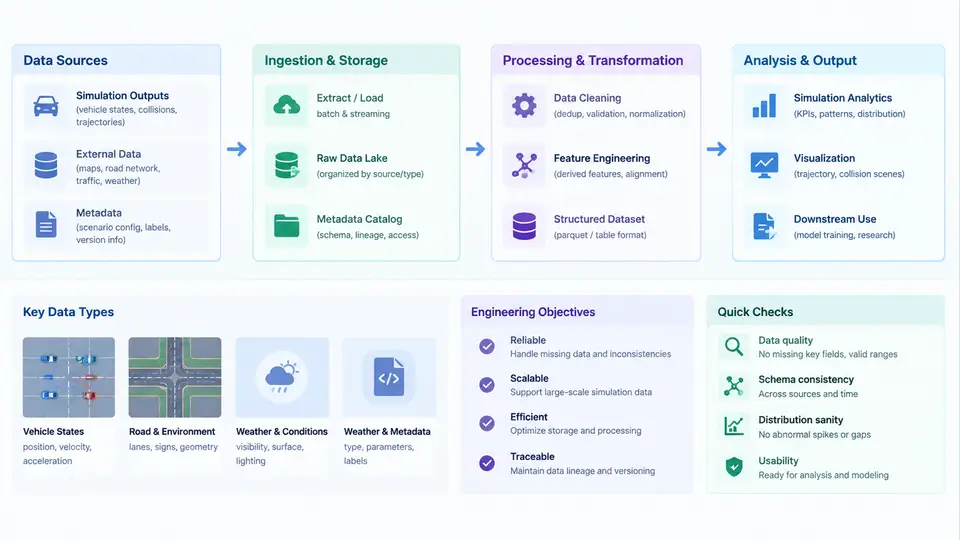
A vehicle crash simulation is not a single program run; it is a chain of data transformations that begins with a CAD surface and ends with a signed-off occupant injury number. Between those two points, geometry is meshed, materials are assigned, boundary conditions are applied, a solver integrates millions of equations over tens of milliseconds of physical time, and post-processing extracts thousands of scalar curves. Each hand-off is a place where data can be lost, silently corrupted, or reinterpreted. A crash simulation data pipeline is the engineered system that makes those hand-offs explicit, repeatable, and auditable.
This chapter establishes the vocabulary and the end-to-end map that the remaining 29 chapters build on. The goal is not to teach LS-DYNA or Primer syntax here, but to make clear what data exists, where it flows, what each stage is responsible for, and what "correct" means at every boundary.
1.1 What a Crash Data Pipeline Actually Is
In everyday engineering practice, a "pipeline" is often confused with a folder of scripts. A production pipeline has four distinguishing properties:
- Deterministic inputs. Given the same CAD revision, material library version, and configuration file, the pipeline produces byte-identical solver decks. Non-determinism (timestamps, unordered dictionary iteration, floating-point formatting drift) is treated as a defect.
- Explicit contracts between stages. Each stage declares what it consumes and what it emits. A meshing stage consumes a geometry file plus a mesh specification and emits a mesh database with named parts; it does not silently invent part names.
- Traceable provenance. Every output artifact carries a record of the inputs and tool versions that produced it. When a CAE analyst asks "why did the B-pillar intrusion change between run 0412 and run 0413?", the answer must be recoverable from metadata, not from memory.
- Fail-fast validation. Errors are caught at the stage that caused them, not three stages later when the solver diverges at 8 ms.
The engineering objective is therefore not "automate the clicking." It is to convert a craft process into a reproducible engineering product where a result can be defended in a design review.
1.2 The End-to-End Workflow
A typical frontal-offset deformable barrier (ODB) load case moves through the following stages. The names are conventional; the boundaries matter more than the labels.
- Geometry intake. CAD is exported to a neutral format (STEP AP242, JT, or IGES). The pipeline records the CAD revision, the export timestamp, and a hash of the file. Units are declared here — mixing millimetres and metres is the single most common catastrophic error in crash CAE.
- Geometry cleanup and midsurfacing. Slivers, gaps, and duplicate surfaces are removed. For thin-walled body-in-white (BIW) parts, the solid is converted to a midsurface suitable for shell meshing. Target: a watertight, manifold surface set per part.
- Meshing. Shell elements (typically 5–8 mm target size for BIW, 2–3 mm for critical joints) are generated. Element quality is checked against thresholds: Jacobian, warpage, aspect ratio, skew, and minimum/maximum angle. The output is a mesh database with a stable part naming convention.
- Assembly and connection. Parts are positioned in the vehicle coordinate system, then joined by spot welds, adhesives, seam welds, bolts, and rigid bodies. Weld information usually comes from a separate weld file exported from the CAD/PLM system.
- Material and section assignment. Each part receives a material card (e.g.,
*MAT_024for elastic-plastic steel,*MAT_187for aluminum) and a section property (shell thickness, integration points). Material data comes from a controlled library, not from individual analysts' spreadsheets. - Load case and boundary conditions. Initial velocity, barrier geometry and position, gravity, contact definitions, and output requests are applied. For ODB, the barrier is positioned per the regulatory or internal protocol.
- Solver execution. LS-DYNA (or Pam-Crash, Radioss) runs the explicit integration. The pipeline manages the job submission, wall-clock limits, and restart policy.
- Post-processing and extraction. Intrusion, acceleration, and force curves are extracted at defined measurement points. Occupant injury criteria (HIC, chest deflection, femur load) are computed, often by coupling to a MADYMO or similar occupant model.
- Reporting and archival. Results are written to a structured report and the full artifact set is archived with its provenance record.
The SVG below shows this flow with the data objects that cross each boundary — the contracts that make the pipeline verifiable.
1.3 Data Sources and Their Failure Modes
Crash CAE draws from four primary data sources, each with characteristic problems.
| Source | Typical Format | Common Failure Mode | Mitigation |
|---|---|---|---|
| CAD / PLM | STEP AP242, JT, IGES | Unit mismatch; missing or duplicated surfaces; stale revision | Hash + revision check at intake; unit declaration in config |
| Weld / join data | CSV, XML from PLM | Weld points outside part boundaries; missing welds after geometry change | Automated coverage report; tolerance-based projection |
| Material library | LS-DYNA keyword cards, CSV | Unit inconsistency; outdated curve data; duplicate material IDs | Versioned library with hash; ID uniqueness check |
| Test / correlation data | CSV, MDF4, ISO 6487 filtered | Channel naming mismatch; different filter class; time-zero offset | Channel mapping table; explicit filter and time-shift metadata |
The most insidious failures are not crashes — they are silent reinterpretations. A weld file that uses millimetres while the mesh is in metres will produce a model that runs, converges, and gives a plausible but wrong answer. This is why the pipeline treats unit declaration as a first-class contract, not a comment in a README.
1.4 Engineering Objectives and Success Criteria
A pipeline is judged by four measurable outcomes:
- Reproducibility. Re-running the pipeline from the same inputs yields identical decks and, on the same hardware and solver version, identical results. This is verified by hashing the generated keyword file.
- Traceability. Any result can be traced back to the exact CAD revision, material library version, and configuration that produced it. This is what makes a design decision defensible.
- Throughput. The pipeline reduces the wall-clock time from CAD release to first result. In practice, the bottleneck is usually mesh cleanup and weld projection, not solver time.
- Error containment. Defects are caught at the stage that introduced them. A unit error is caught at intake, not after a 12-hour solver run.
1.5 A Minimal Working Example: Unit Consistency Check
Consider a pipeline stage that reads a configuration file and validates units before meshing. The configuration declares the unit system, and the validation function checks that all downstream stages agree.
# pipeline_config.yaml
units:
  system: "mm_t_s"          # millimetre, tonne, second, Newton, MPa
  length: "mm"
  mass: "t"
  time: "s"
  force: "N"
  stress: "MPa"

geometry:
  source: "cad/body_rev_C.step"
  revision: "C"
  hash: "sha256:a3f1..."

mesh:
  target_size_mm: 6.0
  min_jacobian: 0.6
  max_warpage_deg: 15.0
  max_aspect_ratio: 5.0

materials:
  library: "lib/materials_v2.3.k"
  hash: "sha256:9c2e..."
# validate_units.py
import yaml

REQUIRED_KEYS = {"length", "mass", "time", "force", "stress"}

def validate_units(config_path: str) -> None:
    with open(config_path) as f:
        cfg = yaml.safe_load(f)

    units = cfg.get("units", {})
    missing = REQUIRED_KEYS - units.keys()
    if missing:
        raise ValueError(f"Missing unit declarations: {missing}")

    if units["system"] != "mm_t_s":
        raise ValueError(
            f"Unsupported unit system: {units['system']}. "
            "This pipeline is validated for mm_t_s only."
        )

    # Cross-check: stress must be consistent with force / length^2
    # In mm_t_s: N / mm^2 = MPa  -> consistent
    expected_stress = f"{units['force']}/{units['length']}^2"
    if units["stress"] != "MPa":
        raise ValueError(
            f"Stress unit {units['stress']} inconsistent with "
            f"{expected_stress} in mm_t_s system."
        )

    print("Unit validation passed: mm_t_s system confirmed.")
Running this stage on a misconfigured file produces an immediate, actionable error rather than a solver divergence at 15 ms. The expected output on a valid configuration is a single confirmation line; the typical failure symptom is a ValueError naming the missing or inconsistent key.
7.85e-9 for steel density, you are in mm–t–s. If you write 7850, you are in m–kg–s and your model will be wrong by a factor of 10¹² in mass.
1.6 What This Course Covers
The remaining chapters follow the pipeline from left to right, then address the cross-cutting concerns that make it production-grade. You will build a working pipeline incrementally: geometry intake and validation, automated meshing and quality gating, weld and connection generation, material card management, load case templating, solver job orchestration, result extraction, and finally reporting and archival. Each chapter produces a concrete artifact — a script, a configuration schema, a validation report, or a data contract — that plugs into the next.
The measure of success is not that the pipeline runs once. It is that it runs the same way, on a different analyst's machine, six months from now, and produces a result you can defend.