4. Data acquisition and preprocessing from
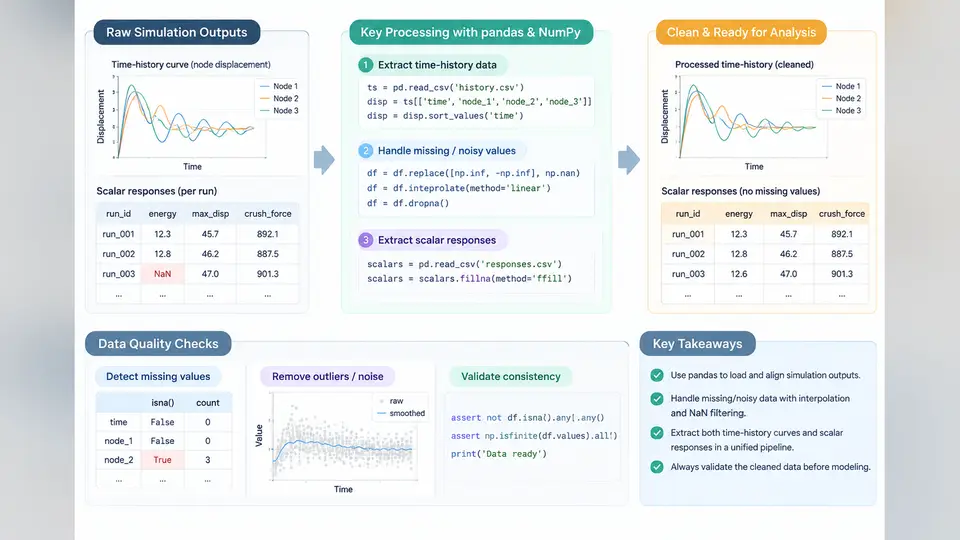
Crashworthiness optimization lives or dies by the quality of the response data feeding the surrogate model. A finite element (FE) crash simulation — typically an LS-DYNA or Radioss explicit run — produces hundreds of megabytes of binary output, but the surrogate only needs a compact, well-conditioned set of scalar responses and, optionally, time-history curves. This chapter covers the practical pipeline: extracting those quantities from solver output, assembling them into a tidy pandas DataFrame, and cleaning the missing or noisy values that inevitably appear across a design-of-experiments (DOE) sweep.
What to Extract and Why
Two families of responses dominate crashworthiness surrogates:
- Scalar responses — one number per simulation. Examples: peak acceleration at the B-pillar (
a_peak, in g), maximum intrusion into the occupant compartment (intrusion_max, in mm), total absorbed energy (E_absorbed, in kJ), and mass (mass, in kg). These map directly to surrogate outputs. - Time-history curves — sampled signals such as the acceleration–time trace at a node set, or the force–displacement curve of a crash box. These are often reduced to scalars (peak, mean, integral) before surrogate training, but the raw curves remain valuable for validation and for feature engineering.
The design variables (thicknesses, material grades, rib spacing) form the input matrix X; the extracted responses form the output matrix y. Every row of X must correspond to exactly one completed simulation, and every column of y must be traceable to a specific extraction rule. This traceability is what separates a reproducible study from an unrepeatable one.
Extracting Time-History Curves
LS-DYNA writes nodal and element time-history data to binout or ASCII d3plot/nodout files depending on the *DATABASE cards. The most portable route in Python is lasso-python (LS-DYNA) or pyradioss, but for teaching and for ASCII output, a direct parser is clearer. Suppose each run writes a CSV-like curve file run_017/accel_node1042.csv with columns time and accel:
import numpy as np
import pandas as pd
from pathlib import Path

def load_curve(path):
    df = pd.read_csv(path, comment='#')
    df = df.sort_values('time').reset_index(drop=True)
    return df

curve = load_curve('run_017/accel_node1042.csv')
# time in ms, accel in g
t = curve['time'].to_numpy()
a = curve['accel'].to_numpy()
Two preprocessing steps are almost always required before reducing a curve to scalars. First, resampling to a uniform time base, because explicit solvers output at variable intervals and different runs may not share timestamps. Second, filtering, because raw acceleration signals carry high-frequency numerical noise that inflates the peak. A standard approach is the SAE J211 CFC 60 filter (a fourth-order Butterworth low-pass at 60 Hz for occupant accelerations):
from scipy.signal import butter, filtfilt

def cfc_filter(signal, dt, cutoff_hz=60.0, order=4):
    fs = 1.0 / dt
    b, a = butter(order, cutoff_hz / (fs / 2.0), btype='low')
    return filtfilt(b, a, signal)   # zero-phase, no time shift

dt = np.median(np.diff(t)) * 1e-3   # ms -> s
a_filt = cfc_filter(a, dt)
a_peak = np.max(np.abs(a_filt))
Note the sign convention: acceleration is taken as magnitude, so a_peak is positive regardless of the direction of the dominant pulse. State this convention explicitly in your data dictionary, because a surrogate trained on signed peaks will behave differently from one trained on magnitudes.
Assembling the Response Matrix
With one extraction function per response, a DOE sweep collapses into a single loop. The key discipline is to record failures rather than silently dropping them:
def extract_scalars(run_dir):
    curve = load_curve(Path(run_dir) / 'accel_node1042.csv')
    t = curve['time'].to_numpy()
    a = curve['accel'].to_numpy()
    dt = np.median(np.diff(t)) * 1e-3
    a_filt = cfc_filter(a, dt)
    return {
        'a_peak': float(np.max(np.abs(a_filt))),
        'a_mean': float(np.trapz(np.abs(a_filt), t) / (t[-1] - t[0])),
        'intrusion_max': float(read_intrusion(run_dir)),
        'E_absorbed': float(read_energy(run_dir)),
    }

rows = []
for run in sorted(Path('doe').glob('run_*')):
    try:
        rec = extract_scalars(run)
        rec['run_id'] = run.name
        rec['status'] = 'ok'
    except Exception as exc:
        rec = {'run_id': run.name, 'status': f'failed: {exc}'}
    rows.append(rec)

df = pd.DataFrame(rows)
The resulting DataFrame is the canonical artifact of this stage. A typical sweep of 60 runs might yield 57 ok rows and 3 failures — two terminated early due to negative volume, one with a missing curve file. Those three rows are not noise to be deleted; they are information about the feasible design space.
Handling Missing and Noisy Outputs
Missing values in crash DOE data fall into three categories, and each demands a different treatment:
| Category | Typical cause | Recommended action |
|---|---|---|
| Structural missing | Solver crash, negative volume, missing file | Mark infeasible; exclude from training but retain in the log |
| Extraction missing | Node set empty, wrong ID, unit mismatch | Fix the extraction rule and re-run; do not impute |
| Statistical missing | Occasional NaN in a valid run | Impute with median or model-based estimate, flag the row |
Imputation is a last resort. For a surrogate, a wrong value is worse than a missing one, because the model will fit the error. When imputation is unavoidable, use a median across the DOE for that column and add a boolean imputed_* flag so downstream analysis can weight or exclude those rows.
Noise in scalar responses usually originates from mesh sensitivity, contact instability, or hourglassing. A practical diagnostic is to compare the coefficient of variation across repeated runs of the same design point. If a_peak varies by more than 5% between identical inputs, the response is not yet a reliable surrogate target — refine the mesh or tighten the contact controls before proceeding.
From Raw Output to a Clean Training Set
The final step is to merge the response matrix with the design-variable matrix, align them by run_id, and persist the result. A compact, reproducible pattern:
X = pd.read_csv('doe/design_variables.csv')      # run_id + dv columns
merged = X.merge(df, on='run_id', how='inner')

# Drop structurally infeasible runs, keep the log
feasible = merged[merged['status'] == 'ok'].copy()
feasible = feasible.dropna(subset=['a_peak', 'intrusion_max'])

feasible.to_parquet('training_set.parquet', index=False)
merged.to_csv('doe_full_log.csv', index=False)   # audit trail
Keeping both files matters. The parquet file is the clean input to the surrogate; the CSV log preserves every failure and its cause, which becomes essential when you later ask why the optimizer avoids a particular corner of the design space.
Verification Checklist
Before declaring the dataset ready, verify the following on the merged frame:
- Row count:
len(feasible)equals the number of successful runs; the difference from the DOE size is explained in the log. - Unit consistency: acceleration in g, length in mm, energy in kJ — confirm by spot-checking one run against the solver's own report.
- Range sanity:
a_peakbetween 10 g and 200 g for a typical frontal impact;intrusion_maxbelow the occupant-compartment limit. - No silent zeros: a response of exactly 0.0 usually means a failed extraction, not a physical result.
- Correlation check:
df[['a_peak','intrusion_max','E_absorbed']].corr()should show physically plausible signs — higher energy absorption generally correlates with lower intrusion.
df.describe() and the minimum values of every response column before training.
The output of this chapter is a single, auditable table: one row per feasible simulation, one column per design variable and per scalar response, with a companion log of every excluded run and the reason for exclusion. That table is the foundation on which the surrogate models in the following chapters are built, and its quality determines the ceiling of everything downstream.