4. Parametric geometry representation
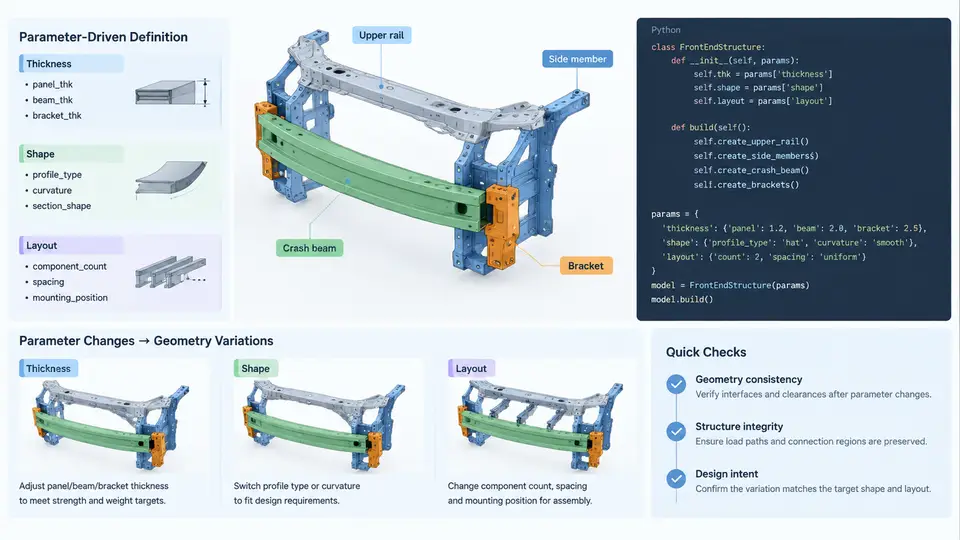
In a parametric crash model, geometry is not drawn once and frozen. It is generated from a set of named variables that describe thickness, shape, and layout. When those variables change, the mesh, the section properties, and the load paths update together. This chapter shows how to represent a vehicle front-end — bumper beam, crash boxes, longitudinal rails, and the shotgun/upper load path — as Python data structures that a meshing or solver-preparation script can consume directly.
Why Parametric Representation Matters for Crash Models
A front-end crash model is rarely built for a single load case. The same architecture must be evaluated for full frontal rigid barrier, offset deformable barrier (ODB), and small overlap, often at multiple speeds and with several material gauges. If the geometry is stored as raw node and element coordinates, every variant requires manual rework. If it is stored as parameters, a variant is a dictionary change.
The practical benefit is traceability. When a rail thickness moves from 1.6 mm to 2.0 mm, the model should record that change as a parameter value, not as an unexplained edit to a shell property card. Parametric representation makes the design intent explicit and reviewable.
Choosing the Parameter Set
A workable front-end parameter set separates three concerns: thickness, shape, and layout. Thickness controls section stiffness and folding behavior. Shape controls the cross-section and the trigger geometry. Layout controls where components sit relative to each other and to the barrier.
| Category | Example Parameter | Typical Value | Effect on Crash Response |
|---|---|---|---|
| Thickness | rail_t |
1.8 mm | Higher gauge raises axial crush force and delays folding |
| Thickness | crashbox_t |
2.2 mm | Controls energy absorbed before rail buckling |
| Shape | rail_section_w |
80 mm | Section width sets bending stiffness of the rail |
| Shape | rail_section_h |
120 mm | Section height influences vertical crush stability |
| Shape | trigger_depth |
6 mm | Indentation depth that initiates a fold |
| Layout | rail_y_offset |
380 mm | Lateral position of rail centerline from vehicle center |
| Layout | rail_z_height |
520 mm | Vertical position relative to ground reference |
| Layout | crashbox_len |
180 mm | Axial length available for controlled deformation |
These values are illustrative. In a real program they come from the body-in-white drawing, the section database, and the packaging study. The point is that each value has a name, a unit, and a documented role.
Encoding the Parameters in Python
A plain dictionary is sufficient for a first implementation and keeps the data serializable to JSON or YAML. Dataclasses add validation and readability once the parameter count grows.
from dataclasses import dataclass, field

@dataclass
class FrontEndParams:
    # Thickness (mm)
    rail_t: float = 1.8
    crashbox_t: float = 2.2
    bumper_t: float = 1.5
    # Shape (mm)
    rail_section_w: float = 80.0
    rail_section_h: float = 120.0
    trigger_depth: float = 6.0
    # Layout (mm)
    rail_y_offset: float = 380.0
    rail_z_height: float = 520.0
    crashbox_len: float = 180.0
    bumper_width: float = 1200.0

params = FrontEndParams()
print(params.rail_t, params.rail_y_offset)
With this object, a geometry builder can compute node coordinates and section properties without hard-coded numbers. The following function derives the rail centerline and the crash box attachment points from the layout parameters.
def rail_centerline(p: FrontEndParams):
    # Vehicle coordinate system: X forward, Y left, Z up.
    # Origin at front axle center, ground plane at Z = 0.
    x_front = 0.0
    x_rear = -p.crashbox_len - 400.0
    y = p.rail_y_offset
    z = p.rail_z_height
    return [(x_front, y, z), (x_rear, y, z)]

def crashbox_attach(p: FrontEndParams):
    # Crash box sits between bumper beam and rail front.
    x_bumper = 60.0
    x_rail = x_bumper - p.crashbox_len
    return {
        "bumper_end": (x_bumper, p.rail_y_offset, p.rail_z_height),
        "rail_end": (x_rail, p.rail_y_offset, p.rail_z_height),
    }
Note the coordinate convention stated in the comment: X forward, Y left, Z up, origin at the front axle center with the ground plane at Z = 0. Every downstream function and every figure in this chapter uses that same convention. If a supplier drawing uses a different origin, convert once at import and document the transform.
From Parameters to Section Properties
Thickness and shape parameters feed directly into shell section properties. For a thin-walled rail modeled with shell elements, the wall thickness is the shell thickness, and the section dimensions determine the perimeter and the second moment of area. A simple rectangular section approximation is enough to sanity-check the parameter set before meshing.
def rect_section_props(w, h, t):
    # Thin-walled rectangular section, uniform thickness t.
    area = 2 * t * (w + h)
    iyy = (t * h**2 * (3 * w + h)) / 6.0
    izz = (t * w**2 * (3 * h + w)) / 6.0
    return {"area": area, "Iyy": iyy, "Izz": izz}

props = rect_section_props(80.0, 120.0, 1.8)
print(props)
Running this with the example values gives an area of approximately 720 mm² and a bending stiffness that scales with the cube of the section height. That sensitivity is why rail_section_h is a high-leverage parameter: a 10 percent increase in height raises Iyy by roughly 30 percent, which changes the rail's resistance to bending during offset impact.
Trigger Geometry as a Shape Parameter
Crash boxes and rails need a trigger — a local indentation or bead that initiates a predictable fold. Representing the trigger as a parameter lets you sweep its depth and position without rebuilding the mesh by hand.
def trigger_positions(p: FrontEndParams, n_triggers=2):
    # Triggers placed along the crash box length.
    spacing = p.crashbox_len / (n_triggers + 1)
    return [60.0 - spacing * (i + 1) for i in range(n_triggers)]

print(trigger_positions(params))
With crashbox_len = 180 and two triggers, the positions are 0 mm and −60 mm from the bumper end. In a real model these become node perturbations or bead definitions applied to the shell mesh. The parameter trigger_depth controls how far the indentation is pushed inward.
Layout Consistency and the SVG Overview
Layout parameters are the most error-prone because they couple components. If rail_y_offset changes, the bumper beam mounting points, the crash box positions, and the shotgun attachment all move. A single source of truth — the FrontEndParams object — prevents drift between components.
The figure shows how the three parameter groups map onto the physical assembly. Thickness parameters attach to the shell definitions of each component. Shape parameters define the cross-section and the trigger pattern. Layout parameters position the components in the vehicle coordinate system. Because all three groups live in one object, a change to rail_y_offset propagates to the bumper mounting points and the crash box attachment without manual editing.
Validation Before Meshing
Parametric models fail silently when parameters are inconsistent. A crash box longer than the available space between bumper and rail, or a rail height that places the section below the ground plane, will produce a mesh that runs but gives meaningless results. Add explicit checks.
def validate(p: FrontEndParams):
    errors = []
    if p.crashbox_len <= 0:
        errors.append("crashbox_len must be positive")
    if p.rail_z_height - p.rail_section_h / 2 < 0:
        errors.append("rail section intersects ground plane")
    if p.trigger_depth >= p.rail_section_w / 2:
        errors.append("trigger_depth too large for section width")
    if p.rail_y_offset <= p.bumper_width / 2:
        errors.append("rail offset inside bumper half-width")
    return errors

for e in validate(params):
    print("ERROR:", e)
With the example values, validate returns an empty list. If you set rail_z_height = 50, the second check fires because 50 − 60 = −10 mm, meaning the rail section would extend below the ground plane. That is a packaging error, not a solver error, and catching it before meshing saves a full run.
Practical Workflow
- Define the
FrontEndParamsdataclass with thickness, shape, and layout fields, each with a unit comment. - Write builder functions that consume the parameter object and return node coordinates, section properties, and trigger positions.
- Run
validatebefore any meshing step and treat errors as blocking. - Export the parameter set to JSON with the model so each run is reproducible.
- When sweeping a gauge or section, change only the parameter value and regenerate; never edit the mesh directly.
The result is a front-end model that can be reconfigured for a new gauge, a revised section, or a shifted rail position in minutes rather than days, with a clear record of what changed and why.