1. Parametric vehicle crash modeling
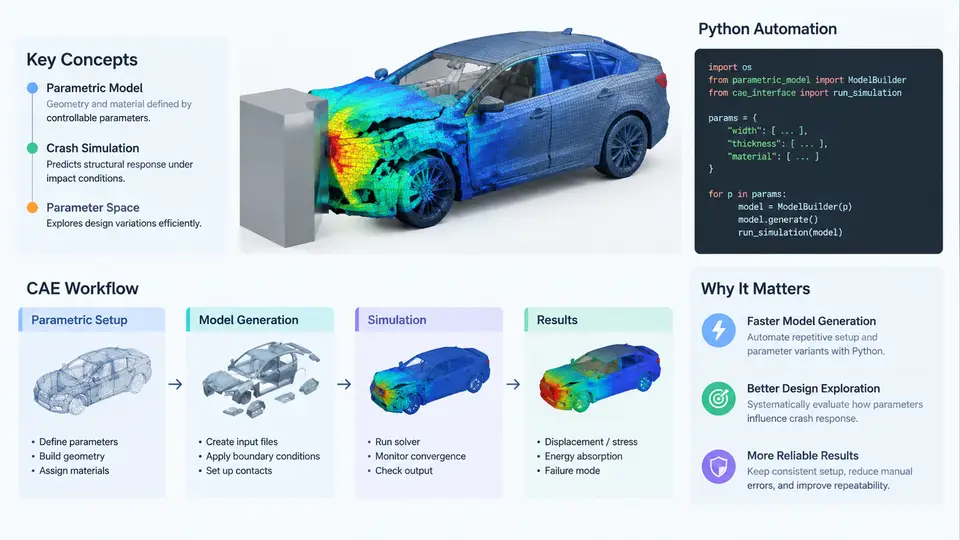
Full-vehicle crash simulation is one of the most computationally expensive and geometrically complex tasks in automotive CAE. A single frontal offset impact model may contain 3–6 million shell elements, hundreds of material definitions, dozens of contact interfaces, and a dozen or more load cases that must be evaluated across multiple design variants. Building these models by hand — or even by replaying recorded GUI macros — does not scale. Parametric vehicle crash modeling addresses this by treating the crash model itself as a function of explicit design variables, so that a new variant can be generated, assembled, and submitted for solving with minimal human intervention.
What "Parametric" Actually Means in a Crash Model
A parametric crash model separates three layers that are usually entangled in a hand-built deck:
- Design parameters — the quantities the engineering team wants to vary: rail gauge thickness, bumper beam material grade, longitudinal member section height, spot-weld pitch, mass distribution, or occupant restraint timing.
- Geometry and topology generators — the rules that turn those parameters into actual mesh, connections, and property assignments. These may be analytic (a swept rail whose cross-section is driven by two parameters), template-based (a library of pre-meshed components selected by parameter ranges), or morphing-based (a baseline mesh deformed by shape basis vectors).
- Assembly and load-case logic — the rules that decide which components are included, how they are connected, which contacts are activated, and which boundary conditions and initial velocities apply for each impact scenario.
The key property is traceability: given a parameter vector, the generator must produce a deterministic, reproducible model. If two engineers run the same parameter set, they must obtain the same deck — same node count, same element quality, same connection definitions.
The CAE Workflow Around a Crash Model
Parametric generation does not replace the CAE workflow; it automates the repetitive middle of it. A typical full-vehicle crash CAE loop looks like this:
- CAD / geometry preparation — import the body-in-white and closure geometry, clean it, and define the mid-surface or solid representation suitable for shell or solid meshing.
- Meshing and component definition — create shell/solid meshes, assign thickness and material properties, and define connection entities (spot welds, adhesives, bolts, seams).
- Assembly — position subsystems (powertrain, suspension, closures, seats, dummy, battery pack) and establish contacts and constraints.
- Load-case setup — apply initial velocity, gravity, barrier definition, rigid wall, and output requests (accelerations, intrusions, energy balance).
- Solver execution — run LS-DYNA, PAM-CRASH, or Radioss, typically on an HPC cluster with explicit time integration.
- Post-processing and correlation — extract intrusion, acceleration, and energy curves; compare against physical test or target; feed results back into the next design iteration.
Steps 2–4 are where parametric automation delivers the largest return, because they are rule-heavy, repetitive, and error-prone when done manually.
Where Python Fits
Python has become the de facto automation language in crash CAE for several practical reasons. It has mature libraries for numerical work (NumPy, SciPy, pandas), it can read and write the text-based input decks used by LS-DYNA and Radioss directly, and it can drive the pre-processors (ANSA, HyperMesh, Primer) through their scripting APIs. More importantly, it can sit above those tools and orchestrate the whole loop.
A typical Python automation stack for parametric crash modeling includes:
- Parameter management — a YAML or JSON file, or a pandas DataFrame, holding the design variable table. Each row is one variant.
- Deck generation — Python writes or patches the
*INCLUDEfiles, keyword cards, and connection definitions. For LS-DYNA, this means emitting*PART,*SECTION_SHELL,*MAT_*,*CONSTRAINED_SPOTWELD, and*CONTACTcards with parameter-driven values. - Pre-processor scripting — when geometry must be regenerated, Python calls ANSA or HyperMesh in batch mode to mesh and connect, then exports the deck.
- Job submission — Python generates the solver command line, writes the
.kor.radfile, and submits to the queue (SLURM, PBS, LSF). - Result harvesting — after the solve, Python parses
d3plot,binout, or ASCII output, extracts key responses, and writes a summary table.
The following minimal example shows the shape of a parameter-driven deck writer. It is illustrative, not a complete LS-DYNA deck:
import yaml

with open("variants.yaml") as f:
    variants = yaml.safe_load(f)

for v in variants["designs"]:
    with open(f"run_{v['id']}.k", "w") as deck:
        deck.write("*KEYWORD\n")
        deck.write(f"*SECTION_SHELL\n{v['rail_id']},1,{v['rail_t']:.3f}\n")
        deck.write(f"*MAT_PIECEWISE_LINEAR_PLASTICITY\n{v['mat_id']},{v['rho']},{v['E']},{v['nu']},{v['sigy']}\n")
        deck.write("*CONTROL_TERMINATION\n")
        deck.write(f"{v['t_end']:.1f}\n")
        deck.write("*END\n")
Each variant produces a self-contained deck whose thickness, material, and termination time are driven by the YAML table. The same pattern extends to spot-weld pitch, contact friction, and barrier offset.
Why This Matters for Crash Specifically
Crash simulation has three characteristics that make automation unusually valuable. First, model build time dominates — a hand-built full-vehicle deck can take days, while a parametric generator can produce a variant in minutes. Second, design of experiments (DOE) and optimization require dozens to hundreds of runs; without automation, the study is infeasible. Third, regulatory and internal load cases multiply — frontal, offset, side, rear, pole, and pedestrian cases each need their own boundary conditions, and a parameter change must propagate consistently to all of them.
Visual Overview of the Parametric Loop
The diagram below shows how design parameters flow through generation, assembly, solving, and result harvesting, and how the harvested responses feed back into the next parameter set.
Practical Considerations Before You Automate
Automation amplifies whatever is already in the model. If the baseline deck has inconsistent units, duplicate node IDs, or unverified contact definitions, the generator will reproduce those defects at scale. Before writing a single line of Python, confirm that the baseline model runs cleanly, that the parameter set is genuinely independent (changing rail thickness should not silently require a manual weld update), and that the output requests capture the responses the team actually uses for decisions.
A second consideration is granularity of parameterization. Over-parameterizing early — exposing every thickness and material constant — creates a combinatorial explosion and makes the generator hard to maintain. A better starting point is to parameterize only the variables that appear in the design study, and to keep the rest fixed in a baseline include file. The generator then patches only the cards that change, which keeps the diff between variants small and reviewable.
Finally, treat the generated deck as a build artifact. Log the parameter vector, the generator version, the solver version, and the submission timestamp alongside each run. When a correlation discrepancy appears six weeks later, that log is what allows the team to reproduce the exact model and isolate whether the cause was a parameter change, a generator bug, or a solver version difference.