4. Extracting nodal coordinates and element
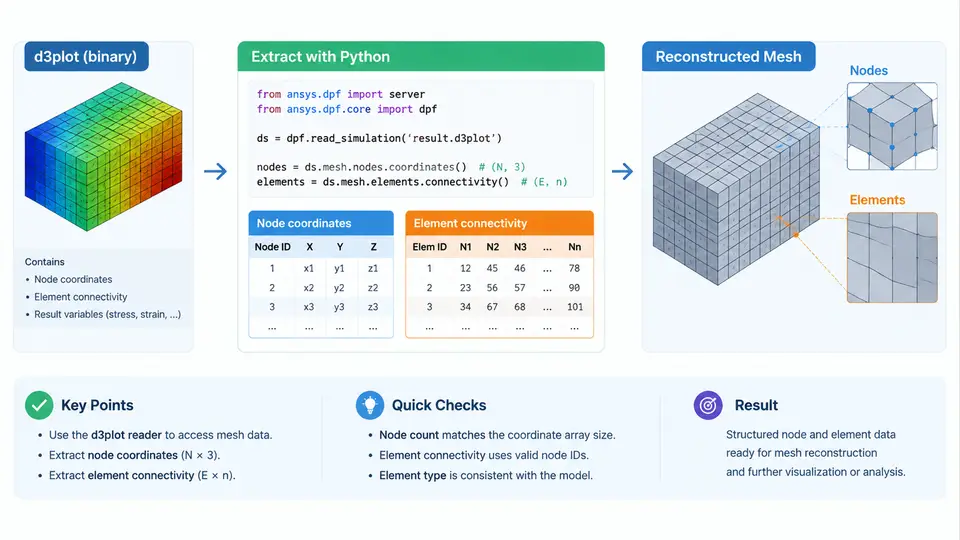
To reconstruct a mesh from an LS-DYNA d3plot database, two pieces of information are indispensable: the spatial position of every node and the list of nodes that define each element. In LS-PrePost these are exposed through the Geometry and Element panels, but when you build an automated Python pipeline you must read them directly from the binary state database. This section explains where that data lives inside the file, how the lasso-python reader surfaces it, and how to assemble a consistent mesh model that downstream visualization and analysis code can consume.
What the d3plot Actually Stores
A d3plot file is a sequence of Fortran-style records. The header block carries control information (title, time step, number of nodes, number of solid/shell/beam elements, and the word size). Immediately after the header comes the geometry block, which is written only once and contains the initial nodal coordinates and the element connectivity. Every subsequent state block stores per-state results such as displacement, stress, and strain, but it does not repeat the connectivity. This is why mesh reconstruction always reads the geometry block first and then applies state displacements on top of it.
Two conventions matter here. First, LS-DYNA uses a right-handed coordinate system; the nodal coordinates you read are in the model's global frame, and any displacement you later add must use the same frame. Second, node and element IDs are 1-based in the LS-DYNA input deck, but the Python arrays that hold them are 0-based. Mixing the two is the single most common source of "off-by-one" mesh corruption, so decide early whether your internal representation stores IDs or array indices, and document it.
Reading the Geometry Block with lasso-python
The lasso-python package wraps the LS-DYNA reader and exposes the geometry through a D3plot object. The typical access pattern is:
from lasso.dyna import D3plot, ArrayType

d3 = D3plot("crash_run/d3plot")

# Nodal coordinates: shape (n_nodes, 3), float32
node_coords = d3.arrays[ArrayType.node_coordinates]

# Element connectivity, one array per element family
solid_conn = d3.arrays[ArrayType.element_solid]
shell_conn = d3.arrays[ArrayType.element_shell]
beam_conn  = d3.arrays[ArrayType.element_beam]

# Global IDs (1-based, as written by LS-DYNA)
node_ids   = d3.arrays[ArrayType.node_ids]
solid_ids  = d3.arrays[ArrayType.element_solid_ids]
The connectivity arrays are ragged: solids have eight nodes per element, shells have four, and beams have two. lasso-python stores them as a list of variable-length arrays, so you cannot treat them as a single rectangular NumPy array without padding. A robust reconstruction step therefore iterates over each element family separately and builds a unified element table with an explicit element_type column.
Building a Unified Mesh Model
The goal of reconstruction is a single object that answers three questions: where is each node, which nodes belong to each element, and what type is each element. A compact representation uses three arrays:
points— shape(n_nodes, 3), the coordinates in the global frame.cells— a Python list of index tuples, one per element, referencing rows ofpoints.cell_types— a parallel list of strings such as"hexa8","quad4", or"beam2".
Because connectivity in the file uses 1-based IDs, the conversion to 0-based indices requires a lookup table. Building it once with a dictionary is far faster than calling np.where inside a loop:
import numpy as np

id_to_index = {nid: i for i, nid in enumerate(node_ids)}

cells = []
cell_types = []

for conn in solid_conn:
    cells.append(tuple(id_to_index[nid] for nid in conn))
    cell_types.append("hexa8")

for conn in shell_conn:
    cells.append(tuple(id_to_index[nid] for nid in conn))
    cell_types.append("quad4")

for conn in beam_conn:
    cells.append(tuple(id_to_index[nid] for nid in conn))
    cell_types.append("beam2")
If a node ID referenced by an element is missing from id_to_index, the model is inconsistent — usually because the geometry block was truncated or the wrong file was read. Raising a KeyError at this point is preferable to silently producing a mesh with dangling references.
Applying State Displacements
Once the reference mesh is built, deforming it to a given state is a single vectorized addition. The displacement array has the same shape as the coordinates and is indexed by state:
state = 20
disp = d3.arrays[ArrayType.node_displacement][state]  # (n_nodes, 3)
deformed = node_coords + disp
Note that node_displacement is the total displacement from the initial configuration, not an incremental step. If you need velocity or acceleration for the same state, they are stored in separate arrays and must be read with the same state index. Keeping the state index explicit in every access prevents the classic bug of mixing coordinates from state 0 with displacements from state 20.
len(cells) == n_solid + n_shell + n_beam and that points.shape[0] == n_nodes. A quick bounding-box comparison against LS-PrePost's Measure tool catches coordinate-frame mistakes before they propagate into plots.
Handling Large Models Efficiently
Crash models routinely exceed one million nodes. Two practical measures keep memory and runtime under control. First, read only the arrays you need by passing a filter to the reader rather than loading the full state history. Second, store connectivity as a flat int32 array plus an offset array instead of a list of tuples; this reduces Python object overhead by an order of magnitude and lets you slice element families without copying. For visualization, convert to the target library's format (for example, a pyvista.UnstructuredGrid) only after the mesh has been validated.
Common Failure Modes and How to Diagnose Them
Three symptoms appear repeatedly in practice. If the reconstructed mesh looks exploded — elements scattered far from their neighbors — the connectivity was read from the wrong element family, or the ID-to-index map was built from a different node ordering than the coordinates. If the mesh is collapsed to a point, the coordinates were read as integers or the word-size flag was misdetected, producing garbage floats. If only some elements are missing, the geometry block was truncated, often because the file was copied while the solver was still writing it. In each case, compare the reconstructed bounding box and element count against the header values before proceeding to visualization.
With a validated points/cells/cell_types triple in hand, you have a complete, self-contained mesh model. The next step — mapping per-state result arrays onto that mesh for contouring and animation — builds directly on this foundation, and the ID-to-index map you constructed here is reused unchanged.