1. LS-DYNA d3plot file format
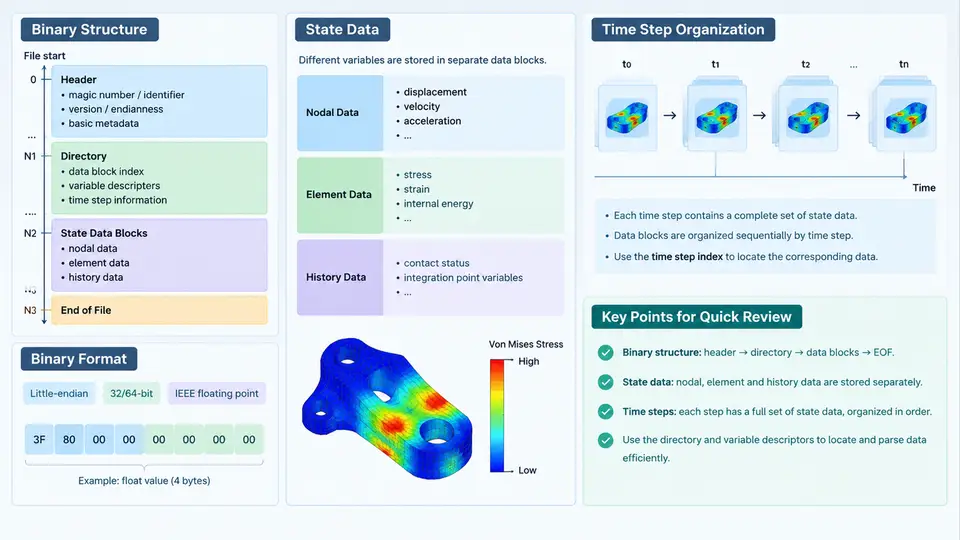
The d3plot file is the primary binary results database written by LS-DYNA during an explicit or implicit simulation. Every quantity you later visualize — nodal displacement, element stress, contact force, rigid-body motion — is stored inside this file. To process it reliably with Python, you must understand three things: how the binary records are laid out, how state data is grouped per output time, and how the sequence of states is organized across one or more physical files. This chapter builds that mental model from the byte level upward.
Why the Format Matters Before You Write Code
LS-DYNA does not write a self-describing container such as HDF5 or NetCDF. The d3plot format is a flat, word-addressed binary stream with a fixed header, followed by repeating blocks whose sizes depend on the mesh and on which output options were active. There is no embedded schema and no index at the end of the file. Consequently, a reader must reconstruct the layout by reading the header, computing block sizes from the mesh dimensions, and then walking the file state by state. Libraries such as lasso-python, qd-ldpm, or custom numpy-based parsers all follow exactly this procedure.
A second reason is performance. A typical crash model may contain several million nodes and hundreds of states, producing a d3plot of tens of gigabytes. Reading the header first lets you decide which states and which variables to load, instead of streaming the entire file into memory.
Word Size, Endianness, and the Control Block
All numeric data in a d3plot is stored as either 4-byte single precision (float32) or 4-byte integers (int32). Historically the format is word-oriented: one "word" is 4 bytes. Two variants exist — single precision and double precision — and the header records which one was used. Endianness follows the machine that wrote the file, so a reader must detect it rather than assume little-endian.
The file begins with a control block of 64 words. The most important fields are:
| Word offset | Meaning | Typical value |
|---|---|---|
| 0 | File format code / precision indicator | e.g. 0 or 1 |
| 1 | Code identifier (LS-DYNA) | fixed |
| 12 | Number of nodes | e.g. 250000 |
| 13 | Number of solid elements | e.g. 180000 |
| 14 | Number of beam elements | e.g. 1200 |
| 15 | Number of shell elements | e.g. 60000 |
| 16 | Number of thick shell elements | 0 |
| 17 | Number of triangular shell elements | e.g. 400 |
These counts are the key to everything that follows: the size of the geometry block, the size of each state block, and the number of variables per state are all derived from them. A robust reader validates these values against the actual file length before allocating arrays.
Geometry Block: The Static Part
Immediately after the control block comes the geometry section, which is written once and does not change between states. It contains:
- Nodal coordinates, stored as
x, y, ztriplets for every node, in node-ID order. - Element connectivity: the node lists for solids, beams, shells, and thick shells, each in its own contiguous block.
- Optional material and part identifiers, present only when the corresponding output flags were enabled.
Because connectivity is fixed, a Python reader can load it once and reuse it for every state. This is the single largest saving in a typical post-processing workflow.
State Data: What Changes in Time
After the geometry block, the file contains a sequence of states. Each state corresponds to one output time and holds the time-varying results. A state block typically contains, in order:
- A state header with the current simulation time and, in some variants, the time step size.
- Nodal variables — displacement, velocity, acceleration — as
float32arrays of length3 × num_nodes. - Element variables — stress, strain, effective plastic strain, internal energy — sized by element type and by the number of integration points or layers.
- Optional global data such as total kinetic energy, internal energy, and hourglass energy.
The exact set of variables depends on the *DATABASE_BINARY_D3PLOT card and on *DATABASE_EXTENT_BINARY. For example, requesting STRFLG=1 adds strain output, and NEIPB controls how many integration points are written for solids. A reader that assumes a fixed variable layout will fail on models with different output settings — this is the most common source of misaligned data in custom parsers.
Time Step Organization Across Multiple Files
When a simulation produces many states, LS-DYNA splits the output across a family of files rather than writing one enormous file. The naming convention is:
d3plot        # first file, contains control block + geometry + first states
d3plot01      # continuation
d3plot02      # continuation
...
Each continuation file repeats the control block and geometry header so that it can be opened independently, then appends further states. The total number of states is the sum over all files. A correct reader must therefore iterate over the file family, not just the first file.
The time values themselves are stored per state, not in a global index. To build a time vector, you read the time field from each state header in sequence. This matters when output intervals are non-uniform, which happens with adaptive time stepping or with *DATABASE_BINARY_D3PLOT using a time-based interval.
Reading the Header in Python
The following snippet shows the minimal first step: open the file, read the control block as int32, and extract the mesh counts. It assumes little-endian; a production reader should test both byte orders by checking whether the node count is plausible.
import numpy as np

with open("d3plot", "rb") as f:
    control = np.fromfile(f, dtype=np.int32, count=64)

num_nodes  = int(control[12])
num_solid  = int(control[13])
num_beam   = int(control[14])
num_shell  = int(control[15])
num_tshell = int(control[16])
num_tria   = int(control[17])

print(f"nodes={num_nodes}, solids={num_solid}, shells={num_shell}")
Once these counts are known, the geometry block size can be computed and skipped or loaded, and the reader can advance to the first state header. From there, each state is read in turn until the file family is exhausted.
Practical Pitfalls
- Precision mismatch. Double-precision files use 8-byte floats; reading them as
float32silently corrupts every value. - Variable layout drift. Different
*DATABASE_EXTENT_BINARYsettings change the number of element variables per state. Always derive the layout from the header, not from a previous model. - File family truncation. If
d3plot01is missing or renamed, the reader will stop early and report fewer states than expected. - Endianness. Files written on a big-endian platform require a byte swap before interpretation.
What You Should Be Able to Do Now
After this chapter you should be able to open a d3plot file in binary mode, read the 64-word control block, extract node and element counts, compute the geometry block size, and locate the first state header. You should also understand that a complete results database may span several files and that the time vector must be assembled from per-state headers. These are the foundations on which every subsequent operation — extracting displacement, computing stress contours, or animating a deformation — is built.