4. Generating *NODE and *ELEMENT cards prog
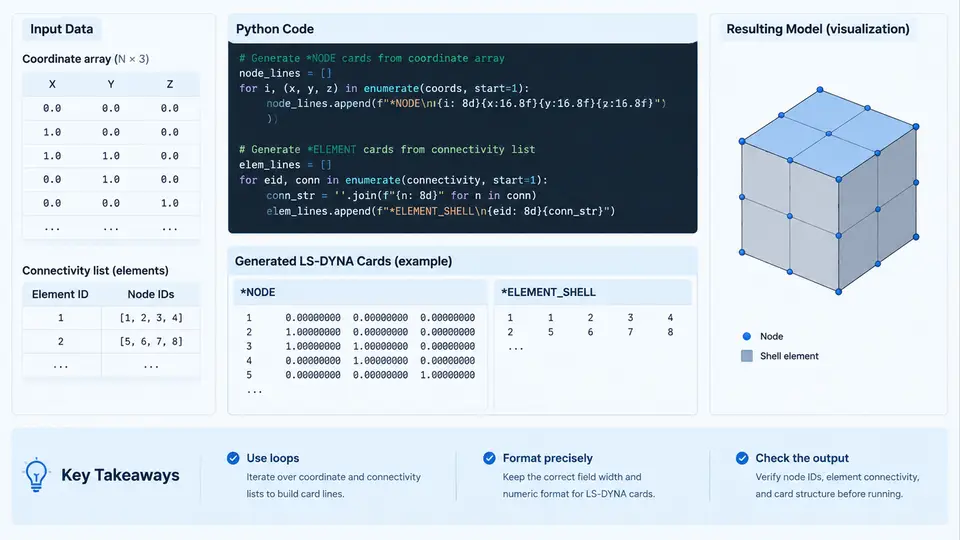
In LS-DYNA keyword files, the *NODE and *ELEMENT cards form the geometric backbone of every model. A *NODE card stores a node ID and three coordinates (X, Y, Z); an *ELEMENT card stores an element ID, an element type, and the node IDs that define its connectivity. When a mesh originates from a solver, CAD tool, or mesher, these cards are written automatically. But in parametric studies, lattice generation, unit-cell construction, or optimization loops, you often need to synthesize them directly from Python data structures. This section shows how to convert coordinate arrays into *NODE blocks and connectivity lists into *ELEMENT blocks using loops and string formatting, while keeping the output valid for the LS-DYNA keyword reader.
Fixed-Width Formatting Is Not Optional
LS-DYNA keyword cards are column-sensitive. The classic *NODE card uses a fixed-width layout: node ID in columns 1–8, X in 9–24, Y in 25–40, Z in 41–56. The *ELEMENT_SHELL card places the element ID in columns 1–8, the part ID in 9–16, and four node IDs in the following 8-column fields. If you emit values separated only by spaces, short IDs may still parse, but once IDs exceed eight digits or coordinates carry many decimals, fields collide and the reader either misreads values or aborts with a format error.
Python's format mini-language handles this cleanly. The expression f"{nid:8d}{x:16.6f}{y:16.6f}{z:16.6f}" produces exactly the required widths. For very large models, LS-DYNA also accepts the comma-separated free format (*NODE followed by *NODE_LONG=1 or the I10 option), but fixed-width output remains the most portable choice and is what we use here.
From Coordinate Arrays to *NODE Cards
Assume coordinates are stored as a NumPy array of shape (n, 3), or equivalently as a list of tuples. Node IDs are usually assigned sequentially starting at 1. The generator below writes a complete *NODE block:
import numpy as np

def write_nodes(fh, coords, start_id=1):
    fh.write("*NODE\n")
    for i, (x, y, z) in enumerate(coords):
        nid = start_id + i
        fh.write(f"{nid:8d}{x:16.6f}{y:16.6f}{z:16.6f}\n")
Three details matter in practice. First, the trailing newline must be present; a missing final newline can merge the last node with the next keyword. Second, coordinate precision of six decimals is a reasonable default for millimetre-scale models, but for models in metres you may need 16.9f to avoid losing resolution. Third, if you later reference nodes by index, keep the mapping index -> node ID explicit rather than assuming it, because offsetting start_id is common when merging meshes.
start_id = max_id_first + 1 and shift every connectivity entry by the same offset. A single off-by-one here produces elements that reference the wrong nodes and typically manifests as inverted or collapsed elements rather than a parse error.From Connectivity Lists to *ELEMENT Cards
Connectivity is naturally a list of tuples, each tuple holding the node IDs of one element in the order required by the element type. For a four-node shell, the order is n1, n2, n3, n4 counter-clockwise when viewed from the positive normal direction. The writer mirrors the node writer:
def write_shells(fh, conn, pid, start_id=1):
    fh.write("*ELEMENT_SHELL\n")
    for i, nodes in enumerate(conn):
        eid = start_id + i
        n1, n2, n3, n4 = nodes
        fh.write(f"{eid:8d}{pid:8d}"
                 f"{n1:8d}{n2:8d}{n3:8d}{n4:8d}\n")
For solid elements the pattern extends to eight nodes under *ELEMENT_SOLID, and for beams only two nodes under *ELEMENT_BEAM. The part ID (pid) must match a *PART definition elsewhere in the deck; it is not optional, because LS-DYNA uses it to attach material, section, and hourglass properties.
Building Connectivity from Structured Grids
The most common programmatic case is a structured grid. Given nx and ny divisions, node numbering runs row by row, and each cell connects four nodes whose indices follow a fixed pattern. The function below generates both the coordinates and the connectivity so the two stay consistent:
def grid_mesh(nx, ny, dx, dy):
    coords = [(ix*dx, iy*dy, 0.0)
              for iy in range(ny+1)
              for ix in range(nx+1)]
    conn = []
    for iy in range(ny):
        for ix in range(nx):
            n0 = iy*(nx+1) + ix + 1
            conn.append((n0, n0+1, n0+nx+2, n0+nx+1))
    return coords, conn
With nx=2, ny=1, dx=10, dy=10, this yields six nodes and two shell elements. Element 1 connects nodes 1, 2, 5, 4 and element 2 connects nodes 2, 3, 6, 5. Verifying this by hand before running a full model is worthwhile: a transposed index produces elements that overlap or leave gaps, which the solver will not flag but which corrupt the stiffness matrix.
Assembling a Complete Deck
A minimal runnable deck needs more than nodes and elements. The *NODE and *ELEMENT_SHELL blocks must be preceded by *KEYWORD and followed by at least a *PART, a *SECTION_SHELL, a *MAT_ card, and a *CONTROL_TERMINATION. The assembly function below writes them in the order LS-DYNA expects:
def write_deck(path, coords, conn, pid=1):
    with open(path, "w") as fh:
        fh.write("*KEYWORD\n")
        write_nodes(fh, coords)
        write_shells(fh, conn, pid)
        fh.write("*PART\n")
        fh.write(f"{'part1':>8}{pid:>8}{1:>8}{1:>8}\n")
        fh.write("*SECTION_SHELL\n")
        fh.write(f"{1:>8}{2:>8}{1.0:>8}{4:>8}\n")
        fh.write("*MAT_ELASTIC\n")
        fh.write(f"{1:>8}{7.85e-9:>8}{210000.0:>8}{0.3:>8}\n")
        fh.write("*CONTROL_TERMINATION\n")
        fh.write(f"{1.0:>8}\n")
        fh.write("*END\n")
Note the use of > (right-align) for the part and section cards, which is the conventional alignment for those fields. The material density 7.85e-9 is in tonne/mm³, consistent with a millimetre–tonne–second unit system; mixing unit systems is one of the most frequent causes of a model that runs but produces nonsense results.
Verification Before Submission
After writing the deck, verify it in three cheap steps. First, count the lines: a grid with nx*ny cells should produce exactly (nx+1)*(ny+1) node lines and nx*ny element lines. Second, check that the maximum node ID referenced in the connectivity block does not exceed the number of nodes written. Third, open the deck in LS-PrePost and confirm the mesh renders without gaps or overlapping elements. If elements appear inverted, the connectivity order is clockwise rather than counter-clockwise; swap the last two node IDs in each tuple to correct it. If the solver reports "negative volume" on solid elements, the same ordering issue is the usual cause.
Scaling to Large Models
For models with millions of nodes, string concatenation in a Python loop becomes the bottleneck. Two practical optimizations: build the output as a list of strings and join once with "".join(lines), and write in binary mode with a pre-encoded buffer. A list comprehension over the coordinate array typically writes a million nodes in a few seconds, which is acceptable for most parametric workflows. If generation time still dominates, vectorized formatting with NumPy's savetxt using a custom format string can be faster, but you lose the per-line control needed for mixed element types.
The core pattern is consistent: keep coordinates and connectivity in plain Python or NumPy structures, assign IDs deterministically, format each card with explicit field widths, and verify counts and connectivity before submission. Once this pipeline is in place, changing mesh density, geometry, or element type becomes a parameter change rather than a manual editing task.