1. LS-DYNA keyword file fundamentals
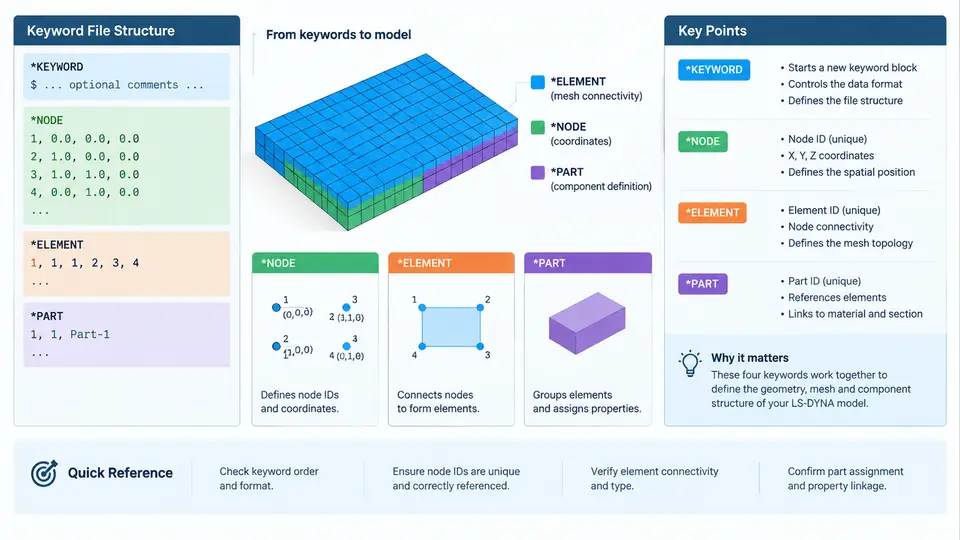
An LS-DYNA keyword file is a plain-text input deck that describes a complete finite element model: nodes, elements, parts, materials, sections, contact definitions, boundary conditions, and control parameters. Unlike GUI-driven preprocessors, the keyword file is the authoritative source of truth for the solver. Understanding its structure is therefore the foundation for any Python-based generation or editing workflow, because every script you write ultimately produces or modifies this text.
File-Level Structure
A keyword file is organized as a sequence of keyword blocks. Each block begins with a keyword line starting with an asterisk, such as *NODE or *ELEMENT_SHELL. The block continues until the next keyword line appears. The file must begin with *KEYWORD, which declares the file format and optionally activates features such as long format or a specific unit system.
*KEYWORD
*NODE
       1  0.0000000  0.0000000  0.0000000       0       0
       2  1.0000000  0.0000000  0.0000000       0       0
*ELEMENT_SHELL
       1       1       1       2       3       4
*PART
plate_shell
         1         1         1
The *KEYWORD line itself is not a data block; it is a header that tells the solver how to interpret everything that follows. Common options include *KEYWORD_LONG=Y for extended field widths and *KEYWORD followed by a title line. In practice, most decks produced by LS-PrePost or generated by Python scripts use the default short format unless node or element IDs exceed the standard field width.
Card Format Rules
LS-DYNA uses a fixed-column card format. Each data line is divided into fields of 10 characters in short format, or 20 characters in long format. The solver reads by column position, not by whitespace separation, although most writers align values to the right edge of each field for readability. This is the single most important rule for Python generation: a value placed in the wrong column will be misread or silently ignored.
| Format | Field width | Fields per line | Typical use |
|---|---|---|---|
| Short (default) | 10 characters | 8 (I10 or E10.3) | Standard models, IDs < 10 digits |
| Long | 20 characters | 4 (I20 or E20.3) | Large models, high-resolution coordinates |
Integer fields use I10 or I20; floating-point fields use E10.3 or E20.3 in the solver's internal reader, but the file itself simply contains text. A node line in short format has fields: node ID, X, Y, Z, and two optional rotational constraints. If you write 1 0.0 0.0 0.0 with single spaces, the solver may still parse it because it tolerates some whitespace, but relying on that behavior is fragile. Python's f"{value:10.3f}" or f"{value:10d}" formatting produces the correct column alignment.
*KEYWORD_LONG=Y. A file that looks correct in a text editor can produce shifted fields and wrong node coordinates if the format declaration does not match the actual column widths.
The Role of *NODE
*NODE defines the geometry of the model. Each line specifies a node ID and its coordinates in the global coordinate system. The coordinate system is right-handed and defined by the solver's global axes; all subsequent element and part definitions reference these node IDs. In a Python generation workflow, nodes are typically stored as a list of tuples and written in a loop:
nodes = [(1, 0.0, 0.0, 0.0), (2, 1.0, 0.0, 0.0)]
with open("model.k", "w") as f:
    f.write("*KEYWORD\n")
    f.write("*NODE\n")
    for nid, x, y, z in nodes:
        f.write(f"{nid:8d}{x:16.7f}{y:16.7f}{z:16.7f}\n")
Note that the example above uses wider fields for coordinates to preserve precision; this is a common practical choice when generating decks programmatically. The key point is consistency: whatever width you choose, every line in the block must follow it.
The Role of *ELEMENT
*ELEMENT blocks connect nodes into finite elements. The keyword is typically suffixed by element type, such as *ELEMENT_SHELL, *ELEMENT_SOLID, or *ELEMENT_BEAM. Each element line contains the element ID, the part ID it belongs to, and the node IDs that define its connectivity. For a shell element, four node IDs are listed; for a solid element, eight. The order of nodes matters because it defines the element's local coordinate system and normal direction.
*ELEMENT_SHELL
       1       1       1       2       3       4
       2       1       2       5       6       3
In this example, element 1 belongs to part 1 and connects nodes 1, 2, 3, and 4. The part ID is the link between geometry and physical properties. If the part ID does not exist in a *PART block, the solver will report an error or assign default properties, which is a common source of unexpected results.
The Role of *PART
*PART is the central assembly keyword. It associates an element set with a section definition (which controls thickness, integration points, and element formulation) and a material definition (which controls density, elastic modulus, yield stress, and so on). A typical *PART block contains a title line, a part ID, a section ID, and a material ID.
*PART
plate_shell
         1         1         1
Here, part 1 uses section 1 and material 1. The section and material blocks must appear elsewhere in the file, typically before or after the part block, because LS-DYNA resolves references after reading the entire deck. This means the order of keyword blocks is flexible, but the references must be valid.
How the Core Keywords Interlock
The relationship between these four keywords is hierarchical and reference-based. *NODE provides the coordinate pool. *ELEMENT consumes node IDs and assigns them to a part ID. *PART maps that part ID to a section and material. *KEYWORD wraps the entire file and declares the format. A missing or mismatched reference at any level breaks the chain.
Practical Generation Checklist
When writing a Python script to generate a keyword file, verify the following before running the solver:
- The file starts with
*KEYWORDand the format declaration matches the actual field widths used. - Every node ID referenced by an element exists in the
*NODEblock. - Every part ID referenced by an element exists in a
*PARTblock. - Every section ID and material ID referenced by a part exists in the corresponding blocks.
- Field widths are consistent within each block; use Python format specifiers such as
{:10d}and{:10.3f}to enforce alignment. - No blank lines interrupt a data block unless the solver explicitly allows them.
*PART block.
With this foundation, you can treat the keyword file not as an opaque artifact but as a structured data format that Python can generate, inspect, and modify with precision. The next step is to build reusable Python functions that emit each block correctly, which is the subject of the following chapters.