4. Reading binout files with lasso-python
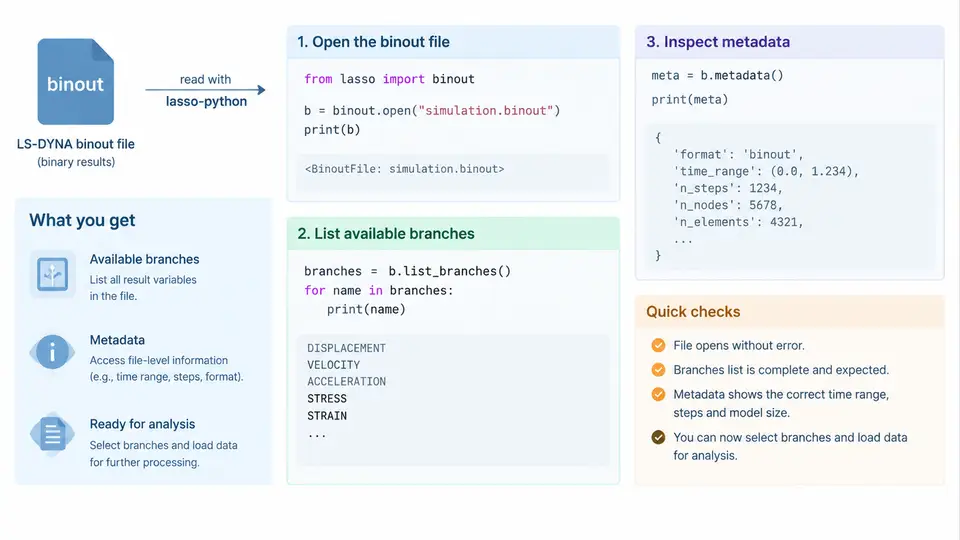
LS-DYNA writes two fundamentally different families of result files. ASCII d3plot files store full-field state data on the mesh, while binout files store scalar and small-vector time history data in a compact binary container. The binout format is what LS-DYNA uses for *DATABASE_BINARY_* outputs such as glstat, matsum, rcforc, nodout, secforc, sleout, and d3thdt. Because these files are binary and self-describing, you cannot inspect them with a text editor. The lasso-python library provides a pure-Python reader that opens the file, enumerates its internal tree, and exposes metadata before you ever touch the numeric arrays.
This section focuses on the first three operations you perform on any binout file: opening it, listing the available branches, and inspecting metadata. Getting these right prevents the most common downstream errors — reading the wrong branch, misinterpreting units, or assuming a time base that does not exist.
Opening a binout file
The entry point is the Binout class in lasso.dyna. It accepts a path to the binout file and opens it lazily: the header and directory structure are parsed immediately, but the large data blocks are read only when you request a specific branch.
from lasso.dyna import Binout

# Open a binout file produced by an LS-DYNA run
binout = Binout("run01/binout")

# The object is now open and the internal directory is parsed
print(type(binout))
# <class 'lasso.dyna.binout.Binout'>
Two practical details matter here. First, the path points to the binout file itself, not to a directory. LS-DYNA may split large binout output across numbered siblings such as binout01, binout02; lasso-python follows these automatically when you open the base name. Second, the file is opened read-only. If the LS-DYNA job is still running and has not flushed its buffers, the directory may be incomplete. Always confirm the job has finished, or at least that the binout file size has stopped growing, before reading.
binout.read() on every branch just to explore — that forces full data reads and can be slow on multi-gigabyte files.
Listing available branches
A binout file is organized as a tree. The top level contains named branches such as glstat, matsum, rcforc, nodout, and secforc. Each branch may contain sub-branches, and each leaf holds one or more time-history arrays. The Binout object exposes this tree through attribute-style access and through explicit listing methods.
# List top-level branches
print(binout._branches)
# ['glstat', 'matsum', 'rcforc', 'nodout', 'secforc']

# List sub-branches of a specific branch
print(binout.rcforc._branches)
# ['rcforc']

# List the leaf variables inside a branch
print(binout.glstat._variables)
# ['time', 'kinetic_energy', 'internal_energy', ...]
The exact branch names depend on which *DATABASE_BINARY_* cards were active in the input deck. A model with only *DATABASE_BINARY_D3PLOT and *DATABASE_GLSTAT will produce a binout containing just glstat. A crash model with contact forces will additionally contain rcforc and sleout. Because the tree is data-driven, never hard-code a branch list; always enumerate it at runtime.
Attribute access is convenient but fragile. binout.glstat works only if the branch exists. For robust scripts, iterate over binout._branches and check membership before accessing:
if "rcforc" in binout._branches:
    rc = binout.rcforc
else:
    raise RuntimeError("No rcforc branch: check *DATABASE_BINARY_RCFORC")
Inspecting metadata
Metadata tells you what the numbers mean before you load them. For each branch, lasso-python exposes the variable names, the number of time steps, and the array shapes. This is where you verify that the branch actually contains the quantity you expect.
# Number of time states in a branch
print(binout.glstat._n_timesteps)
# 251

# Shape of a specific variable
print(binout.glstat.kinetic_energy.shape)
# (251,)

# Time base for the branch
t = binout.glstat.time
print(t[0], t[-1])
# 0.0 0.0025
For branches with multiple entities — for example rcforc, which stores one force record per contact interface — the metadata reveals the entity count. The variable arrays then have shape (n_timesteps, n_entities), and you must map entity indices to interface IDs using the branch's ID array.
print(binout.rcforc._variables)
# ['time', 'x_force', 'y_force', 'z_force', ...]

print(binout.rcforc.x_force.shape)
# (251, 3)   # 251 states, 3 contact interfaces

print(binout.rcforc.ids)
# array([1, 2, 3])
glstat and matsum are typically written at the same interval, but nodout and d3thdt may use different output frequencies. Always read the time array from the branch you are analyzing rather than reusing another branch's time vector.
How the pieces fit together
The diagram below summarizes the read path: a single binary file is opened once, its directory tree is enumerated, and each branch exposes metadata that governs how its data arrays are shaped and interpreted.
Common failure symptoms and how to diagnose them
When the read path above is violated, the errors are usually specific and diagnosable.
- FileNotFoundError on open. The path is wrong, or the job wrote to a different directory. Check the LS-DYNA
d3hspfile for the actual output directory and confirm thebinoutfile exists with a non-zero size. - Empty
_brancheslist. The binout file exists but contains no recognized branches. This usually means the corresponding*DATABASE_BINARY_*cards were absent, or the job terminated before the first output interval. Verify the deck and the termination status. - AttributeError on
binout.rcforc. The branch does not exist. Use membership testing instead of direct attribute access. - Shape mismatch when plotting. You assumed
(n_timesteps,)but the branch stores(n_timesteps, n_entities). Inspect.shapeand.idsbefore slicing. - Time vector length differs from data length. You reused another branch's time array. Read
timefrom the same branch as the data.
_branches, check membership for the branch you need, print _variables and _n_timesteps, then read only the specific variable arrays required. This keeps memory bounded and makes scripts resilient to decks that produce different branch sets.
With the file open, the branch tree enumerated, and metadata verified, you are ready to extract the actual time-history arrays. The next step is to read specific variables and convert them into NumPy arrays for plotting and post-processing — but that work depends entirely on the metadata inspection performed here.