1. Course overview
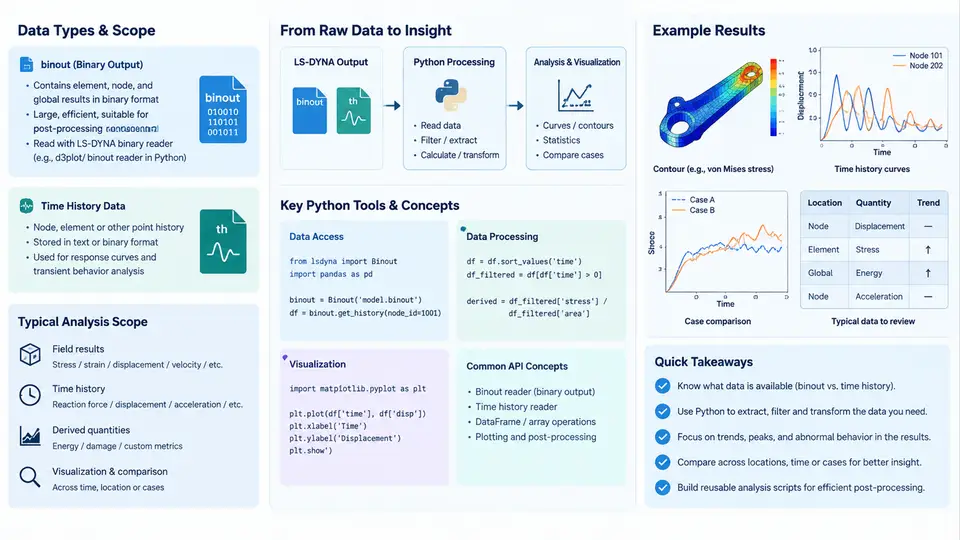
LS-DYNA writes two fundamentally different families of result data. Understanding that split is the foundation of everything in this course. The first family is the binary output — files such as d3plot, binout*, d3thdt, and intfor — written in a compact, machine-oriented format that stores full-field and time-history results for the entire model. The second family is the ASCII time-history output — files such as glstat, matsum, rcforc, nodout, elout, and secforc — written as plain text tables that are easy to read but expensive to parse at scale. Python is the natural tool for turning both families into structured, analyzable data, and this course teaches that workflow end to end.
The central object of study is the binout file. Unlike d3plot, which stores nodal and elemental state across the whole mesh, binout is a container of time-history channels organized by a two-level hierarchy: a branch (the result category, e.g. glstat, matsum, rcforc, nodout, secforc, sleout) and a variable within that branch (e.g. kinetic_energy, internal_energy, x_force). Each variable is a one-dimensional array sampled at the output intervals defined by *DATABASE_BINARY_D3PLOT and *DATABASE_BINARY_D3THDT. This hierarchy is why a single binout file can hold hundreds of independent curves, and why naive parsing fails: you cannot read it as a flat table.
glstat run, but they break down when you need to compare 40 drop-test simulations, extract one force channel from a 2 GB binout, or build a regression dashboard. Binary parsing gives you random access to a named channel without loading the whole file, which is the difference between a 3-second query and a 10-minute wait.
The Python Toolchain
Three libraries dominate this space, and knowing when to use each is a core skill.
lasso-python(formerlyqd-ansa/lasso) — the modern, actively maintained reader. It exposeslasso.dyna.Binoutandlasso.dyna.D3plot, supports branch/variable discovery, and returns NumPy arrays directly. This is the primary tool for the course.qdBinout— the older reader bundled with LS-DYNA distributions. Still found in legacy scripts; its API is less Pythonic and its maintenance is uncertain.numpy+pandas— the analysis layer. Once a channel is a NumPy array, everything from filtering to FFT to regression is available.
A minimal, reproducible read looks like this:
from lasso.dyna import Binout
import numpy as np

b = Binout("binout0000")

# Discover what is actually inside the file
print(b.read())                 # list of branches
print(b.read("glstat"))         # variables in the glstat branch

# Pull one channel as a NumPy array
time = b.read("glstat", "time")
ke   = b.read("glstat", "kinetic_energy")
ie   = b.read("glstat", "internal_energy")

# Energy balance check: total should be roughly conserved
total = ke + ie
print("max total energy:", np.max(total))
print("drift:", (total[-1] - total[0]) / total[0])
Two things in that snippet deserve emphasis. First, b.read() with no arguments is the discovery step — never assume a branch or variable name exists; query it. Second, the energy-drift calculation is a real sanity check, not decoration. In an explicit dynamics run, if total = kinetic + internal drifts by more than a few percent, you likely have hourglassing, an unstable time step, or a contact energy leak, and the model needs attention before any result is trusted.
Where the Data Comes From and Where It Goes
The technical context matters because it constrains what you can analyze. LS-DYNA writes binout incrementally during the solve; the file is only complete and consistent after normal termination. If a job is killed, the last record may be truncated, and a reader will either raise an error or silently return a short array. Always check that the time vector is monotonically increasing and that its length matches the expected number of output intervals.
On the output side, the analysis target is usually one of four things: a scalar time series (energy, momentum, time step), a force/displacement pair (crash pulse, penetration), a per-node or per-element history (acceleration at a sensor location), or a cross-run comparison (design variants, mesh convergence). Each has a different natural data structure, and choosing the right one early prevents painful reshaping later.
What This Course Covers
The 30 chapters follow a deliberate progression. The first block establishes the data model and the reader API: how binout is structured, how to enumerate branches and variables, how to convert channels into NumPy arrays, and how to handle the common failure modes (missing branches, truncated files, unit mismatches). The second block moves into analysis: time alignment across runs, filtering and resampling, numerical differentiation and integration, energy and momentum checks, and frequency-domain inspection. The third block covers engineering workflows: crash pulse extraction, occupant-sensor histories, contact force analysis, and cross-run comparison for design studies. The final block addresses automation — batch processing hundreds of runs, building reusable extraction functions, and producing reports that a team can actually use.
By the end, you should be able to point at any LS-DYNA result directory and answer a specific engineering question with a short, verifiable Python script — not by opening a GUI and clicking, but by writing code that another engineer can read, rerun, and trust.
python -c "import lasso.dyna, numpy, pandas; print('ok')" without errors. If lasso is missing, install it with pip install lasso-python. You will also need at least one completed LS-DYNA run with a binout0000 file to practice on; the course examples assume a crash or drop-test model with glstat, matsum, and rcforc branches present.
Key Concepts to Carry Forward
| Concept | Meaning in This Course | Typical Pitfall |
|---|---|---|
| Branch | Top-level result category inside binout (e.g. glstat) | Assuming a branch exists without querying it |
| Variable | Named channel within a branch (e.g. kinetic_energy) | Name spelling differs between LS-DYNA versions |
| Time vector | Shared sampling axis for all channels in a branch | Assuming uniform spacing; it is not guaranteed |
| Energy balance | Kinetic + internal + hourglass + sliding ≈ constant | Ignoring hourglass and contact energy terms |
| Truncation | Incomplete final record after abnormal termination | Silent short arrays that corrupt statistics |
The single most important habit this course builds is verify before you analyze. Query the branch list, check the time vector, run the energy balance, and only then compute the quantity you actually care about. A wrong number that looks plausible is far more dangerous than an obvious error, and in explicit dynamics the difference between a valid and an invalid result is often a few percent of energy drift that no plot will reveal unless you look for it.