1. CAE results data landscape
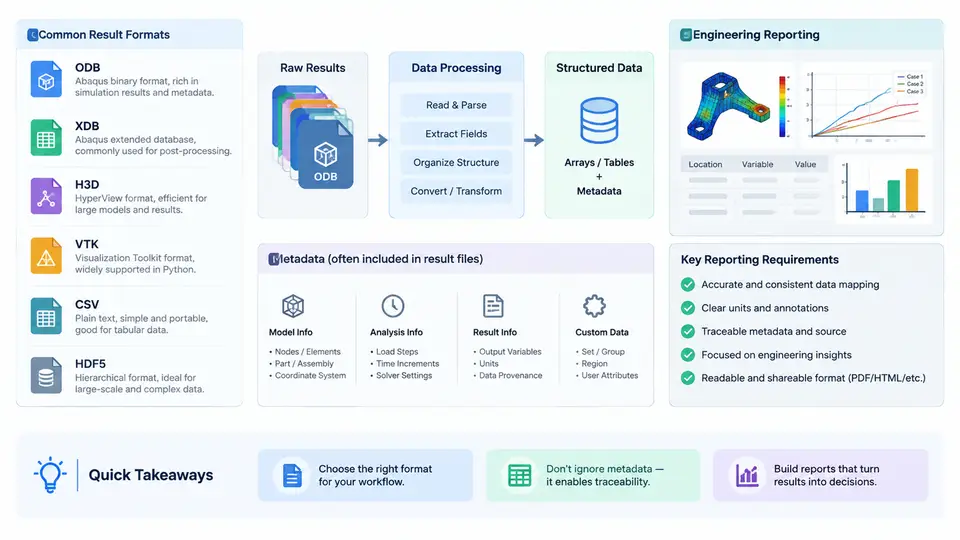
Before a single chart is drawn, a dashboard engineer must answer a deceptively simple question: what is actually inside the results file? CAE post-processing is not a single data source but a federation of formats, each optimized for a different stage of the simulation lifecycle. Choosing the wrong reader, or assuming a field exists when it does not, is the most common root cause of broken dashboards. This chapter maps the data landscape you will work with throughout the course and establishes the metadata and reporting requirements that drive every downstream design decision.
The Five Families of CAE Results Data
In practice, results arrive in five broad families. Understanding their internal structure tells you what is cheap to extract and what is expensive.
- Solver-native binary databases (ODB, XDB, H3D). Abaqus ODB and its lighter XDB companion, and Altair Hyper3D (H3D), store the full model plus a time-series of field outputs. They are hierarchical: an
instancecontainsnodesandelements, and eachstep/frameholdsfield outputs(stress, displacement) andhistory outputs(force, energy). These files are self-describing but require vendor APIs —odbAccessfor ODB, the HyperWorks reader for H3D — and are typically read-only. - VTK / VTU. The Visualization Toolkit format is the lingua franca of open-source post-processing (ParaView, PyVista). It stores unstructured grids with point and cell arrays, making it ideal for derived quantities and cross-solver comparison.
- HDF5. A general-purpose hierarchical container. Many modern solvers (and tools like
h5py) use it to store large arrays with named groups and attributes. It is fast, chunked, and compression-friendly, but carries no CAE semantics by itself. - CSV / tabular exports. The lowest common denominator. Perfect for history outputs, scalar KPIs, and quick plots, but lossy for spatial fields and prone to unit and header ambiguity.
The key insight is that these formats differ along two axes: spatial richness (can it represent a mesh field?) and semantic richness (does it know what a "node" or "step" is?). CSV sits at the bottom of both; ODB/H3D sit at the top. Your dashboard architecture should normalize everything into one intermediate representation — typically a mesh plus a tidy table of (frame, entity_id, quantity, value) — so that plotting code never branches on file type.
Metadata: The Part Everyone Forgets
A field array without metadata is a number without meaning. Every results file carries — or should carry — three layers of metadata, and your dashboard must surface all three.
| Layer | Typical contents | Why the dashboard needs it |
|---|---|---|
| Model metadata | Units system, coordinate frame, part/instance names, material IDs | Correct axis labels, unit conversion, legend titles |
| Step / frame metadata | Step name, analysis type, frame time, increment number | Time-axis construction, animation, load-case filtering |
| Field metadata | Quantity name, component (S11, U2), location (nodal/elemental), invariants | Selecting the right array, computing von Mises, avoiding double-counting |
Two traps recur constantly. First, units are almost never stored in ODB or H3D — they are an implicit convention of the analyst. A dashboard that plots "stress" without confirming mm-N-MPa versus m-kg-Pa will silently mislead. Second, nodal versus elemental location changes the array shape: nodal fields have one value per node, elemental fields one per element (or per integration point). Mixing them in a single plot produces either an exception or, worse, a plausible-looking but wrong contour.
From Raw Data to Engineering Reporting Requirements
Engineering reporting is not the same as post-processing. A contour plot answers "where is it high?"; a report must answer "is it acceptable, and why?" That shift imposes concrete requirements on how you extract and structure data.
- Traceability. Every number on a report page must be traceable to a file, step, frame, and entity. Store a provenance record alongside each extracted value.
- Comparability. Reports compare against allowables, baselines, or design variants. Normalize units and coordinate frames at ingestion so comparisons are valid.
- Reproducibility. A reviewer must be able to regenerate the exact figure. This means versioning the extraction script, not just the source file.
- Aggregation. Reports rarely show every node. They show maxima, margins of safety, and trends — which requires reducing fields to scalars with a documented reduction rule (e.g., max von Mises over a named element set).
A Minimal Extraction Example
The following snippet illustrates the normalization idea using h5py on an HDF5 results file. It reads a nodal displacement field for one frame and reshapes it into the tidy form used by every later chapter. The numbers are illustrative, not measured.
import h5py
import numpy as np

with h5py.File("results.h5", "r") as f:
    # metadata first — never assume units
    units = f.attrs.get("units", "unknown")
    frame_time = f["Step-1/Frame-10"].attrs["time"]

    # nodal displacement: shape (n_nodes, 3)
    u = f["Step-1/Frame-10/U"][:]          # example shape (4820, 3)
    node_ids = f["Model/node_ids"][:]      # example shape (4820,)

# reduce to a scalar magnitude per node
u_mag = np.linalg.norm(u, axis=1)

# tidy table: one row per (frame, entity, quantity)
rows = [(frame_time, nid, "U_mag", float(v))
        for nid, v in zip(node_ids, u_mag)]

print(f"units={units}, frame_time={frame_time}, rows={len(rows)}")
# example output: units=mm-N-MPa, frame_time=0.35, rows=4820
Run this against a real file and you should see a row count equal to the node count and a frame time matching the solver's step definition. If the row count is three times the node count, you forgot to reduce the vector components — a classic symptom of skipping the field-metadata layer.
What This Means for the Rest of the Course
The formats and metadata described here are the raw material. The reporting requirements — traceability, comparability, reproducibility, aggregation — are the constraints. Together they define the contract your dashboard must satisfy: it must know where each number came from, what it means, and whether it is safe to compare. With that contract established, the next step is building the ingestion and normalization layer that turns this heterogeneous landscape into a single, trustworthy dataset.