4. CAD file formats and interoperability
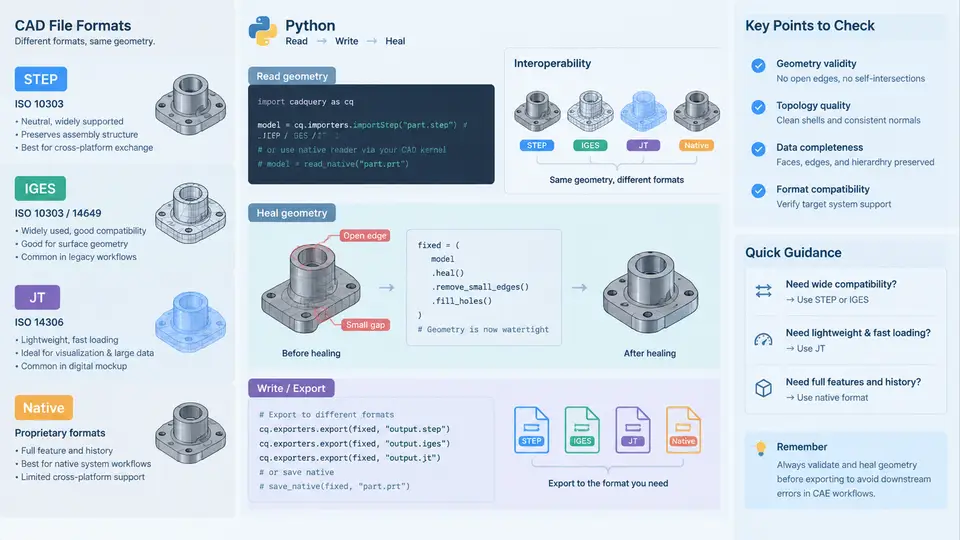
In a Python-driven CAE workflow, geometry rarely originates inside the solver. It arrives from a mechanical CAD system — SolidWorks, NX, CATIA, Creo, or Inventor — and must survive translation into a form the mesher and solver can consume. The quality of that translation determines whether downstream automation succeeds or collapses into a manual repair session. This chapter examines the four format families you will encounter, how Python reads and writes them, and how to detect and heal the defects that translation inevitably introduces.
Format Families and Their Trade-offs
CAD exchange formats fall into two broad categories: neutral formats designed for cross-system transfer, and native formats tied to a specific kernel.
STEP (ISO 10303) is the modern standard for solid model exchange. It stores B-rep topology — faces, edges, vertices — alongside analytic and NURBS surface definitions. AP203 covers configuration-controlled mechanical design; AP214 adds color and layer information; AP242 extends to PMI (product manufacturing information) and tessellated geometry. STEP preserves solid identity, so a part remains a closed volume after import. This makes it the default choice for CAE preprocessing.
IGES (Initial Graphics Exchange Specification) predates STEP and stores geometry as independent entities — surfaces, curves, and points — without guaranteed topological connectivity. A cylinder exported to IGES may arrive as two trimmed surfaces with no shared edge definition. IGES remains useful for legacy data and for surface-only models, but it demands more healing effort.
JT (ISO 14306) is a lightweight visualization and collaboration format built on the Siemens Parasolid kernel. It supports both B-rep and tessellated representations, with level-of-detail (LOD) control. JT is common in large assembly visualization and PLM workflows, but its tessellated modes are unsuitable for precise meshing unless the B-rep segment is retained.
Native formats — .sldprt, .prt, .catpart, .ipt — offer the highest fidelity because they preserve the original kernel's exact geometry and feature tree. However, reading them requires the corresponding kernel or a licensed translator. Python libraries such as pythonocc-core can read some native formats through Open Cascade, but coverage is incomplete and version-dependent.
| Format | Topology | Typical Use | Healing Burden |
|---|---|---|---|
| STEP AP242 | Full B-rep solid | CAE preprocessing, PMI | Low |
| IGES | Surfaces/curves only | Legacy, surface models | High |
| JT (B-rep) | B-rep or tessellated | Visualization, PLM | Medium |
| Native | Kernel-exact | Authoring, high-fidelity transfer | Lowest (if readable) |
Reading Geometry with Python
The workhorse for neutral-format I/O in Python is pythonocc-core, a set of bindings to Open Cascade (OCCT). A minimal STEP read looks like this:
from OCC.Core.STEPControl import STEPControl_Reader
from OCC.Core.IFSelect import IFSelect_RetDone

reader = STEPControl_Reader()
status = reader.ReadFile("bracket.step")
if status != IFSelect_RetDone:
    raise RuntimeError("STEP read failed")

reader.TransferRoots()
shape = reader.OneShape()
print("Solids:", len(shape.Solids()))
For IGES, swap STEPControl_Reader for IGESControl_Reader. The API is nearly identical, but the resulting shape frequently contains open shells rather than solids. Always inspect the topology count before proceeding.
JT reading is less standardized in open-source Python. Options include the jt-open reader or conversion through a commercial translator. In practice, many pipelines convert JT to STEP upstream using a PLM connector, then read STEP in Python.
Writing and Round-Tripping
Writing is symmetric. To export a healed shape to STEP AP242:
from OCC.Core.STEPControl import STEPControl_Writer, STEPControl_AsIs

writer = STEPControl_Writer()
writer.Transfer(shape, STEPControl_AsIs)
writer.Write("bracket_healed.step")
A critical practice is the round-trip test: write the shape, read it back, and compare topology counts and bounding-box dimensions. If the solid count drops from 1 to 0, the export lost closure. If the bounding box grows by more than a tolerance (say 1e-4 mm), a surface was likely replaced by a planar approximation.
Common Translation Defects
Translation between kernels introduces predictable defects:
- Gaps between faces — adjacent surfaces do not share an edge within tolerance, leaving the shell open.
- Sliver faces — extremely thin faces with high aspect ratio that destabilize meshing.
- Self-intersections — a face folds through itself, often from a bad trim curve.
- Duplicate or coincident faces — two faces occupy the same space, causing non-manifold edges.
- Invalid tolerances — vertex or edge tolerance exceeds the model scale, masking real gaps.
Healing Geometry in Python
OCCT provides a healing toolkit accessible from Python. The typical sequence is: sew, fix, upgrade, and validate.
from OCC.Core.ShapeFix import ShapeFix_Shape
from OCC.Core.ShapeAnalysis import ShapeAnalysis_ShapeContents

fixer = ShapeFix_Shape(shape)
fixer.SetPrecision(1e-4)
fixer.SetMaxTolerance(1e-2)
fixer.Perform()
healed = fixer.Shape()

contents = ShapeAnalysis_ShapeContents()
contents.Perform(healed)
print("Shells:", contents.NbShells(), "Faces:", contents.NbFaces())
The SetPrecision value defines the sewing tolerance — the maximum gap that will be closed. Setting it too tight leaves gaps; too loose merges distinct features. A practical starting point is 1e-4 mm for millimeter-scale parts, adjusted after inspecting the gap distribution.
For more aggressive repair, ShapeFix_Solid attempts to close shells into solids, and ShapeUpgrade_UnifySameDomain merges coplanar faces to reduce face count before meshing.
Verification and Acceptance Criteria
After healing, verify that the shape is a valid solid using BRepCheck_Analyzer:
from OCC.Core.BRepCheck import BRepCheck_Analyzer

analyzer = BRepCheck_Analyzer(healed)
if analyzer.IsValid():
    print("Shape is valid")
else:
    print("Shape has defects — inspect sub-shapes")
A valid solid is necessary but not sufficient. Also confirm that the volume is positive and finite, that the number of solids matches the expected part count, and that no face has an area below the meshing threshold. For a bracket expected to be a single solid, a result of two solids usually indicates a gap that sewing failed to close.
Practical Guidance
Prefer STEP AP242 as your primary exchange format. It carries solid topology, supports PMI, and is well-supported by open-source Python. Treat IGES as a fallback for surface-only legacy data and budget extra healing time. For JT, confirm whether the B-rep segment is present before attempting to mesh; if only tessellation exists, request a STEP export from the source system instead.
Automate the read–heal–verify sequence as a reusable function so every incoming part passes through identical checks. Log the topology counts, bounding box, and validity flag for each part. When a part fails, the log tells you whether the problem is a gap, a sliver, or a tolerance issue — and that determines which healing parameter to adjust. This discipline turns format interoperability from a recurring crisis into a controlled, auditable step in your CAE pipeline.