1. CAE geometry and model preparation autom
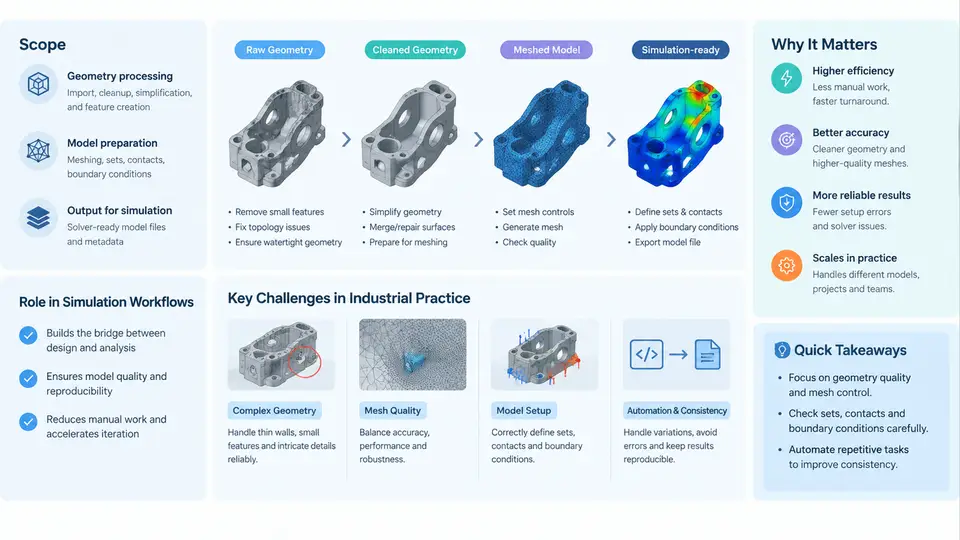
In a production CAE workflow, the solver is rarely the bottleneck. The hours that disappear before a mesh is ever generated — importing CAD, healing slivers, removing irrelevant features, extracting fluid volumes, assigning thicknesses, and renaming parts — usually dominate the calendar time of a simulation engineer. CAE geometry and model preparation automation is the discipline of replacing those repetitive, error-prone manual operations with scripted, parameterized, and verifiable procedures. This chapter defines what that discipline covers, where it sits in the simulation pipeline, and why it remains difficult in real industrial practice.
1.1 What "Geometry and Model Preparation" Actually Covers
The term is often used loosely. For automation purposes it is useful to draw a boundary around the operations that transform a design representation into a solver-ready representation. These operations fall into four families:
- Translation and topology normalization. Reading native CAD (CATIA
.CATPart, NX.prt, SolidWorks.SLDPRT) or neutral formats (STEP AP242, Parasolid.x_t, JT) and converting them into a consistent B-Rep topology with stable face and edge identifiers. - Defeaturing and idealization. Suppressing fillets, chamfers, bolt holes, embossed logos, and small steps that are irrelevant to the physics but expensive to mesh. Mid-surfacing thin-walled parts and extracting fluid domains from solid assemblies belong here as well.
- Geometry repair and cleanup. Closing gaps, fixing sliver faces, removing duplicate surfaces, stitching free edges, and resolving self-intersections introduced by translation or boolean operations.
- Simulation attribute assignment. Naming bodies and faces, tagging contact pairs, assigning shell thickness, defining symmetry planes, and writing out solver-specific metadata (for example, a Nastran
PSHELLproperty or an Ansys named selection).
Automation means that each of these families is driven by code — Python scripts against a geometry kernel API — rather than by interactive mouse operations. The output is not merely a cleaned model; it is a reproducible cleaned model, regenerable from the same CAD revision with the same parameters.
1.2 Where It Sits in the Simulation Workflow
It helps to place preparation automation in the wider chain. The diagram below shows the typical data and control flow, with the automated preparation stage highlighted as the bridge between design data and the solver deck.
The key architectural point is that preparation automation is not a single script but a layer that sits between CAD and meshing, with its own configuration store and its own validation logic. The feedback loop from meshing and solving back into preparation is what makes the layer valuable: when a mesh fails, the fix is applied in the preparation rules, not by hand-editing the model.
1.3 Why This Is Hard in Industrial Practice
Textbook examples use clean, single-body parts. Production models do not. The following challenges recur across automotive, aerospace, and heavy machinery programs.
| Challenge | Typical symptom | Automation implication |
|---|---|---|
| Topology instability across CAD revisions | Face IDs shift after a design change; a script that worked yesterday now selects the wrong face | Selection must be rule-based (by proximity, area, normal, or feature name), not by index |
| Dirty imported geometry | Free edges, sliver faces, gaps of 0.01–0.5 mm after STEP translation | Healing tolerances must be parameterized and logged; silent auto-heal hides defects |
| Feature recognition ambiguity | Fillet suppression removes a load-bearing blend; hole removal deletes a cooling passage | Rules need explicit exclusion lists and a reviewable report of what was removed |
| Mixed modeling paradigms | Solid parts, shell mid-surfaces, and 1D beams coexist in one assembly | Preparation must branch by part type and emit different solver entities |
| Traceability and audit | An auditor asks why a rib was removed; no record exists | Every operation must produce a machine-readable log with input hash and parameters |
These are not independent problems. Topology instability forces rule-based selection; rule-based selection requires feature recognition; feature recognition produces decisions that must be audited. A preparation automation system that ignores any one of these will be abandoned by engineers within a few design cycles.
1.4 A Minimal Reproducible Example
To make the scope concrete, consider a small but realistic task: prepare a thin-walled bracket for shell meshing. The input is a STEP file with 47 faces, including 12 bolt-hole cylinders, 8 fillets, and one embossed part number. The goal is a mid-surface with holes removed, fillets suppressed, and a uniform 2.0 mm thickness assigned.
A Python script against a geometry kernel API (the exact API depends on the kernel — Parasolid, ACIS, or Open CASCADE) would follow this sequence:
import caekit
from caekit import heal, defeat, midsurface

# 1. Load and normalize
part = caekit.load_step("bracket_rev_c.step", units="mm")
part.heal(tolerance=0.05, stitch=True, report="heal_log.json")

# 2. Identify features by rule, not by index
holes = part.find_cylindrical_faces(diameter_range=(4.0, 12.0))
fillets = part.find_blend_faces(radius_max=3.0)
emboss = part.find_faces_by_name(pattern="PART_NO_*")

# 3. Suppress with an explicit exclusion list
defeat.suppress(holes, exclude=part.faces_named("COOLING_*"))
defeat.suppress(fillets)
defeat.suppress(emboss)

# 4. Mid-surface and thickness
shell = midsurface.extract(part, method="pairing", max_thickness=4.0)
shell.assign_thickness(2.0, unit="mm")

# 5. Validate before export
report = shell.validate(
    watertight=True,
    max_free_edges=0,
    volume_delta_pct=5.0
)
report.export("prep_report.json")
shell.export("bracket_shell.x_t")
Three things in this snippet deserve attention. First, find_cylindrical_faces uses a diameter range rather than a face index, so the script survives a CAD revision that renumbers faces. Second, the exclusion list COOLING_* prevents the rule from deleting a functional feature that happens to match the hole pattern. Third, validate produces a quantitative gate — free-edge count and volume delta — that decides whether the output is acceptable. Without that gate, the script would silently emit a broken model.
1.5 What "Good" Looks Like
A mature preparation automation capability has four observable properties. It is parameterized: tolerances, thicknesses, and rule thresholds live in a config file, not in code. It is idempotent: running it twice on the same input produces the same output. It is auditable: every suppression, healing operation, and attribute assignment is logged with the input revision hash. And it is gated: the pipeline refuses to hand a model to the mesher unless quantitative validation criteria are met.
These properties, rather than any particular API or kernel, define the discipline. The remaining chapters of this course build them up one at a time — starting with the geometry kernel APIs and data structures that make rule-based selection possible.