1. CAE workflow automation with Python
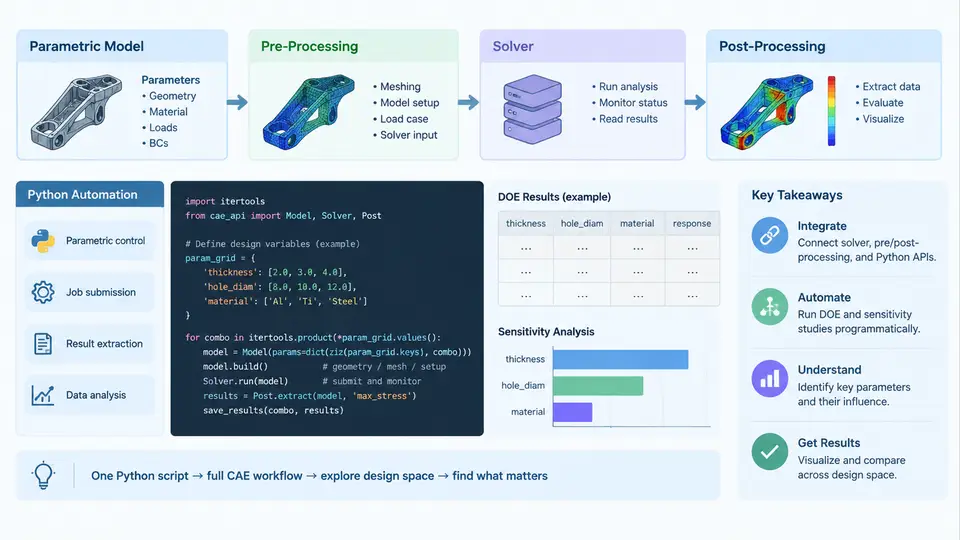
Design of Experiments (DOE) in a CAE context is not a single simulation; it is a controlled family of simulations in which geometry, material, or boundary parameters are varied systematically, and the resulting responses are collected for statistical analysis. Doing this by hand — editing a CAD model, re-meshing, launching a solver, opening a post-processor, and copying numbers into a spreadsheet — is slow, error-prone, and impossible to audit. Python automation turns this into a reproducible pipeline. This chapter establishes the architecture of that pipeline and the interfaces that connect its stages.
The Four-Stage Automation Pipeline
A practical CAE automation pipeline has four cooperating stages, each with a distinct responsibility and a well-defined data contract with its neighbors:
- Parametric model definition — the geometry, mesh controls, material properties, and boundary conditions are expressed as a set of named parameters with numeric values and valid ranges.
- Pre-processing — parameters are injected into the model, geometry is regenerated or updated, the mesh is rebuilt or morphed, and a solver input deck is written.
- Solver execution — the input deck is submitted to the solver, either in batch mode or through an API, and the run is monitored for convergence and completion.
- Post-processing — result files are parsed, scalar responses (maximum stress, displacement, temperature, mass, etc.) are extracted, and the data is assembled into a design matrix for DOE analysis.
The key architectural principle is that each stage communicates through files or well-defined objects, not through shared mutable state. This makes individual stages testable and allows the pipeline to be parallelized across design points.
Parametric Model Representation
The foundation of any DOE automation is a clean parametric representation. Parameters should be stored in a plain data structure — typically a dictionary or a dataclass — so they can be serialized, logged, and passed between stages without ambiguity.
from dataclasses import dataclass, asdict

@dataclass
class DesignPoint:
    run_id: int
    plate_length: float      # mm
    plate_width: float       # mm
    fillet_radius: float     # mm
    thickness: float         # mm
    youngs_modulus: float    # MPa
    load: float              # N

    def to_dict(self):
        return asdict(self)
Each field corresponds to a dimension or property that the pre-processor can drive. The valid ranges for these parameters define the design space, and the DOE sampling strategy (full factorial, Latin hypercube, central composite, etc.) generates a list of DesignPoint instances. Keeping the parameter set explicit and typed prevents the most common automation failure: silently passing a string where a float is expected, or forgetting to update a dependent dimension when a primary one changes.
Pre-Processing: From Parameters to Solver Input
Pre-processing is where the parametric model becomes a concrete simulation. There are two common strategies:
Script-driven CAD and meshing. Tools such as Salome, Gmsh, or a CAD system's Python API accept parameter values and regenerate geometry and mesh programmatically. For example, with Gmsh's Python API, a plate with a fillet can be rebuilt from scratch for each design point:
import gmsh

def build_plate_mesh(dp: DesignPoint, mesh_size: float, out_path: str):
    gmsh.initialize()
    gmsh.model.add(f"plate_{dp.run_id}")
    # Rectangle with a filleted corner approximated by a spline
    p1 = gmsh.model.geo.addPoint(0, 0, 0, mesh_size)
    p2 = gmsh.model.geo.addPoint(dp.plate_length, 0, 0, mesh_size)
    p3 = gmsh.model.geo.addPoint(dp.plate_length, dp.plate_width, 0, mesh_size)
    p4 = gmsh.model.geo.addPoint(0, dp.plate_width, 0, mesh_size)
    l1 = gmsh.model.geo.addLine(p1, p2)
    l2 = gmsh.model.geo.addLine(p2, p3)
    l3 = gmsh.model.geo.addLine(p3, p4)
    l4 = gmsh.model.geo.addLine(p4, p1)
    loop = gmsh.model.geo.addCurveLoop([l1, l2, l3, l4])
    surf = gmsh.model.geo.addPlaneSurface([loop])
    gmsh.model.geo.synchronize()
    gmsh.model.mesh.generate(2)
    gmsh.write(out_path)
    gmsh.finalize()
Template-based input deck generation. When the geometry is fixed and only material or load parameters vary, it is often more efficient to keep a template solver input file and substitute parameter values. A simple approach uses Python's string.Template:
from string import Template

DECK_TEMPLATE = Template("""
*MATERIAL, NAME=STEEL
*ELASTIC
$youngs_modulus, 0.3
*STEP
*STATIC
*CLOAD
NODE_SET, 2, $load
*END STEP
""")

def write_deck(dp: DesignPoint, template_path: str, out_path: str):
    with open(template_path) as f:
        tmpl = Template(f.read())
    rendered = tmpl.substitute(
        youngs_modulus=dp.youngs_modulus,
        load=dp.load,
    )
    with open(out_path, "w") as f:
        f.write(rendered)
Both strategies produce the same deliverable: a solver-ready input file whose content is a deterministic function of the design point. That determinism is what makes the pipeline auditable.
Solver Execution and Monitoring
Solver invocation should be treated as a subprocess with explicit exit-code handling. A robust wrapper captures stdout and stderr, checks the return code, and verifies that the expected result file was produced:
import subprocess, os

def run_solver(deck_path: str, work_dir: str, timeout: int = 3600):
    result = subprocess.run(
        ["ccx", "-i", os.path.basename(deck_path)],
        cwd=work_dir,
        capture_output=True,
        text=True,
        timeout=timeout,
    )
    if result.returncode != 0:
        raise RuntimeError(f"Solver failed: {result.stderr[-500:]}")
    return result.stdout
For DOE runs, the wrapper should also record wall-clock time and detect non-convergence. A solver that exits with code 0 but produces a result file containing "NOT CONVERGED" is a silent failure that will corrupt the design matrix if not caught. Always parse the solver log for convergence keywords before accepting a run.
Post-Processing: Extracting Responses
Post-processing converts raw result files into scalar responses. For a typical structural run, the responses might be maximum von Mises stress, maximum displacement, and total mass. Parsing depends on the solver's output format — ASCII result files can be read directly, while binary formats require a library such as meshio or the solver's own Python API.
import numpy as np

def extract_responses(result_file: str) -> dict:
    # Example: read a simple ASCII nodal result table
    data = np.loadtxt(result_file, skiprows=1)
    von_mises = data[:, 1]
    displacement = data[:, 2]
    return {
        "max_von_mises": float(von_mises.max()),
        "max_displacement": float(displacement.max()),
    }
The output of this stage is a row in the design matrix: one column per input parameter, one column per response. After all design points are processed, the matrix is written to CSV and handed to the DOE analysis stage.
Orchestration and the Design Matrix
The orchestrator ties the stages together. It iterates over design points, calls pre-processing, solver, and post-processing in sequence, and accumulates results. A minimal implementation looks like this:
import csv

def run_doe(design_points, template_path, work_root):
    rows = []
    for dp in design_points:
        work_dir = os.path.join(work_root, f"run_{dp.run_id}")
        os.makedirs(work_dir, exist_ok=True)
        deck = os.path.join(work_dir, "model.inp")
        write_deck(dp, template_path, deck)
        run_solver(deck, work_dir)
        responses = extract_responses(os.path.join(work_dir, "model.dat"))
        row = dp.to_dict()
        row.update(responses)
        rows.append(row)
    with open("design_matrix.csv", "w", newline="") as f:
        writer = csv.DictWriter(f, fieldnames=rows[0].keys())
        writer.writeheader()
        writer.writerows(rows)
    return rows
This structure is intentionally simple, but it embodies the essential properties of a production DOE pipeline: each run is isolated in its own directory, inputs and outputs are co-located, and the final design matrix is a single artifact that can be versioned and re-analyzed.
run_config.json answers it instantly.
Pipeline Architecture at a Glance
The diagram below shows how the four stages connect, what data flows between them, and where the design matrix is assembled. Note that the solver stage is the only one that is typically parallelized, since pre- and post-processing are usually fast relative to the solve.
What to Verify Before Scaling Up
Before launching a large DOE campaign, validate the pipeline on a small set of design points — typically the corners of the design space plus the center point. Check three things: (1) the pre-processor produces a valid input deck for every corner, including the extreme values; (2) the solver converges and the log contains no warnings that would invalidate the response; (3) the post-processor extracts the expected number of response values and they are physically plausible (e.g., stress increases with load, displacement increases with span). If any corner fails, the failure will recur across the full DOE and waste hours of compute.
A common failure mode is a parameter combination that produces degenerate geometry — for example, a fillet radius larger than half the plate width. The pre-processor should validate parameter combinations against geometric constraints before attempting to build the model, and raise a clear error rather than letting the mesher fail with an opaque message. Similarly, the solver wrapper should distinguish between "solver crashed" and "solver ran but did not converge," because the two require different remediation.
Summary
Python-based CAE workflow automation replaces manual simulation with a deterministic, auditable pipeline. The parametric model defines the design space; pre-processing injects parameters into geometry, mesh, and input decks; the solver stage executes and monitors each run; post-processing extracts scalar responses; and the orchestrator assembles everything into a design matrix. The interfaces between stages — a DesignPoint object, a solver input file, a result file, and a CSV row — are the contracts that make the pipeline modular, testable, and ready for the sensitivity analysis that follows.