4. Subprocess fundamentals
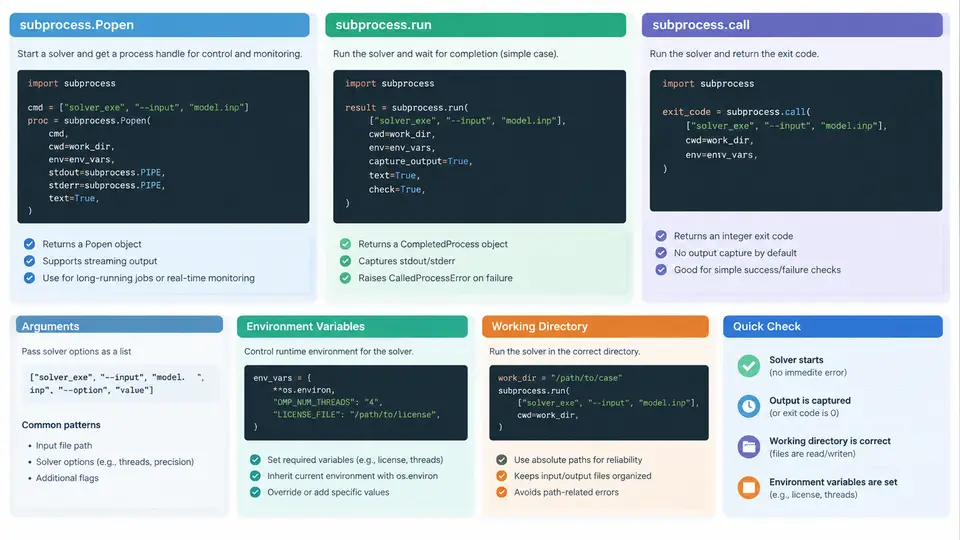
Every batch execution system for a CAE solver ultimately reduces to one operation: starting an external process, feeding it the right arguments and environment, waiting for it to finish, and inspecting what it produced. Python's subprocess module is the standard tool for this job. This section covers the three entry points you will use most — subprocess.run, subprocess.call, and subprocess.Popen — and the three concerns that cause the most production failures: argument construction, environment variables, and working directories.
Choosing the Right Entry Point
The three functions are not interchangeable; they sit at different levels of control.
| API | Blocking | Returns | Typical use |
|---|---|---|---|
subprocess.call | Yes | Exit code only | Fire-and-forget checks where you only need success/failure |
subprocess.run | Yes | CompletedProcess (exit code, stdout, stderr) | Default choice for solver runs with captured output |
subprocess.Popen | No | Process handle | Concurrent solves, streaming logs, timeouts, killing jobs |
For a single solver invocation where you want the log text back, run is the right default. Reach for Popen only when you need to do something while the solver runs — poll progress, stream the log, enforce a wall-clock limit, or launch several jobs at once.
Building the Argument List
CAE solvers are driven almost entirely by command-line arguments. A typical Abaqus job looks like this on the command line:
abaqus job=crash_01 input=crash_01.inp cpus=4 interactiveIn Python, pass this as a list, never as a single string with shell=True:
import subprocess

cmd = [
    "abaqus",
    "job=crash_01",
    "input=crash_01.inp",
    "cpus=4",
    "interactive",
]
result = subprocess.run(cmd, capture_output=True, text=True)
print(result.returncode)
print(result.stdout[-2000:])
Each list element becomes one argv entry. This matters because solver arguments frequently contain =, spaces in paths, or characters the shell would interpret. With a list and no shell, no quoting or escaping is needed — the operating system receives the arguments exactly as written. Using shell=True with an interpolated string is the single most common source of broken batch scripts: a path like C:\Users\John Doe\model.inp splits at the space, and a filename containing & or ; can execute unintended commands.
shell=True is a command-injection risk. Always pass a list.
Environment Variables
CAE solvers depend heavily on environment variables: license server addresses (LM_LICENSE_FILE, ABAQUSLM_LICENSE_FILE), MPI configuration (I_MPI_ROOT, PATH), scratch directories (TMPDIR), and thread limits (OMP_NUM_THREADS). By default a child process inherits the parent's environment. To override specific variables, copy the environment and modify it:
import os, subprocess

env = os.environ.copy()
env["LM_LICENSE_FILE"] = "27000@license-server"
env["OMP_NUM_THREADS"] = "4"
env["TMPDIR"] = "/scratch/jobs/crash_01"

result = subprocess.run(cmd, env=env, capture_output=True, text=True)
Two details are easy to get wrong. First, env= replaces the entire environment rather than merging — always start from os.environ.copy(). Second, on Windows, environment variable names are case-insensitive but Python dictionaries are not; if you set Path while the inherited environment has PATH, you can end up with two entries and unpredictable resolution. Use the exact casing the platform expects.
Working Directories
Solver output — .odb, .dat, .msg, .sta, restart files — is written relative to the process working directory, not the script's location. The cwd parameter sets this explicitly:
job_dir = "/scratch/jobs/crash_01"
result = subprocess.run(cmd, cwd=job_dir, env=env,
                        capture_output=True, text=True)
Without cwd, the child inherits the parent's directory. A monitoring script launched from /home/user/scripts would then scatter solver output into the scripts folder. Setting cwd per job keeps each run isolated and makes cleanup a matter of deleting one directory.
Note that cwd does not change how the executable is found. If abaqus is not on PATH, use an absolute path in cmd[0] or add its directory to the PATH entry of your copied environment.
When You Need Popen
run blocks until the solver exits. For a crash simulation that may take hours, you often want to monitor it. Popen returns immediately with a handle:
proc = subprocess.Popen(cmd, cwd=job_dir, env=env,
                        stdout=subprocess.PIPE,
                        stderr=subprocess.STDOUT,
                        text=True)

try:
    stdout, _ = proc.communicate(timeout=3600)
except subprocess.TimeoutExpired:
    proc.kill()
    stdout, _ = proc.communicate()
    print("Job exceeded wall-clock limit and was killed")

print("exit code:", proc.returncode)
Key points: stdout=subprocess.PIPE captures output, and stderr=subprocess.STDOUT merges error text into the same stream so the log stays in chronological order. communicate() reads both pipes safely and avoids the deadlock that occurs when a child fills its pipe buffer while the parent is not reading. The timeout argument is what makes Popen worth the extra complexity — it gives you a hard wall-clock limit, which is essential when a solver hangs on a non-converging increment.
Interpreting the Result
Do not treat a zero exit code as proof of success. CAE solvers sometimes exit 0 after writing a partial result, and sometimes exit non-zero for benign warnings. A robust check combines three signals:
- Exit code —
result.returncode == 0is necessary but not sufficient. - Log content — scan
stdoutfor solver-specific markers such asTHE ANALYSIS HAS COMPLETED SUCCESSFULLYor***ERROR. - Output artifacts — confirm the expected
.odbor result file exists and is non-empty incwd.
success derived from all three signals. This keeps the monitoring layer in later chapters simple and consistent.
Common Failure Symptoms
FileNotFoundError— the executable is not onPATH; use an absolute path or fix thePATHentry in your copied environment.- License error in the log —
LM_LICENSE_FILEwas not set or was overwritten by an incompleteenvdictionary. - Output files appear in the wrong folder —
cwdwas omitted, so the child inherited the parent's directory. - Process hangs indefinitely — no
timeoutwas set oncommunicate(), or the solver is waiting on a license that will never be granted. - Truncated or interleaved log —
stderrwas not merged intostdout, so error messages are lost or out of order.
With these fundamentals in place — a list-based command, an explicitly copied and modified environment, a per-job working directory, and a result check that goes beyond the exit code — you have a reliable primitive on which the rest of the batch execution and monitoring system can be built.