1. Course overview
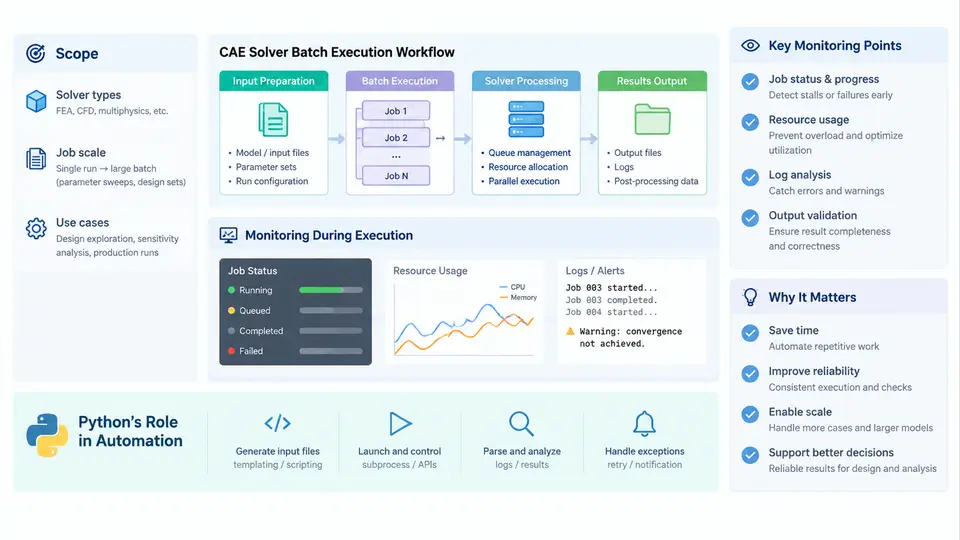
This course addresses a recurring problem in engineering simulation: a CAE solver such as Abaqus, ANSYS Mechanical APDL, LS-DYNA, Nastran, or OpenFOAM is fully capable of solving a single model, yet production work rarely involves a single model. Design-of-experiments matrices, parametric sweeps, load-case combinations, mesh-convergence studies, and nightly regression suites all require the same solver to be launched dozens or hundreds of times with systematically varying inputs. Doing this by hand is slow, error-prone, and impossible to audit. The goal of this course is to show how Python can be placed around the solver as an orchestration and monitoring layer, so that a batch of jobs becomes a reproducible, observable, and restartable process rather than a folder full of manually launched runs.
What "Batch Execution" Actually Means
Batch execution is not simply running a solver in a loop. A production-grade batch system has to answer five distinct questions for every job it manages:
- What is the input? Which model file, parameter set, or case directory defines this specific run, and where does it come from?
- How is the solver invoked? Which executable, which command-line flags, which working directory, and which environment (licenses, MPI launcher, thread limits)?
- Is it still running, finished, or dead? How do we distinguish a solver that is computing from one that has silently stalled or crashed?
- Did it succeed? A solver can exit with code 0 and still produce a physically meaningless result, so exit status alone is insufficient.
- What happens next? Where do results go, what is recorded, and can a failed job be re-run without repeating the successful ones?
Python's role is to answer all five in one place. Because Python can generate input decks, spawn subprocesses, parse text and binary output, read result databases through solver APIs, and write structured logs, it can serve as the single control plane for the entire batch.
The Typical CAE Batch Workflow
Although solvers differ in detail, the batch workflow they share is remarkably consistent. Understanding this shared skeleton is what allows one Python framework to drive several different solvers.
- Case definition. A parameter set is defined — for example, a set of thicknesses, material constants, or boundary-condition magnitudes. In Python this is naturally a list of dictionaries or a CSV/JSON file read into a list of records.
- Input generation. For each case, an input deck is produced. This may be template substitution into a solver input file, a call to a parametric modeling script, or a Python API call that builds the model directly.
- Job submission. The solver is launched as a subprocess with a controlled working directory, environment, and resource allocation. On a cluster this step may hand off to a scheduler such as SLURM or PBS rather than running locally.
- Execution monitoring. While the job runs, the framework watches for progress, resource consumption, license availability, and error signatures in the solver's stdout or log file.
- Result extraction. After completion, key quantities — maximum stress, displacement, temperature, modal frequency, or a convergence metric — are read from the result files and stored in a structured table.
- Aggregation and reporting. The extracted values are combined into a summary table, plotted, or compared against acceptance criteria.
The following diagram shows this workflow as a data and control flow, with the Python orchestration layer at the center and the solver treated as an external process whose state must be inferred from observable signals.
Why Monitoring Is a First-Class Requirement
New users often assume that if a solver process is still alive, everything is fine. In practice, CAE solvers fail in ways that a simple process check cannot detect. A nonlinear static analysis may spend hours in an equilibrium iteration that will never converge. A transient run may abort because a time increment fell below the minimum allowed value. A job may terminate because a license token was reclaimed, or because the scratch disk filled up. In each case the process may exit cleanly, or may hang indefinitely.
Effective monitoring therefore combines several independent signals:
- Process liveness. Is the PID still present, and is it consuming CPU? A process that is alive but using 0% CPU for a long period is a stall candidate.
- Log progress. Solvers write increment, iteration, or time-step records to a status file. The rate at which new records appear is a direct measure of progress.
- Error signatures. Known fatal messages — for example, excessive distortion, negative eigenvalue, or license checkout failure — can be matched in the log to classify a failure early rather than waiting for the process to end.
- Resource limits. Wall-clock timeouts, memory ceilings, and disk quotas should be enforced by the framework, not left to chance.
A practical Python implementation typically polls these signals on a fixed interval and maintains a per-job state. The state machine is small but essential: a job moves from PENDING to RUNNING, then to one of COMPLETED, FAILED, or STALLED. Only COMPLETED jobs proceed to result extraction; FAILED and STALLED jobs are logged with their diagnostic evidence and optionally retried.
A Minimal but Realistic Execution Skeleton
The following example shows the essential structure of a batch runner. It is deliberately small, but it already contains the three elements that distinguish a batch system from a loop: controlled working directory, captured output, and explicit timeout handling.
import subprocess, pathlib, time

def run_case(case_id, workdir, solver_cmd, timeout_s=3600):
    workdir = pathlib.Path(workdir)
    log_path = workdir / f"{case_id}.log"
    start = time.time()
    with open(log_path, "w") as log:
        proc = subprocess.Popen(
            solver_cmd,
            cwd=workdir,
            stdout=log,
            stderr=subprocess.STDOUT,
            text=True,
        )
        try:
            rc = proc.wait(timeout=timeout_s)
        except subprocess.TimeoutExpired:
            proc.kill()
            return {"case": case_id, "state": "STALLED",
                    "wall_s": round(time.time() - start, 1)}
    state = "COMPLETED" if rc == 0 else "FAILED"
    return {"case": case_id, "state": state, "returncode": rc,
            "wall_s": round(time.time() - start, 1)}
Running this over a list of cases produces a structured record per job. The record is the foundation for everything that follows: it can be written to CSV, used to decide which cases to retry, and joined with extracted result values to form the final summary table.
Scope of This Course
Across the following chapters we will build this system incrementally. We will start with subprocess control and working-directory management, then add log parsing and state classification, then result extraction through solver-specific APIs, and finally aggregation, reporting, and restartability. The emphasis throughout is on patterns that survive contact with real solvers: non-zero exit codes that are not failures, failures that return zero, log formats that change between solver versions, and batches that must be resumed after an interruption without re-running completed work.
By the end, you should be able to take a solver you already know how to run once, and turn it into a batch process that runs unattended, reports its own status, and leaves behind an auditable record of every case it executed.