4. Interfacing with CAE solvers
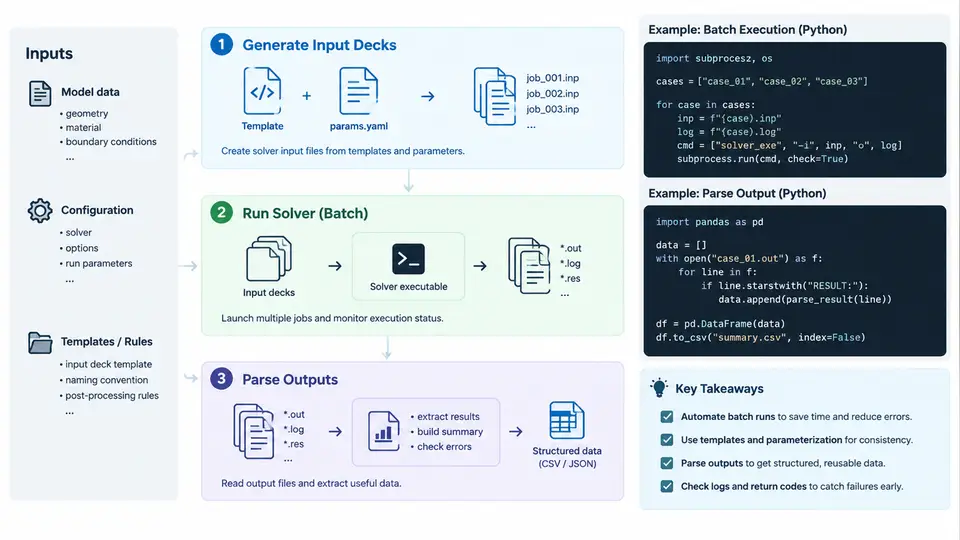
Automotive CAE workflows rarely involve a single interactive solver run. A typical crash, NVH, or durability study requires dozens to hundreds of load cases, each producing large result files that must be post-processed and compared. Python becomes valuable at exactly this boundary: it orchestrates the solver, generates the input decks, and extracts the numbers that engineers actually need. This chapter focuses on the three mechanical layers of that interface — launching solvers in batch mode, writing valid input decks programmatically, and parsing solver output reliably.
Batch Execution: Controlling the Solver Process
Most automotive solvers (Abaqus, LS-DYNA, Optistruct, Nastran, Pam-Crash) are driven from the command line. Python's subprocess module is the standard tool for invoking them. The key decision is whether to use subprocess.run() (blocking, simple) or subprocess.Popen() (non-blocking, allows streaming and parallel dispatch).
import subprocess, pathlib

def run_abaqus(job_name: str, cpus: int = 4, workdir: pathlib.Path = pathlib.Path(".")):
    cmd = ["abaqus", "job=" + job_name, f"cpus={cpus}", "interactive", "scratch=./tmp"]
    result = subprocess.run(
        cmd,
        cwd=workdir,
        capture_output=True,
        text=True,
        timeout=3600,
    )
    return result.returncode, result.stdout, result.stderr
Three practical points matter here. First, always set cwd explicitly; solvers write scratch files relative to the working directory, and mixing runs in one folder causes silent file collisions. Second, capture both stdout and stderr — many solvers report fatal errors on stderr while returning exit code 0. Third, use a timeout so a hung solver does not block an overnight batch.
For parallel dispatch across load cases, concurrent.futures.ProcessPoolExecutor is usually the right abstraction. Each worker calls run_abaqus() with a different job name. The number of workers should match the number of solver licenses and available cores, not the number of load cases.
Input Deck Generation: Templates and Parameter Substitution
An input deck is a text file with a rigid syntax. Generating it programmatically means separating the invariant structure (element definitions, material cards, boundary conditions) from the varying parameters (thickness, material properties, load magnitudes, output requests).
The most maintainable approach is a template file with named placeholders, rendered by Python's string.Template or Jinja2. Avoid f-strings for large decks — they become unreadable and hard to diff.
from string import Template

DECK_TEMPLATE = Template("""
*HEADING
$job_name - thickness $thickness mm
*MATERIAL, NAME=STEEL
*ELASTIC
210000., 0.30
*SHELL SECTION, ELSET=panel, MATERIAL=STEEL
$thickness,
*STEP
*STATIC
*BOUNDARY
$bc_set, 1, 6
*END STEP
""")

def render_deck(job_name, thickness, bc_set):
    return DECK_TEMPLATE.substitute(
        job_name=job_name, thickness=f"{thickness:.3f}", bc_set=bc_set
    )
Two rules prevent most deck-generation bugs. First, format numeric values explicitly (f"{thickness:.3f}") — solvers are sensitive to field width and scientific notation. Second, validate the rendered deck before submission: check that every required keyword appears, that no placeholder remains unresolved, and that the element count matches the mesh. A lightweight validator that greps for $ characters catches the most common failure.
For parametric studies, keep a manifest — a CSV or JSON file listing each job name and its parameter set. The manifest is the single source of truth; the deck generator reads it, and the post-processor writes results back against the same job names.
Output Parsing: From Raw Files to Engineering Numbers
Solver output comes in three flavors: plain-text status files (.sta, .msg, d3hsp), structured result databases (.odb, .d3plot, .h3d), and tabular ASCII (.dat, .csv). Each needs a different parsing strategy.
For text status files, line-oriented parsing with regular expressions is sufficient and fast. The goal is usually a small set of scalars: maximum displacement, peak stress, energy balance, termination status.
import re

def parse_sta(sta_path):
    pattern = re.compile(r"^\s*(\d+)\s+([\d.E+-]+)\s+([\d.E+-]+)")
    rows = []
    with open(sta_path) as f:
        for line in f:
            m = pattern.match(line)
            if m:
                rows.append((int(m.group(1)), float(m.group(2)), float(m.group(3))))
    return rows
For binary result databases, use the solver vendor's Python API — odbAccess for Abaqus, lasso or d3plot readers for LS-DYNA, h5py for HDF5-based formats. These APIs expose node sets, element sets, and time steps directly, avoiding fragile byte-level parsing.
from odbAccess import openOdb

def peak_mises(odb_path, set_name):
    odb = openOdb(odb_path, readOnly=True)
    step = odb.steps[odb.steps.keys()[-1]]
    frame = step.frames[-1]
    field = frame.fieldOutputs["S"]
    subset = field.getSubset(region=odb.rootAssembly.nodeSets[set_name])
    return max(v.mises for v in subset.values)
Regardless of format, three parsing practices pay off. First, parse incrementally and write results to a structured store (SQLite, Parquet, or CSV) as each job finishes — do not hold everything in memory until the end. Second, record provenance: solver version, deck hash, and timestamp alongside each result. Third, treat missing or malformed output as a first-class outcome, not an exception to swallow. A job that produced no .sta file is a different failure than one that produced a .sta with zero increments.
Putting It Together: A Minimal Batch Driver
The three layers compose into a driver that reads a manifest, generates decks, dispatches solver runs, and parses results. A compact version looks like this:
import csv, pathlib
from concurrent.futures import ProcessPoolExecutor

def process_case(row, workdir):
    deck = render_deck(row["job"], float(row["thickness"]), row["bc_set"])
    (workdir / f"{row['job']}.inp").write_text(deck)
    rc, out, err = run_abaqus(row["job"], cpus=4, workdir=workdir)
    if not (workdir / f"{row['job']}.sta").exists():
        return {"job": row["job"], "status": "no_output", "peak": None}
    peak = peak_mises(workdir / f"{row['job']}.odb", "PANEL")
    return {"job": row["job"], "status": "ok", "peak": peak}

with open("manifest.csv") as f:
    rows = list(csv.DictReader(f))

with ProcessPoolExecutor(max_workers=4) as pool:
    results = list(pool.map(process_case, rows, [pathlib.Path("runs")] * len(rows)))
This driver is deliberately small, but it already handles the failure modes that matter: missing output, parallel dispatch, and structured result collection. From here, the natural extensions are retry logic for transient license failures, per-case logging, and a summary report that flags any case whose peak stress exceeds a threshold.
The interface between Python and a CAE solver is not glamorous, but it is where most automation time is saved. Batch execution removes manual clicking, deck generation removes copy-paste errors, and output parsing removes the spreadsheet shuffle. Together they turn a solver into a callable function that a CAE team can build real workflows on top of.