1. Course overview
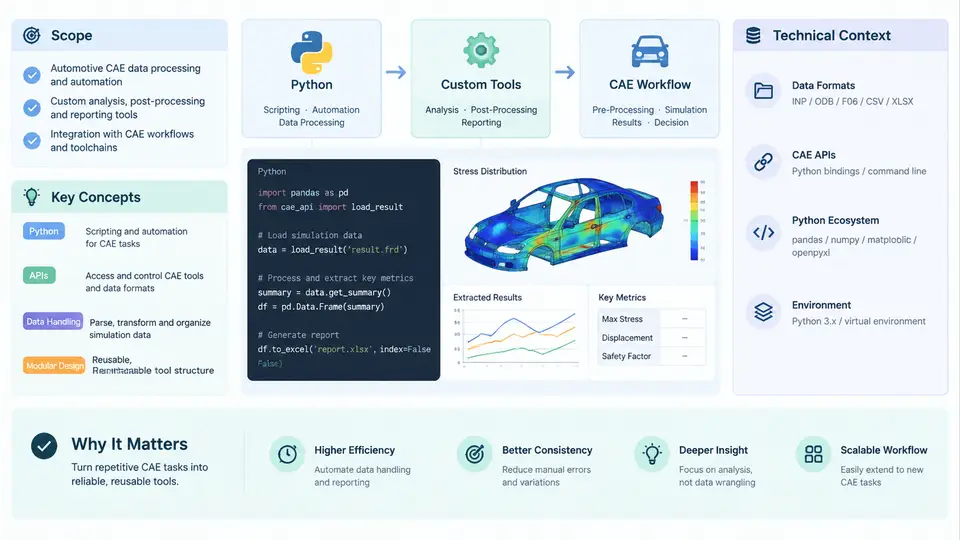
Automotive CAE teams sit at an unusual intersection: they depend on mature commercial solvers such as LS-DYNA, Abaqus, ANSYS, and STAR-CCM+, yet the work that consumes most of their engineering hours is not solving — it is everything around solving. Model assembly, mesh cleanup, load-case generation, batch submission, result extraction, report generation, and cross-project data reuse are all repetitive, project-specific, and rarely served well by off-the-shelf tools. This course is about closing that gap with Python.
The central premise is simple: a CAE engineer who can write maintainable Python can convert recurring manual effort into reusable, version-controlled tooling. The goal is not to turn simulation engineers into software developers, but to give them enough engineering-grade Python to build tools that their colleagues actually trust and keep using.
What "Custom Tools" Means in This Context
In this course, a custom CAE tool is any Python program that automates, validates, transforms, or orchestrates part of the CAE workflow. That definition deliberately spans a wide range:
- Pre-processing utilities — parameterized model builders, mesh quality checkers, connector and weld generators, material card converters.
- Solver orchestration — batch job launchers, queue managers, restart handlers, license-aware schedulers.
- Post-processing pipelines — automated result extraction, curve generation, contour export, fatigue or intrusion metric calculation.
- Data and reporting tools — DOE tables, correlation dashboards, standardized PowerPoint or HTML report generators.
- Integration glue — adapters between PLM systems, CAE databases, and solver decks.
What unites these is not the technology but the intent: each tool encodes engineering knowledge that would otherwise live only in a senior engineer's habits.
The Technical Context: Where Python Fits
Python's role in automotive CAE is best understood as an orchestration layer that sits between the engineer, the CAE data, and the solver. The diagram below shows this relationship.
The engineer expresses intent through parameters; the Python layer translates that intent into solver decks, submits jobs, watches for completion, extracts the quantities of interest, and writes results into a report or database. The dashed feedback path is important: tooling should feed observed metrics and failures back into the next iteration, not just produce one-shot outputs.
Why Python Specifically
Several properties make Python the pragmatic choice for this layer:
- Text handling. CAE decks are text. Python's string and regular-expression support makes parsing and rewriting
*INCLUDE,*PART, or*MATblocks tractable. - Scientific ecosystem.
numpyandpandashandle result arrays and DOE tables;pyvistaandvtkhandle mesh and field data;matplotlibhandles curves. - Vendor APIs. Abaqus ships
abaqus python; ANSYS exposes PyMAPDL and PyFluent; LS-DYNA has LS-PrePost scripting and LS-OPT; most PLM and CAE data systems expose REST or Python SDKs. - Low ceremony. A useful tool can start as a 40-line script and grow into a package without a rewrite.
The trade-off is performance and packaging. Python is not the right language for a custom explicit solver kernel, and distributing tools to engineers who do not have a Python environment requires deliberate packaging decisions. Both topics are addressed later in the course.
Scope and Boundaries
This course covers the full lifecycle of a CAE tool: identifying a worthwhile automation target, designing its interface, implementing it against real CAE data, testing it, and deploying it to a team. It does not attempt to teach finite element theory, solver numerics, or general software architecture at scale. Where solver behavior matters — for example, when deciding which result quantities to extract — the course assumes the reader already has domain knowledge and focuses on how to encode it.
Core Concepts Used Throughout
Four concepts recur in every chapter and are worth defining up front.
| Concept | Meaning in this course | Typical manifestation |
|---|---|---|
| Deck as data | Treating solver input files as structured, parseable data rather than opaque text. | Reading *MAT_PIECEWISE_LINEAR_PLASTICITY cards into Python objects. |
| Parameterization | Separating engineering intent (thickness, material, load case) from the generated deck. | A YAML or JSON config that drives deck generation. |
| Idempotent execution | Running the tool twice produces the same result and does not corrupt state. | Overwriting outputs atomically; never appending to a shared log without rotation. |
| Traceability | Every output can be traced back to the inputs and tool version that produced it. | Embedding a git commit hash and config hash in the report header. |
A Minimal End-to-End Example
To make the scope concrete, consider a task that appears in nearly every automotive CAE group: generating a batch of frontal-impact load cases by varying barrier offset and velocity, then extracting maximum intrusion at a set of measurement points.
A hand-built version of this workflow might look like the following. It is intentionally small, but it already contains the essential shape of a real tool: configuration, generation, execution, extraction, and reporting.
import json, subprocess, pathlib
import numpy as np

cfg = json.loads(pathlib.Path("cases.json").read_text())
workdir = pathlib.Path("runs"); workdir.mkdir(exist_ok=True)

for case in cfg["cases"]:
    name = f"offset{case['offset_mm']}_v{case['velocity_kph']}"
    deck = workdir / f"{name}.k"
    template = pathlib.Path("template.k").read_text()
    deck.write_text(
        template
        .replace("__OFFSET__", str(case["offset_mm"]))
        .replace("__VELOCITY__", str(case["velocity_kph"]))
    )
    subprocess.run(["ls-dyna", "i=" + str(deck), "ncpu=8"], check=True)

    # extract intrusion at measurement node set
    d3plot = workdir / f"{name}_d3plot"
    intrusion = extract_max_intrusion(d3plot, cfg["node_set"])
    print(f"{name}: max intrusion = {intrusion:.1f} mm")
Even at this size, several engineering decisions are already embedded: how the template is parameterized, how the solver is invoked, which node set defines intrusion, and how results are reported. The rest of the course expands each of these into a maintainable, testable, team-ready form.
How the Course Is Organized
The 30 chapters progress through four broad phases. The first phase establishes Python foundations specific to CAE: file formats, parsing, and the scientific stack. The second phase builds individual tools — deck generators, mesh checkers, batch runners, result extractors. The third phase addresses engineering quality: testing, logging, configuration, and packaging. The final phase covers integration and scale: HPC and queue systems, PLM and CAE database connectivity, and team-level deployment practices.
Each chapter is written to stand on its own while contributing to a coherent toolkit. By the end, the reader should be able to look at a manual CAE workflow and see, concretely, where Python can remove friction — and how to build that tool so it survives contact with a real project.