4. Parametric modeling fundamentals
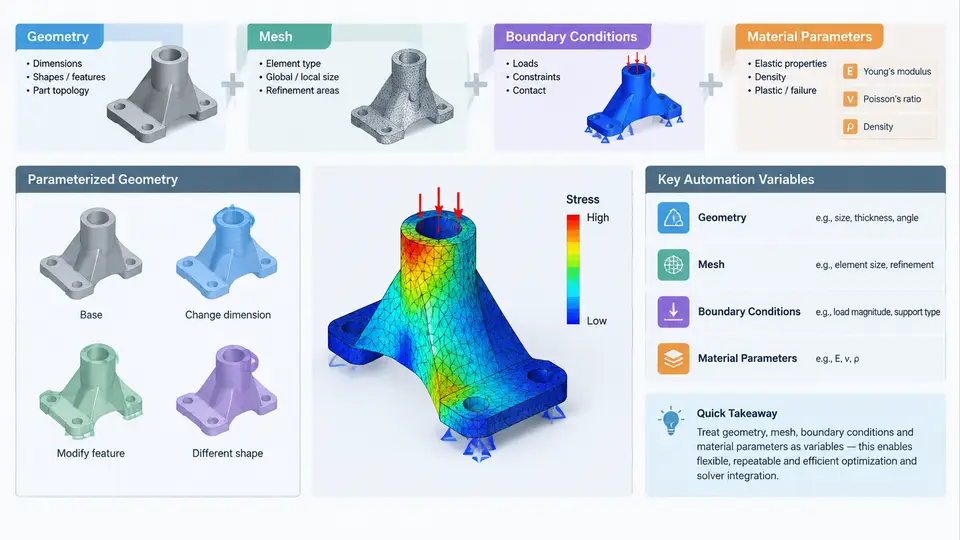
Automated CAE optimization only becomes meaningful when the model itself can be driven by numbers. A parametric model is a CAE model in which every quantity that the optimizer is allowed to change is exposed as a named, typed variable rather than being hard-coded in the geometry kernel, the mesher, or the solver input deck. This chapter establishes the four variable families that dominate almost every optimization study — geometry, mesh, boundary conditions, and material parameters — and shows how to expose each one so that a Python driver can sweep, sample, or optimize it reliably.
Why Parametric Modeling Is the Bottleneck, Not the Solver
In a typical workflow, the solver is rarely the limiting factor. A linear static solve may take seconds, while rebuilding geometry, re-meshing, and re-applying boundary conditions can take minutes. If those steps are not fully scriptable, an optimizer that needs 500 design evaluations will never finish. The practical goal of parametric modeling is therefore to make one full design-evaluation cycle — from parameter vector to converged result — a single deterministic function call.
This is best expressed as a pure function:
def evaluate(design_vector: dict) -> dict:
    """Map a design vector to scalar responses."""
    geom   = build_geometry(design_vector["geometry"])
    mesh   = generate_mesh(geom, design_vector["mesh"])
    model  = apply_bcs(mesh, design_vector["bc"])
    model  = assign_materials(model, design_vector["material"])
    result = solve(model)
    return extract_responses(result)
Every key in design_vector is an automation variable. The rest of this chapter defines what belongs in each sub-dictionary and how to keep the mapping stable across hundreds of evaluations.
Geometry Parameters
Geometry variables are the most intuitive but also the most fragile. They fall into three practical categories:
- Dimensional parameters — lengths, radii, thicknesses, fillet sizes, hole diameters. These are scalar and map directly to sketch or feature dimensions.
- Topological parameters — counts and patterns, such as the number of cooling channels, ribs, or bolt holes. These change the feature tree, not just a value.
- Shape parameters — control-point coordinates of a spline or a free-form surface. These are vectors, not scalars, and usually require a shape basis (e.g., Bézier or B-spline control points) to keep the design space low-dimensional.
A critical rule: never let the optimizer drive a raw CAD dimension without bounds and constraints. A thickness that goes negative, or a fillet radius larger than the adjacent edge, will crash the geometry kernel and abort the entire study. Enforce bounds at the parameter-definition layer, not inside the CAD call.
GEOMETRY_SPACE = {
    "plate_length":  {"type": "continuous", "bounds": (80.0, 200.0), "unit": "mm"},
    "plate_width":   {"type": "continuous", "bounds": (40.0, 120.0), "unit": "mm"},
    "hole_diameter": {"type": "continuous", "bounds": (4.0, 20.0),   "unit": "mm"},
    "rib_count":     {"type": "integer",    "bounds": (2, 8)},
}
When a geometry rebuild fails, the driver should catch the exception and return a penalty response rather than terminating. This keeps the optimizer's sampling loop alive and lets it learn to avoid infeasible regions.
Mesh Parameters
Mesh variables control discretization. They are often overlooked because engineers treat the mesh as a fixed preprocessing step, but in optimization the mesh must adapt to changing geometry — a hole that grows from 4 mm to 20 mm cannot keep the same element size without either losing accuracy or exploding the element count.
Useful mesh automation variables include:
- Global element size — the base target size for the mesher.
- Local refinement size — element size on named faces, edges, or near stress concentrations.
- Growth rate — how quickly element size increases away from a refinement region.
- Element order — first-order (linear) versus second-order (quadratic). This is discrete and changes result accuracy significantly.
- Boundary-layer parameters — first-layer height and layer count for CFD or thermal studies.
A robust pattern is to define mesh size as a function of geometry rather than an independent variable:
def mesh_size_for(geom_params):
    smallest_feature = min(geom_params["hole_diameter"], geom_params["plate_width"] / 10)
    return max(smallest_feature / 3.0, 0.5)  # never below 0.5 mm
This reduces the effective dimensionality of the design space and prevents the optimizer from wasting evaluations on meshes that cannot resolve the geometry.
Boundary Conditions as Variables
Boundary conditions (BCs) are frequently treated as fixed physical truth, but in many optimization studies they are themselves uncertain or designable. Three cases are common:
- Load magnitude and direction — the applied force, pressure, or moment may be a design variable when the structure must perform across a load envelope.
- Support location — moving a fixed support or a roller changes the load path and is a legitimate topology or shape variable.
- Contact and interface parameters — friction coefficient, contact stiffness, or gap size in assembly-level studies.
BCs must be applied to named selections, not to raw face or vertex IDs. Face IDs change every time the geometry is rebuilt, so a BC bound to "Face 47" will silently attach to the wrong surface after the first design iteration. Named selections — "top_surface", "mounting_holes", "load_face" — survive geometry changes as long as the naming logic is preserved in the CAD feature tree.
BC_DEFINITION = {
    "fixed_support": {"selection": "mounting_holes", "type": "fixed"},
    "load":          {"selection": "top_surface",    "type": "force",
                      "magnitude": 1500.0, "direction": (0, 0, -1)},
}
Material Parameters
Material variables are the simplest to expose but the most dangerous to misinterpret. Young's modulus, Poisson's ratio, density, yield strength, and thermal conductivity are all scalar and easy to parameterize. The risk is that the optimizer will exploit unphysical combinations — for example, a material with the stiffness of steel and the density of foam — unless the material space is constrained to real, manufacturable candidates.
Two practical strategies:
- Discrete material selection — the variable is an index into a fixed library of real materials. This is safe and reflects actual design practice.
- Continuous material interpolation — used in topology optimization (e.g., SIMP), where density is a continuous field. This requires a penalization exponent to push intermediate densities toward 0 or 1.
For most parametric studies, discrete selection is the correct choice. Expose the material as a categorical variable and let the optimizer choose among aluminum 6061, titanium Ti-6Al-4V, and carbon-fiber composite, each with its own validated property set.
Putting It Together: A Design Vector Schema
The four variable families combine into a single design vector. The table below shows a representative schema for a bracket optimization study. All values are illustrative examples, not measured results.
| Family | Variable | Type | Range / Options | Unit |
|---|---|---|---|---|
| Geometry | plate_length | continuous | 80 – 200 | mm |
| Geometry | hole_diameter | continuous | 4 – 20 | mm |
| Geometry | rib_count | integer | 2 – 8 | — |
| Mesh | global_size | continuous | 1.0 – 5.0 | mm |
| Mesh | element_order | categorical | linear, quadratic | — |
| BC | load_magnitude | continuous | 500 – 3000 | N |
| BC | support_location | categorical | left, right, both | — |
| Material | material_id | categorical | Al6061, Ti64, CFRP | — |
The SVG below illustrates how these four families feed into a single evaluation pipeline and where the critical coupling points — geometry-to-mesh and BC-to-named-selection — must be enforced.
Validation and Failure Modes
Before launching an optimization run, validate the parametric model with a small set of hand-picked design vectors. A practical smoke test uses three points: the lower bound of every variable, the upper bound, and the midpoint. If any of these three fails to produce a converged solve, the design space contains infeasible regions that the optimizer will waste evaluations exploring.
Common failure symptoms and their causes:
- Geometry rebuild error — a dimension violates a geometric constraint (e.g., fillet radius exceeds edge length). Fix: tighten bounds or add constraint checks before the CAD call.
- Mesh generation failure — local element size is too large relative to the smallest feature. Fix: couple mesh size to geometry as shown earlier.
- BC applied to wrong face — named selection was lost during geometry rebuild. Fix: verify that the CAD feature tree preserves the naming logic, and assert face count after each rebuild.
- Unrealistic material combination — continuous material interpolation produced an intermediate density. Fix: use discrete material selection or add a penalization exponent.
- Non-deterministic results — the same design vector produces different responses across runs. Fix: check for random seeds in the mesher, parallel solver non-determinism, or floating-point tolerance in the geometry kernel.
evaluate() function. If the same input always produces the same output, the optimizer can trust its own history. If it does not, no amount of solver accuracy will rescue the study.Once the four variable families are exposed, bounded, and coupled correctly, the parametric model becomes a reliable black box. The optimizer sees only a vector in and a vector out; the engineering complexity of geometry, mesh, BCs, and materials is hidden behind a stable interface. That interface is what makes the remaining chapters — sampling, surrogate modeling, and solver integration — possible.