1. Course overview
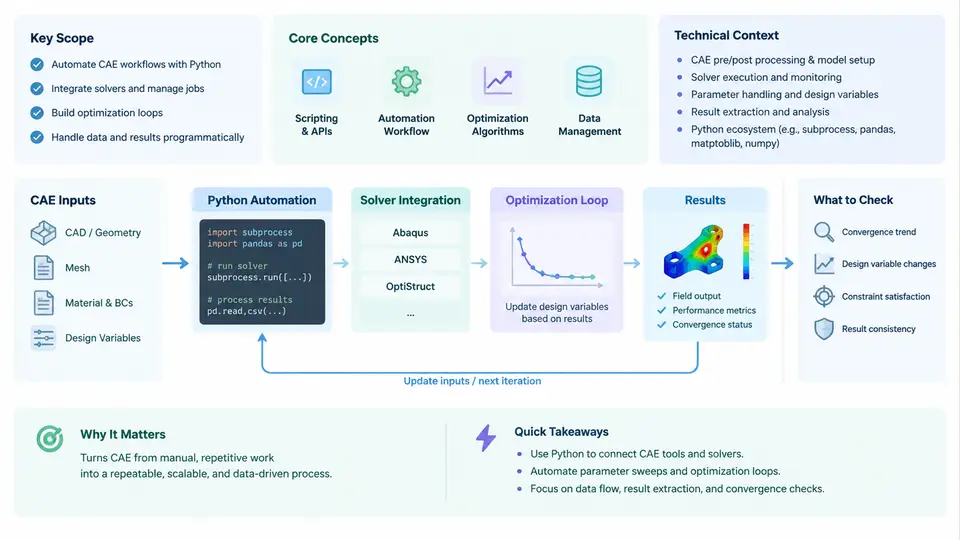
This course addresses a specific engineering discipline: using Python as the orchestration and computation layer that connects CAD geometry, CAE preprocessing, commercial or open-source solvers, and post-processing into repeatable, parameterized workflows. The goal is not to teach Python syntax or finite element theory from scratch, but to show how these two domains combine into a practical automation stack that engineers can maintain and extend.
Modern CAE practice increasingly demands more than a single simulation run. Design space exploration, sensitivity studies, surrogate model construction, and multi-objective optimization all require hundreds or thousands of solver invocations. Performing these manually is infeasible. Python-driven automation solves this by treating the solver as a callable component within a larger computational pipeline, where geometry parameters, mesh settings, boundary conditions, and solver controls are all programmatically controlled.
What "Python-Driven CAE Automation" Actually Means
The term covers three distinct but connected capabilities:
- Automation — replacing manual GUI operations with scripted execution. This includes parametric geometry generation, automated meshing, batch job submission, and result extraction. The key enabler is that most CAE tools expose a scripting interface (APIs such as Ansys ACT, Abaqus Python API, or file-based input decks for solvers like CalculiX, OpenFOAM, and SU2).
- Optimization — wrapping the automated simulation in an optimization loop. This requires defining design variables, objective functions, and constraints, then selecting an appropriate algorithm (gradient-based, genetic, or surrogate-assisted). Python libraries such as SciPy, DEAP, and scikit-opt provide these algorithms, while the simulation acts as the objective function evaluator.
- Solver integration — the technical layer that handles input file generation, process execution, output parsing, and error handling. This is where most engineering effort is spent in practice, because solvers have heterogeneous interfaces, licensing constraints, and failure modes that must be managed programmatically.
A common misconception is that automation means simply recording GUI actions into a macro. In reality, robust automation requires understanding the solver's input/output contract, designing a clean parameter interface, and building error recovery into the workflow. The sections below clarify the technical context and the mental model this course will use throughout.
The CAE Automation Stack
Figure 1 shows the layered architecture that this course follows. Each layer has a distinct responsibility and a well-defined interface to its neighbors.
Figure 1 — The four-layer CAE automation stack. The optimization layer drives the loop; the orchestration and integration layers translate parameters into solver executions and return objective values.
Why Python Specifically
Python has become the dominant language for CAE automation for several practical reasons. First, every major commercial solver now ships a Python API or supports Python-based scripting: Ansys exposes PyAnsys and ACT, Abaqus provides a built-in Python interpreter, and OpenFOAM and SU2 can be driven through Python wrappers. Second, the scientific Python ecosystem (NumPy, SciPy, pandas, matplotlib) provides ready-made tools for data manipulation, optimization, and visualization that would otherwise need to be written from scratch. Third, Python's subprocess and file I/O capabilities make it straightforward to integrate solvers that only accept text input decks, which remains common in legacy and open-source tools.
The trade-off is performance: Python is slower than compiled languages for tight numerical loops. In practice this is rarely a bottleneck because the solver itself dominates runtime. The Python layer spends most of its time waiting for the solver to finish, so the overhead of file parsing and process management is negligible by comparison.
Core Concepts and Terminology
Before proceeding, it is worth establishing precise definitions for terms used throughout the course:
| Term | Definition | Typical Implementation |
|---|---|---|
| Design variable | A parameter that the optimizer may adjust (e.g., rib thickness, inlet velocity) | Scalar or vector entry in a parameter dictionary |
| Objective function | A scalar metric to minimize or maximize (e.g., mass, drag coefficient) | Python function returning a float, evaluated from solver output |
| Constraint | A condition the design must satisfy (e.g., max stress < yield strength) | Penalty term, filter, or explicit constraint in the optimizer |
| Design of Experiments (DOE) | A structured set of sample points in design space | Latin hypercube, full factorial, or Sobol sequences |
| Surrogate model | A cheap approximation of the solver response surface | Kriging, radial basis functions, polynomial regression |
| Input deck | The text or binary file that fully specifies a solver run | Jinja2 templates, f-strings, or solver-specific APIs |
| Convergence check | Verification that the solver reached a valid solution | Parsing residual logs, checking exit codes, validating output ranges |
A Minimal End-to-End Example
To make the stack concrete, consider a simple structural problem: a cantilever beam whose cross-section height h is the design variable. The objective is to minimize mass while keeping maximum von Mises stress below 200 MPa. The solver is CalculiX, driven by a Python script.
The workflow proceeds as follows. The optimization layer (SciPy's minimize with SLSQP) proposes a value of h. The orchestration layer writes a CalculiX input deck from a template, substituting the current h into the geometry definition. The integration layer invokes the solver via subprocess.run, waits for completion, and parses the .dat output file to extract the maximum stress. The objective function returns the computed mass, and the constraint function returns 200 - sigma_max. The optimizer then proposes the next h.
import subprocess, re, numpy as np
from scipy.optimize import minimize

def run_simulation(h):
    # Generate input deck from template
    with open("beam_template.inp") as f:
        deck = f.read().replace("{{HEIGHT}}", str(h))
    with open("beam_run.inp", "w") as f:
        f.write(deck)
    # Execute solver
    result = subprocess.run(["ccx", "beam_run"], capture_output=True, text=True)
    if result.returncode != 0:
        raise RuntimeError(f"Solver failed: {result.stderr[:200]}")
    # Parse max von Mises stress from .dat
    with open("beam_run.dat") as f:
        content = f.read()
    stresses = re.findall(r"von Mises.*?([\d.]+)", content)
    return float(stresses[-1]) if stresses else np.nan

def objective(h):
    return 7850 * 0.5 * h * 0.02  # density * volume (example)

def constraint(h):
    sigma = run_simulation(h)
    return 200e6 - sigma

result = minimize(objective, x0=[0.1], method="SLSQP",
                  constraints={"type": "ineq", "fun": constraint},
                  bounds=[(0.02, 0.3)])
print(result.x, result.fun)
This example is deliberately simplified, but it contains every element of the full stack: parameterization, template-based input generation, subprocess execution, output parsing, and optimizer coupling. The remainder of the course expands each layer with production-grade techniques.
Scope and Boundaries of This Course
This course covers the following areas in depth: parametric geometry and mesh generation via Python; input deck templating and solver invocation for both API-driven and file-driven solvers; robust output parsing and error handling; DOE and sampling strategies; gradient-based and population-based optimization; surrogate modeling and infill criteria; parallel and distributed execution; and workflow reproducibility. It does not attempt to teach finite element formulation, CFD discretization theory, or the internal algorithms of specific solvers. Those topics are assumed as prerequisites or covered elsewhere.
The technical context is one of increasing automation in engineering design. Companies that can run a 500-design DOE overnight and identify a Pareto front by morning have a decisive advantage over those that evaluate designs one at a time. Python is the glue that makes this possible, and the skills developed in this course are directly applicable to real industrial workflows.