4. Curtain airbag geometry and mesh generat
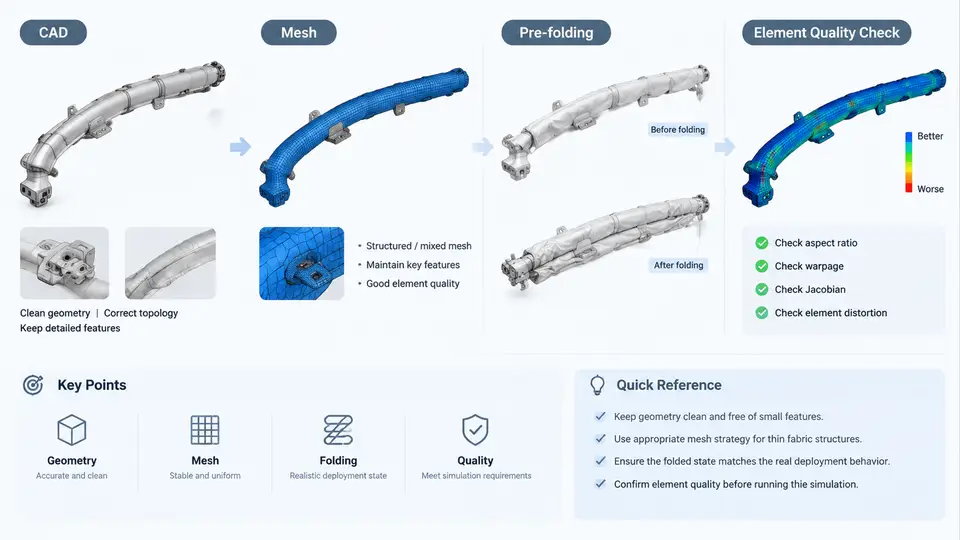
Curtain airbag (CAB) simulation quality is decided long before the first explicit time step. The airbag must be represented as a clean, watertight shell mesh with a controlled folding pattern and correctly defined seams; otherwise the gas flow, contact, and deployment kinematics will be dominated by mesh artifacts rather than physics. This section covers the practical pipeline from raw CAD to a solver-ready LS-DYNA model: CAD cleanup, shell meshing, folding pattern definition, and seam modeling.
CAD Cleanup: From Surface Model to Simulation-Ready Geometry
Curtain airbag CAD typically arrives as a thin-walled surface or a solid with negligible thickness. The first task is to extract a mid-surface or a single-sided shell representation. In LS-DYNA, the airbag is modeled with *PART_COMPOSITE or a single shell part using *SECTION_SHELL with the fabric thickness (commonly 0.25–0.40 mm for coated nylon). The CAD must therefore be reduced to a single continuous surface.
Key cleanup operations include:
- Gap and sliver removal: Stitch adjacent panels within a tolerance of 0.1–0.5 mm. Unstitched edges create free edges that leak gas in the FSI (fluid-structure interaction) model.
- Surface simplification: Remove logos, mounting tabs, and non-structural details that do not affect deployment. Retain mounting holes and tether attachment points.
- Normal consistency: Ensure all shell normals point outward (or consistently inward) so that the
*MAT_FABRICelement formulation and contact thickness behave correctly. - Symmetry handling: If the CAB is symmetric, model half and apply
*BOUNDARY_SPC_SETon the symmetry plane, or model full if the folding is asymmetric.
Shell Meshing Strategy
The mesh must balance accuracy and runtime. For a typical side curtain airbag (approximately 1.5–2.0 m long, 0.4–0.6 m tall), a target element size of 8–15 mm is common for the unfolded state. The mesh should be predominantly quad-dominated with aspect ratios below 3:1 and no triangles in high-curvature regions.
Element formulation matters. LS-DYNA offers *SECTION_SHELL with ELFORM 2 (Belytschko-Tsay) for speed, but for airbag folding and self-contact, ELFORM 16 (fully integrated) or ELFORM -16 is often preferred to avoid hourglassing. The fabric material *MAT_FABRIC requires a defined ELFORM and a NIP (number of integration points) typically set to 2 or 3.
Mesh generation workflow:
- Import the cleaned surface into a meshing tool (HyperMesh, ANSA, or LS-PrePost).
- Define a global element size of 10 mm and apply local refinement (5 mm) near the inflator inlet and tether anchors.
- Generate a mapped or paved quad mesh. Check for duplicate nodes and coincident elements.
- Run a quality check: Jacobian > 0.6, warpage < 15°, skew < 45°.
- Assign the shell section and material properties.
After meshing, the airbag is still in its flat, unfolded configuration. The next step is to define how it folds.
Folding Patterns and Their Simulation
Curtain airbags use specific folding patterns to achieve rapid, controlled deployment. Common patterns include:
| Pattern | Description | Typical Use |
|---|---|---|
| Z-fold | Accordion fold along the length | Roof rail mounting |
| Roll fold | Spiral roll from one edge | Compact packaging |
| Flat fold | Layered flat stack | Simple geometries |
| Combination | Z-fold + roll at ends | Production CABs |
In LS-DYNA, folding is not performed by the solver directly. Instead, the folded geometry is generated in a preprocessor using a folding algorithm, or the airbag is modeled in the unfolded state and a *MAT_ADD_EROSION or *INITIAL_FOLD approach is used. The most robust method is to create the folded mesh explicitly and then use *AIRBAG_REFERENCE_GEOMETRY to define the unfolded reference for FSI.
For a Z-fold along the X-axis (vehicle longitudinal), the folding process in a preprocessor involves:
1. Select the airbag part.
2. Define fold lines at intervals of 50 mm along X.
3. Apply alternating rotations of +180° and -180° about each fold line.
4. Compress the folded stack to a thickness of 20–30 mm.
5. Export the folded mesh as a new LS-DYNA input deck.
The folded mesh must be checked for element inversion and self-intersection. A common failure is element penetration at fold creases, which causes negative volume errors during the explicit run. Use *CONTACT_AUTOMATIC_SINGLE_SURFACE with a small thickness offset to handle self-contact.
Seam Modeling
Seams are the stitched or welded joints that define the airbag chamber boundaries. In LS-DYNA, seams are modeled as either:
- Shared nodes: The two shell surfaces are merged at the seam line. This is the simplest and most stable approach but requires a conformal mesh.
- Tied contact: Use
*CONTACT_TIED_SHELL_EDGE_TO_SURFACEor*CONTACT_TIED_NODES_TO_SURFACEto connect non-conformal meshes. This is more flexible but can introduce numerical stiffness. - Seam elements: Use
*ELEMENT_SEATBELTor discrete elements to represent the stitch line. This is rarely used for CABs due to complexity.
For a production CAB, the seam line is typically defined by a curve in CAD. After meshing, the nodes along this curve are either merged or tied. The seam must be leak-proof: any gap will allow gas to escape and reduce deployment pressure.
Integrated Workflow and Verification
The complete geometry and mesh generation workflow can be summarized as follows:
After the model is assembled, run a short initialization check: a 1 ms run with no inflator input. The airbag should remain stable with no negative volume or excessive hourglass energy. If hourglass energy exceeds 5% of internal energy, refine the mesh or switch to a fully integrated shell formulation.
For the folding pattern, a practical validation is to inflate the folded airbag with a simple pressure curve and observe the deployment sequence. The airbag should unfold smoothly without element tangling. If the airbag jams, the fold lines may be too tight or the contact thickness too large.
Practical Deliverable: Mesh Quality Checklist
The following checklist can be used directly before submitting a CAB model to the solver:
| Check | Criterion | Tool / Command |
|---|---|---|
| Free edges | Only at inlet and mounting boundary | Preprocessor edge query |
| Jacobian | > 0.6 | Mesh quality panel |
| Warpage | < 15° | Mesh quality panel |
| Skew | < 45° | Mesh quality panel |
| Aspect ratio | < 3:1 | Mesh quality panel |
| Duplicate nodes | None | Equivalence / merge |
| Normal consistency | All outward | Normal display |
| Seam continuity | No gaps | Visual + node merge check |
| Folded state inversion | None | Negative volume check |
| Hourglass energy | < 5% internal energy | glstat file |
With a clean mesh, a validated folding pattern, and leak-proof seams, the CAB model is ready for the FSI and deployment simulations covered in later sections. The geometry and mesh stage is where most runtime errors originate; investing time here pays off in stable, physically meaningful results.