4. Dummy model architecture in LS-DYNA
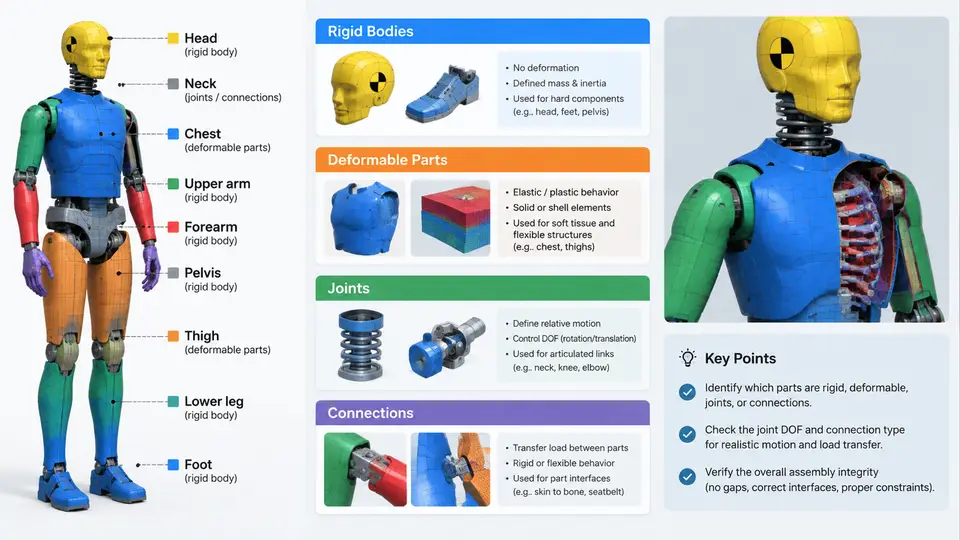
A full Anthropomorphic Test Device (ATD) in LS-DYNA is not a single monolithic mesh. It is an assembly of several hundred parts organized into a deliberate hierarchy of rigid bodies, deformable components, kinematic joints, and discrete connections. Understanding this architecture is essential before touching any card: it determines how mass is distributed, how load paths propagate, which parts can be simplified, and where numerical instabilities typically originate. This section dissects the architecture of a typical frontal impact dummy (e.g., a Hybrid III 50th percentile male) as implemented in LS-DYNA, and shows how the pieces fit together at the keyword level.
Why the Architecture Matters
An ATD model must reproduce two things simultaneously: the kinematics of a human surrogate (joint ranges of motion, segment inertias, centers of gravity) and the local compliance that generates measurable injury signals (chest deflection, femur axial force, head acceleration). Rigid bodies handle the first requirement efficiently; deformable parts handle the second. If you make everything rigid, you lose all injury channels. If you make everything deformable, the model becomes prohibitively expensive and prone to hourglassing. The architecture is therefore a deliberate compromise, and every part in the assembly is assigned to one of these categories for a reason.
Rigid Bodies: The Skeleton of the Model
In LS-DYNA, a rigid body is defined by *MAT_RIGID (Material Type 20) applied to a part, with the constraint flags CMO, CON1, and CON2 controlling translational and rotational degrees of freedom. In a Hybrid III model, the following are typically rigid:
- Head skull shell and skull cap (the head is rigid; the "brain" response is inferred from head CG acceleration, not from skull deformation)
- Upper and lower torso structural shells (the ribcage is deformable, but the spine box and thoracic spine are rigid)
- Pelvis and lumbar spine segments
- Upper and lower arm bones, forearm, and hand
- Upper and lower leg bones (femur and tibia shafts)
- Various mounting brackets, load cell housings, and instrumentation blocks
Each rigid body carries a *PART_INERTIA or *ELEMENT_RIGID definition that specifies mass, center of mass, and inertia tensor. These values are not arbitrary — they are calibrated to the physical ATD's measured properties. For example, the Hybrid III head assembly has a mass of approximately 4.54 kg with a specified CG location relative to the head accelerometer mount. If you change the mass, you change the head acceleration response and invalidate the model against certification corridors.
*PART_INERTIA definitions unless you recompute the combined mass properties. A common error is to merge the head and neck into one rigid body, which destroys the neck load path and produces non-physical head accelerations.
Deformable Parts: Where Injury Signals Are Born
Deformable parts use shell or solid elements with material models that capture nonlinear, rate-dependent behavior. In a frontal ATD, the critical deformable components are:
| Component | Typical Material Model | Injury Channel |
|---|---|---|
| Ribcage (6 ribs, sternum) | *MAT_ELASTIC_PLASTIC or *MAT_PIECEWISE_LINEAR_PLASTICITY |
Chest deflection, rib strain |
| Neck (rubber/steel cable) | *MAT_ELASTIC with discrete beam elements |
Neck axial force, bending moment |
| Abdomen insert | *MAT_SOFT_TISSUE or *MAT_VISCOELASTIC |
Abdomen compression |
| Femur (load cell region) | *MAT_RIGID for bone, deformable for load cell |
Femur axial force |
| Knee slider | *MAT_ELASTIC_PLASTIC |
Knee displacement |
The ribcage is the most instructive example. Each rib is modeled as a curved shell structure with a defined thickness and material curve. The sternum connects the left and right rib pairs. When the chest is loaded by the airbag or belt, the ribs deflect inward, and the chest deflection is measured as the relative displacement between the sternum and the spine box. This displacement is computed in LS-DYNA using *DATABASE_HISTORY or *ELEMENT_SEATBELT_SLIPRING output, or more commonly via a *CONSTRAINED_INTERPOLATION or a user-defined measurement between two nodes.
Joints: Kinematic Constraints Between Segments
Joints in an LS-DYNA dummy model are not physical connectors in the CAD sense; they are constraint definitions that allow specific relative motion while restricting others. The most common joint types are:
- Revolute (pin) joints: defined with
*CONSTRAINED_JOINT_REVOLUTE, used at the elbow, knee, and ankle. These allow rotation about one axis and constrain translation in all three directions. - Spherical joints: defined with
*CONSTRAINED_JOINT_SPHERICAL, used at the shoulder and hip. These allow rotation about all three axes but constrain translation. - Universal joints: used at the neck-to-head interface in some models, allowing two rotational degrees of freedom.
- Translational joints: used in the knee slider and lumbar spine, allowing one translational degree of freedom.
Each joint definition references two rigid body part IDs and, optionally, a local coordinate system. The joint stiffness and damping are not inherent to the constraint itself; they are added via *CONSTRAINED_JOINT_STIFFNESS or by attaching discrete elements (e.g., *ELEMENT_DISCRETE) across the joint. In the Hybrid III neck, for example, the neck is not a simple revolute joint — it is a deformable rubber cylinder with a steel cable running through it, modeled as a combination of solid elements and discrete beams. The "joint" is effectively distributed.
*CONSTRAINED_JOINT_REVOLUTE without specifying a local coordinate system causes LS-DYNA to use the global origin, which often places the joint axis in the wrong location. Always define *DEFINE_COORDINATE_SYSTEM or use the CID field on the joint card.
Connections: Tying the Assembly Together
Connections are the glue between rigid and deformable parts. They fall into three broad categories:
- Shared nodes: the simplest connection, used where two parts are meshed continuously. This is common within a single deformable component (e.g., rib to sternum).
- Tied contacts:
*CONTACT_TIED_SHELL_EDGE_TO_SURFACEor*CONTACT_TIED_NODES_TO_SURFACE, used to bond a rigid bracket to a deformable shell without merging nodes. This is the standard method for attaching the shoulder to the upper torso. - Discrete elements:
*ELEMENT_DISCRETEor*ELEMENT_BEAM, used to represent bolts, cables, and springs. The neck cable, the lumbar spine spring, and the knee slider spring are all discrete elements.
The choice of connection type affects both accuracy and stability. Tied contacts are computationally cheaper than shared nodes when the meshes are non-conforming, but they can introduce artificial stiffness if the penalty stiffness is too high. A useful rule of thumb: set the tied contact penalty stiffness to approximately 0.1 times the material's elastic modulus divided by the characteristic element length, then verify that the tied interface does not exhibit visible penetration or separation in a simple pull test.
Putting It All Together: The Full Assembly Hierarchy
The following SVG illustrates the architectural hierarchy of a typical frontal ATD model, showing how rigid bodies, deformable parts, joints, and connections relate to one another. It is not a flowchart of modeling steps; it is a structural map of the model itself.
Reading the Architecture in the Keyword Deck
When you open a full ATD keyword deck, the architecture is visible in the *PART and *CONSTRAINED_JOINT sections. A practical exercise is to list all parts, classify each as rigid or deformable, and then trace the joints. For a Hybrid III 50th percentile model, you should find approximately 40–60 rigid bodies, 10–20 deformable parts, and 15–25 joint definitions. If your count is significantly different, either the model has been simplified (common in crashworthiness-only studies) or parts have been incorrectly merged.
A useful verification step is to run a short simulation with gravity loading only (no impact) and check that the dummy settles into its initial position without drifting or oscillating. If a joint is misaligned or a tied contact is too stiff, the dummy will exhibit visible vibration or separation at the interface. This "settling test" takes only a few minutes of CPU time and catches most architecture-level errors before you invest in a full crash simulation.