4. Building a full-vehicle finite element m
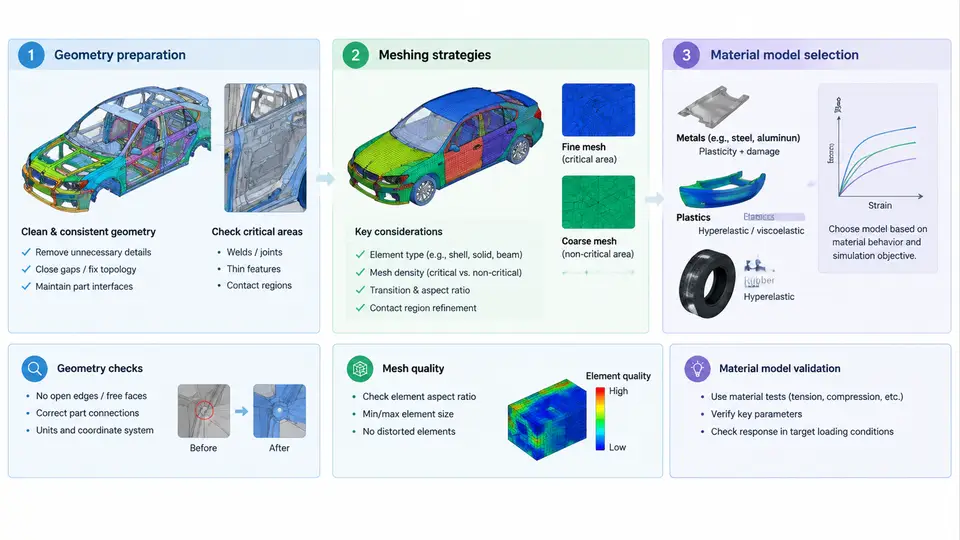
A full-vehicle crash model is only as trustworthy as the geometry, mesh, and material definitions that feed it. In LS-DYNA correlation work, the model build phase determines the upper bound of achievable accuracy: no amount of solver tuning or post-processing can recover information that was never represented in the mesh or the constitutive law. This chapter walks through the three foundational decisions — how to prepare CAD geometry, how to discretize it, and how to assign material and section properties — with the practical detail needed to produce a model that will later correlate against physical test data.
Geometry Preparation and Mid-Surface Extraction
Crash models are dominated by thin-walled stamped components: rails, pillars, rockers, floor pans, and closure panels. These are modeled with shell elements, which means the solid CAD geometry must first be reduced to a mid-surface. The standard workflow is: import the native CAD (STEP, IGES, or a direct CATIA/NX translation), remove non-structural detail (bolt holes below roughly 6 mm diameter, trim flanges, small embosses that do not affect crush mode), then extract the mid-surface using the CAD tool's offset or the pre-processor's mid-meshing function.
Two geometry problems cause the majority of downstream correlation errors. The first is surface discontinuity: adjacent panels that should share a weld line have gaps or overlaps of 0.5–3 mm after mid-surface extraction. These must be healed with a tolerance-matched stitch before meshing, otherwise the mesh will not be node-continuous and the joint will be artificially compliant. The second is unintended thickness variation: a panel modeled at a nominal 1.2 mm when the actual stamped part thins to 0.9 mm in a draw radius will over-predict local stiffness. Where forming data is available, map the thickness field onto the mid-surface; where it is not, document the nominal value as an assumption in the correlation log.
Meshing Strategy: Element Size, Quality, and Continuity
Element size is a direct trade between run time and the fidelity of local deformation. For a full-vehicle frontal or side impact model, a practical baseline is:
- Front-end structure (bumper beam, crash boxes, front rails, shotgun): 5–8 mm target, refined to 3–4 mm in expected fold zones.
- Occupant compartment (rocker, B-pillar, floor, tunnel): 8–10 mm, since these regions should remain largely elastic.
- Rear structure and closures: 10–15 mm, coarsened where crush is not expected.
- Powertrain and suspension: often represented by rigid or deformable coarse meshes (15–25 mm) unless component-level validation is required.
Quality targets for shell elements should be enforced before any material is assigned. A workable acceptance set is: warpage < 15°, aspect ratio < 5, Jacobian > 0.6, minimum quad angle > 30°, and no free edges except at intended panel boundaries. Triangular elements should be limited to transition regions and kept below roughly 5% of the total shell count, because they are stiffer in bending and can suppress the folding pattern that correlation depends on.
Mesh continuity is not optional. Where two panels are joined by spot welds, the mesh must be coincident at the weld location so that a single node or a tied contact can transfer load. Where panels are joined by structural adhesive or continuous laser welds, use a shared-node or tied-surface definition along the entire joint line. A model with 2 mm gaps at weld lines will show early separation and under-predict joint stiffness — a failure mode that is easy to mistake for a material problem during correlation.
Material Model Selection
Material selection in a crash model is driven by the deformation mechanism the component must reproduce. The table below summarizes the models most commonly used in body-in-white and closure structures, with the parameters that must be populated from coupon tests.
| Component / Material | LS-DYNA Material Card | Required Inputs | Typical Use |
|---|---|---|---|
| Mild steel (DC04, CR4) | *MAT_024 (PIECEWISE_LINEAR_PLASTICITY) | E, ν, ρ, yield curve (true stress–plastic strain), strain-rate table | Floor, inner panels, brackets |
| HSLA / DP steel (DP590, DP780) | *MAT_037 (TRANSVERSELY_ANISOTROPIC) | E, ν, ρ, yield curve, R0/R45/R90, rate table | Rails, B-pillar, rocker |
| Cast aluminum (A356, AlSi10Mg) | *MAT_003 (PLASTIC_KINEMATIC) | E, ν, ρ, yield, tangent modulus, hardening parameter | Shock towers, engine mounts |
| Rigid bodies (powertrain, wheels) | *MAT_020 (RIGID) | E, ν, ρ, mass, inertia tensor | Mass representation, no deformation |
| Spot welds | *MAT_100 (SPOTWELD) or *CONSTRAINED_SPOTWELD | Failure force, failure moment, plastic displacement | Joint representation |
For *MAT_024, the yield curve must be entered as true stress versus plastic strain, not engineering stress–strain. A common error is to paste the engineering curve directly, which over-predicts flow stress by 10–20% at large strain and produces a simulation that is too stiff in the crush zone. Convert using σ_true = σ_eng(1+ε_eng) and ε_plastic = ln(1+ε_eng) − σ_true/E before building the card.
Strain-rate sensitivity is not optional for crash. For mild steel, a rate table such as the following (example values, to be replaced by coupon data) is typical:
*DEFINE_TABLE
$    LCID      SID
         1        1
$   strain rate    curve ID
      0.001          100
      0.1            101
      1.0            102
      10.0           103
      100.0          104
*END
Each curve ID references a *DEFINE_CURVE containing the true stress–plastic strain pairs at that rate. If rate data is unavailable, use a single quasi-static curve and document the omission — but expect the simulation to under-predict force in high-rate regions such as the front rail during the first 30 ms of a 56 km/h frontal impact.
Section Properties and Integration
Shell sections in *SECTION_SHELL require the thickness, the number of through-thickness integration points (NIP), and the shear correction factor. For crash shells, NIP = 5 is the standard choice: it captures bending and membrane behavior without the cost of NIP = 7 or 9. The shear correction factor is typically 5/6 for isotropic shells. Thickness must match the mid-surface extraction assumption; if the CAD mid-surface was offset from the true neutral axis, correct the thickness or the bending stiffness will be wrong.
Build Verification Before Running the Full Model
Before committing to a full-vehicle run, perform three checks. First, a free-edge and normal check: every shell should have consistent normals and no unintended free edges. Second, a mass and inertia check: total model mass should match the test vehicle mass within 2%, and the center of gravity should match the measured value within 10 mm in each axis. Third, a single-component crush check: run one front rail or crash box in isolation against a rigid wall at the intended impact speed and compare the force–displacement curve to a coupon-level or component test. If the component-level curve does not match, the full-vehicle result will not correlate, and the discrepancy can be traced back to geometry, mesh, or material in a controlled setting rather than in a 200 ms full-vehicle run.
The build phase ends when the model passes these checks and the assumptions — nominal thicknesses, rate data source, weld failure values — are recorded in the correlation log. That log becomes the reference for every subsequent comparison against physical test data.