4. Penalty-based contact in LS-DYNA
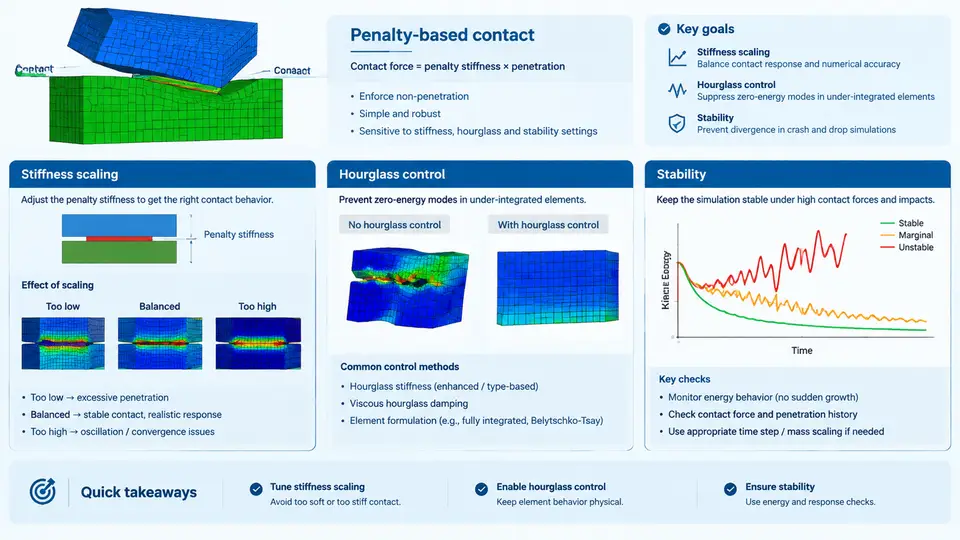
Penalty-based contact is the default and most widely used contact formulation in LS-DYNA for crash and drop simulations. Instead of preventing penetration by kinematic constraints, it allows a small amount of penetration and reacts with a restoring force proportional to that penetration. The formulation is robust, works with any element type, and integrates naturally with explicit time integration. Its behavior, however, depends heavily on how the penalty stiffness is chosen and how it interacts with hourglass control and the critical time step.
How the Penalty Method Works
For each slave node that penetrates a master segment, LS-DYNA computes a penetration depth δ along the segment normal and applies a force
F_normal = k_contact * δ
k_contact = SOFSCL * (m_slave * m_master) / (m_slave + m_master) * (1/Δt²)
where SOFSCL is the scale factor (default 0.10 for *CONTACT_AUTOMATIC_SURFACE_TO_SURFACE), m_slave and m_master are the nodal masses of the slave node and the master segment, and Δt is the current time step. The stiffness is therefore not a fixed material property — it is recomputed every cycle from the local masses and the current stable time step. This is why penalty contact is often described as "self-scaling."
Two additional parameters matter in practice. PENMAX caps the maximum penetration before the slave node is released or the force is limited, and VC (viscous damping coefficient) adds a damping term proportional to the relative normal velocity to suppress high-frequency contact chatter. For crash and drop problems, VC = 10–20 is a common starting point; values above 50 can over-damp and hide real impact behavior.
Stiffness Scaling: SOFSCL, SLSFAC, and the Time-Step Trade-off
The scale factor SOFSCL is the primary knob for tuning penalty stiffness. Increasing it reduces penetration but raises the contact interface frequency, which in turn reduces the stable time step. The relationship is approximately
Δt_contact ≈ 2 / ω_contact, ω_contact ∝ sqrt(k_contact / m_eff)so doubling SOFSCL reduces the contact-limited time step by roughly a factor of √2. In a full-vehicle crash model with 1–2 million elements, the time step is often already governed by small shell elements in the front rail; raising SOFSCL from 0.10 to 0.50 can push the contact frequency above the element frequency and force a mass-scaled or smaller time step, increasing runtime by 30–60% with little accuracy gain.
A practical tuning procedure for a drop simulation of a 5 kg electronics enclosure impacting a rigid floor at 3 m/s:
- Run with default
SOFSCL = 0.10andVC = 0. Inspect thercforcfile for peak interface force and theglstatfile for the time step history. - Check maximum penetration in the
d3plotusing the contact penetration fringe. If penetration exceeds 10% of the shell thickness, increaseSOFSCLin steps of 0.10. - After each increase, verify that
Δtinglstathas not dropped below the element-controlled value. If it has, either accept the runtime penalty or refine the master segment mesh instead. - Add
VC = 10only if the force history shows spurious oscillations at the contact frequency. Confirm that the physical peak force is unchanged within 5%.
For soft materials such as foams or rubber, the default penalty stiffness can be far too high relative to the material stiffness, causing artificial stiffening. In these cases, use SOFT = 1 or SOFT = 2 on the contact card, which scales the penalty stiffness by the slave material stiffness rather than the nodal mass. This is standard practice for *MAT_LOW_DENSITY_FOAM and *MAT_SIMPLIFIED_RUBBER in drop and crash models.
Hourglass Control and Its Coupling with Contact
Reduced-integration shell and solid elements are the workhorses of crash simulation because they are fast, but they suffer from zero-energy hourglass modes. LS-DYNA offers several hourglass control types; the most common for crash are type 4 (Flanagan-Belytschko stiffness form) and type 5 (stiffness form with exact volume integration). The hourglass coefficient QM defaults to 0.10 for shells and 0.05–0.10 for solids.
Contact and hourglass control interact in two important ways. First, contact forces are applied at slave nodes, which can excite hourglass modes if the contact stiffness is much higher than the element stiffness. Second, hourglass forces add to the nodal force vector and can artificially stiffen the contact response if QM is too large. A useful diagnostic is to monitor hourglass energy in glstat: it should stay below 5% of internal energy for a well-behaved crash model. If hourglass energy exceeds 10%, the model is likely too soft in shear or the contact stiffness is too high.
QM = 0.05 and use hourglass type 4. If hourglass energy still exceeds 5%, refine the mesh in the impact zone rather than increasing QM, because a high QM can mask real deformation modes and produce non-physical stiffening.
Stability: Time Step, Mass Scaling, and Contact Frequency
Explicit integration is conditionally stable. The global time step is the minimum over all elements and contact interfaces. Contact introduces an additional frequency that can become critical when penalty stiffness is high or when slave nodes have small masses. Two mitigation strategies are common:
- Selective mass scaling via
*CONTROL_TIMESTEPwithDT2MSnegative (mass added only to elements below the target step). This is preferred over global mass scaling because it limits added mass to small elements. - Contact-aware time step by setting
DT2MSto a value slightly below the contact-limited step, or by using*CONTROL_TIMESTEPwithISDO = 1to compute the contact step internally.
Added mass should be monitored in glstat; for crash models, total added mass above 2–3% of the physical mass is usually unacceptable because it changes the momentum balance. For drop simulations, the same threshold applies, but small local mass scaling in a few shell elements is often tolerable.
Diagnostic Workflow for Unstable Contact
When a crash or drop model terminates with a negative volume, an energy error, or a sudden time-step collapse, the cause is often contact-related. A systematic check sequence is:
- Open
glstatand plotΔt, hourglass energy, and added mass. A sudden drop inΔtcoincident with a contact event points to contact stiffness. - Open
rcforcand check for force spikes exceeding 10× the expected peak. Spikes indicateSOFSCLtoo high orVCtoo low. - Inspect the
d3plotat the failure time. Look for slave nodes that have penetrated deeply or master segments that have inverted. - If penetration is large, increase
SOFSCLor refine the master mesh. If force spikes dominate, addVCor reduceSOFSCL. - If hourglass energy is high, reduce
QMand refine the mesh in the impact zone.
Practical Parameter Reference for Crash and Drop Models
| Parameter | Typical Value | Effect | When to Adjust |
|---|---|---|---|
SOFSCL |
0.10 (default) | Scales penalty stiffness | Increase if penetration > 10% thickness; decrease if Δt collapses |
VC |
0–20 | Viscous damping on normal velocity | Add if force history oscillates; avoid > 50 |
PENMAX |
0.5–1.0 × thickness | Max penetration before release | Set explicitly for thin shells to avoid deep penetration |
SOFT |
0 (default), 1, 2 | Stiffness based on material vs. mass | Use 1 or 2 for foams, rubber, low-density materials |
QM |
0.05–0.10 | Hourglass control coefficient | Reduce if hourglass energy > 5%; refine mesh instead of raising |
DT2MS |
−1e-6 to −5e-6 s | Selective mass scaling target step | Monitor added mass; keep < 2–3% of physical mass |
The key insight for crash and drop simulations is that penalty stiffness, hourglass control, and time step are not independent settings. They form a coupled system: raising SOFSCL reduces penetration but lowers the stable time step; a lower time step increases k_contact because of the 1/Δt² dependence, which can trigger a runaway. The diagnostic workflow above breaks that loop by checking energy balance and force history before changing parameters. In practice, a well-tuned model shows penetration below 10% of shell thickness, hourglass energy below 5% of internal energy, added mass below 2%, and a stable time step that does not collapse during the impact event.