3. Full Vehicle Model Architecture and Asse
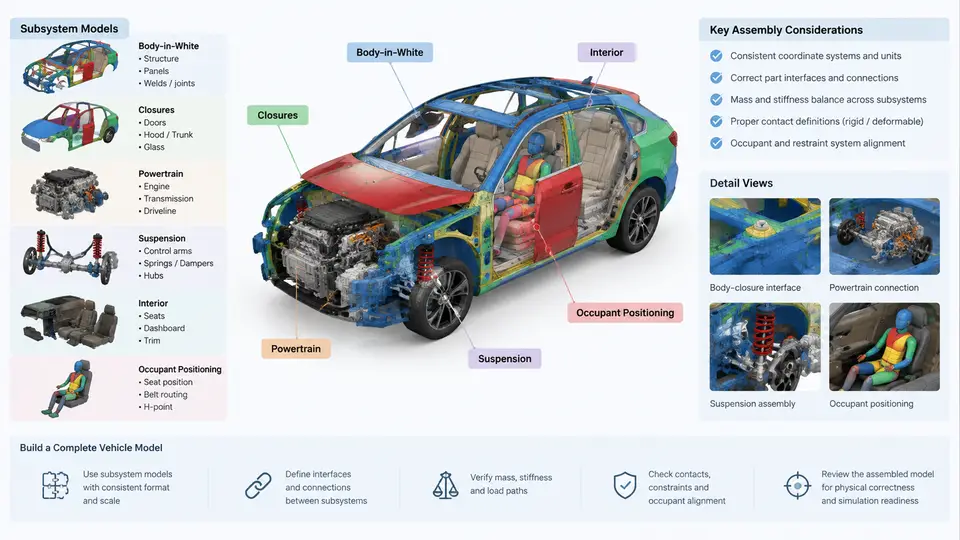
A full vehicle LS-DYNA model is not built in one pass. It is assembled from independently developed and validated subsystem models — body-in-white (BIW), closures, powertrain, suspension, interior, and occupants — each with its own mesh density, material cards, contact definitions, and coordinate conventions. The assembly task is therefore not simply "merge everything and run." It is a controlled integration problem: you must preserve each subsystem's validated behavior while establishing correct mechanical, kinematic, and numerical coupling between them. This section covers the architecture decisions and the concrete assembly workflow that make that possible.
Why Subsystem-Based Assembly Is the Standard Approach
Building the full vehicle directly from a single monolithic mesh is impractical for three reasons. First, development is parallel: the BIW team, chassis team, and interior team work simultaneously, and each needs a runnable model before the others are finished. Second, validation is local: a suspension model can be checked against a quarter-car or component test rig long before the BIW is complete. Third, change management is tractable: when a front rail gauge changes, only the BIW subsystem is re-meshed and re-validated, then re-inserted into the full model.
The cost of this approach is interface management. Every subsystem boundary is a potential source of duplicate nodes, mismatched coordinate systems, conflicting contact definitions, and inconsistent unit systems. The assembly strategy exists to control those interfaces systematically.
Architecture: The Include-File Hierarchy
The standard LS-DYNA architecture for a full vehicle model is a keyword include hierarchy. A top-level main deck contains only control cards, database output requests, and a set of *INCLUDE statements. Each subsystem is a separate include file, and each subsystem file may itself include sub-files for mesh, materials, and contacts.
*KEYWORD
*CONTROL_TERMINATION
$ ... termination, timestep, energy controls
*DATABASE_BINARY_D3PLOT
$ ... output interval
*INCLUDE
biw/main_biw.k
*INCLUDE
closures/hood.k
*INCLUDE
closures/front_door_lh.k
*INCLUDE
closures/front_door_rh.k
*INCLUDE
closures/trunk_lid.k
*INCLUDE
powertrain/engine_transmission.k
*INCLUDE
suspension/front_strut_lh.k
*INCLUDE
suspension/front_strut_rh.k
*INCLUDE
suspension/rear_multilink.k
*INCLUDE
interior/ip_structure.k
*INCLUDE
interior/seats.k
*INCLUDE
occupant/driver_hybrid_iii.k
*INCLUDE
occupant/passenger_hybrid_iii.k
*INCLUDE
contacts/global_contacts.k
*INCLUDE
constraints/rigid_links.k
*END
This structure gives you three practical benefits. You can swap a subsystem file without touching the main deck. You can run a subsystem standalone by pointing LS-DYNA at its own main file. And you can use version control on individual files rather than on one enormous deck.
Coordinate Systems and Unit Consistency
Before any file is merged, establish a single global coordinate convention and document it. A common automotive convention is:
- X axis: longitudinal, positive forward (vehicle nose direction)
- Y axis: lateral, positive to the vehicle's left
- Z axis: vertical, positive upward
- Origin: at the front axle centerline, on the ground plane, on the vehicle centerline
Every subsystem must be delivered in this global frame. If a suspension model was built with its own local origin at the strut top mount, it must be transformed before insertion. The transform is applied either in the CAD export or via *DEFINE_TRANSFORMATION / *INCLUDE_TRANSFORM in the keyword deck. Using *INCLUDE_TRANSFORM is preferable because it keeps the original subsystem file unchanged and makes the offset explicit and auditable.
*INCLUDE_TRANSFORM
$  file                    ID    TRANID  ...
   suspension/front_strut_lh.k   1     100
*DEFINE_TRANSFORMATION
$  TRANID  OPTION
   100     TRANSL
$  X       Y       Z
   -1250.0  380.0   0.0
$  OPTION
   ROTATE
$  X-axis  Y-axis  Z-axis  Angle
   0.0     0.0     1.0     0.0
Units must also be consistent across all subsystems. The most common full vehicle unit system in LS-DYNA is millimeter, millisecond, kilogram, and kilonewton (mm-ms-kg-kN). If a powertrain model arrives in meters and seconds, its mass, stiffness, and contact parameters will be wrong by orders of magnitude. Check the unit system of every incoming file before merging.
Interface Treatment: Tied, Merged, and Contact
Subsystem boundaries fall into three categories, and each requires a different treatment.
Permanently joined interfaces — spot welds, adhesive beads, bolted joints that never separate — are typically modeled with *CONSTRAINED_INTERPOLATION or *CONSTRAINED_NODAL_RIGID_BODY (extra nodes). For a BIW-to-closure hinge, a *CONSTRAINED_EXTRA_NODES set tied to the hinge bracket is standard. These constraints must be defined after both subsystems are present, which is why they live in a separate constraints/ include rather than inside either subsystem file.
Separable interfaces — door latches, hood latches, bolted flanges that can open during a crash — are modeled with *CONTACT_AUTOMATIC_SURFACE_TO_SURFACE or *CONTACT_AUTOMATIC_SINGLE_SURFACE. The latch striker and catch are separate parts with their own contact definition. Do not tie these; the whole point is that they can release.
Sliding or rotating interfaces — suspension bushings, steering column, seat tracks — are modeled with a combination of *CONSTRAINED_JOINT (spherical, revolute, cylindrical) and discrete elements for bushing stiffness. A lower control arm bushing, for example, is often a *CONSTRAINED_JOINT_CYLINDRICAL plus a *MAT_SPRING_ELASTIC or *MAT_DAMPER_VISCOUS to capture the rubber compliance.
Assembly Sequence and Verification
The recommended assembly order is: BIW first, then closures, then powertrain, then suspension, then interior, then occupants. This order matters because each step depends on the previous one's geometry being in place. The powertrain mounts to the BIW subframe; the suspension attaches to the BIW strut towers and subframe; the interior mounts to the BIW floor and cowl; the occupants sit on the seats.
After each subsystem is inserted, run a short verification: a 1 ms run with *CONTROL_TERMINATION set to 1.0 and *DATABASE_BINARY_D3PLOT at a fine interval. Check three things: (1) the initial penetration report — any contact with initial penetration greater than 0.5 mm indicates a geometry or transform error; (2) the added mass from *CONTROL_TIMESTEP — if added mass exceeds 1% of total mass, the timestep is being controlled by a small element that should be remeshed; (3) the energy summary — hourglass energy should be below 5% of internal energy, and sliding interface energy should be small and stable.
Practical Assembly Checklist
The following checklist is a working template you can adapt to your project. It is organized by assembly stage and includes the specific keyword or check associated with each item.
| Stage | Action | Keyword / Check | Pass Criterion |
|---|---|---|---|
| Pre-merge | Confirm unit system of each subsystem | mm-ms-kg-kN | All files consistent |
| Pre-merge | Confirm global coordinate frame | X fwd, Y left, Z up | Origin at front axle CL |
| BIW | Insert BIW, run 1 ms | *CONTROL_TERMINATION = 1.0 | No initial penetration |
| Closures | Insert hood, doors, trunk | *CONSTRAINED_EXTRA_NODES (hinges) | Hinge constraints active |
| Closures | Define latch contacts | *CONTACT_AUTOMATIC_SURFACE_TO_SURFACE | Latch can release |
| Powertrain | Insert engine + transmission | *CONSTRAINED_JOINT + mounts | Mount stiffness matches test |
| Suspension | Insert struts and links | *CONSTRAINED_JOINT_CYLINDRICAL | Bushing compliance correct |
| Interior | Insert IP, seats, trim | *CONSTRAINED_INTERPOLATION | Seat tracks slide freely |
| Occupants | Position H-III dummies | *INITIAL_VELOCITY + belt routing | H-point within 10 mm of target |
| Global | Run 1 ms verification | D3PLOT + GLSTAT + MATSUM | Added mass < 1%, hourglass < 5% |
*CONSTRAINED_* and *CONTACT_* cards that span subsystem boundaries — in separate include files. This makes it possible to swap a subsystem without editing the constraints that connect it, and it makes interface changes visible in version control.
With the architecture, interface treatment, and verification checkpoints in place, the full vehicle model becomes a maintainable assembly rather than a fragile monolith. The next step is to populate each subsystem with validated material and section data, which is the subject of the following section.