1. Course Introduction and Full Vehicle Cra
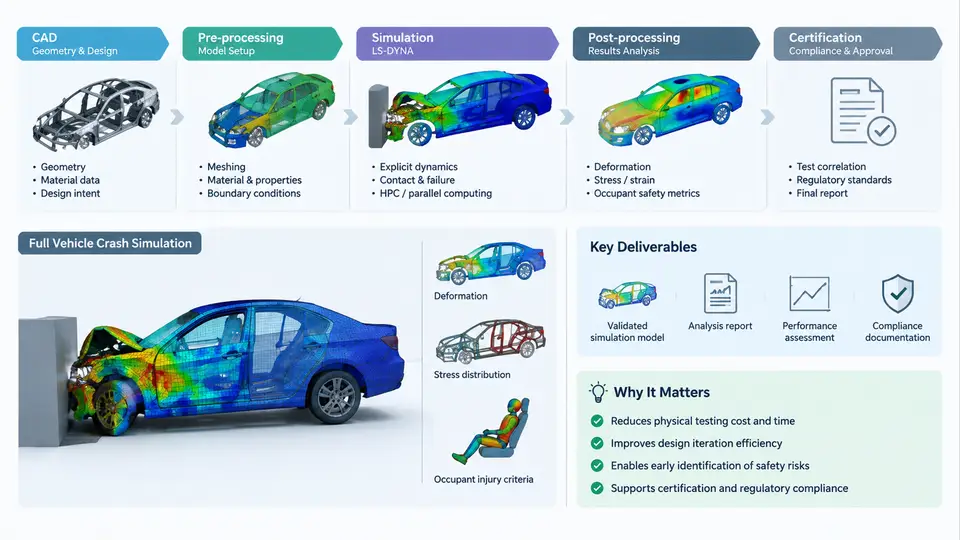
Full vehicle crash simulation is one of the most demanding applications of explicit finite element analysis. In LS-DYNA, a single frontal offset impact model can contain 8–15 million elements, hundreds of contact interfaces, multiple material laws ranging from elastic-plastic steel to strain-rate-sensitive polymers, and a solution that advances in microsecond increments across a 100–150 ms physical event. This chapter establishes what LS-DYNA actually does in that context, how a real vehicle safety project moves from CAD data to a certified result, and what a simulation engineer is expected to deliver at each stage.
What LS-DYNA Contributes to Vehicle Safety Development
LS-DYNA is an explicit time-integration solver built around the central difference method. For crash work, its relevant strengths are:
- Contact-dominated mechanics. Penalty-based and constraint-based contact algorithms handle the self-contact, folding, and separation that occur when sheet metal crumples against itself, against a barrier, and against an occupant.
- Material nonlinearity at high strain rate. Laws such as *MAT_PIECEWISE_LINEAR_PLASTICITY (024), *MAT_JOHNSON_COOK (015), and *MAT_PLASTICITY_WITH_DAMAGE (081) capture yield, hardening, failure strain, and rate dependence.
- Large deformation without remeshing. Lagrangian formulation with element erosion and hourglass control lets structures collapse far beyond the elastic range.
- Multi-physics coupling. Airbag deployment (CV/FPM or ALE), seatbelt slip, and occupant restraint interaction can be solved in the same model or through co-simulation.
The practical consequence is that LS-DYNA is used not only to reproduce a physical test but to explore design variants that would be prohibitively expensive to build. A single validated model can be re-run with a modified B-pillar gauge, a different bumper beam material, or a repositioned airbag in hours rather than weeks.
The Project Lifecycle: From CAD to Certification
A typical full vehicle crash simulation project follows a recognizable sequence, though the boundaries between stages are iterative rather than strictly linear. The figure below shows the workflow with its principal inputs, transformations, and decision points.
The workflow begins with CAD geometry, typically delivered as a complete body-in-white (BIW) assembly plus closures, chassis components, and any relevant interior structures. The geometry is not used directly; it is first cleaned, simplified, and meshed. A common target for full vehicle crash models is a shell element size of 5–8 mm in the front structure and 8–12 mm in the rear, with finer mesh (2–3 mm) in areas where failure or high stress gradients are expected. Spot welds are represented by *CONSTRAINED_SPOTWELD or *MAT_SPOTWELD, and adhesive bonds by *MAT_COHESIVE_MIXED_MODE or tied contact.
Model setup is where most engineering judgment enters. Material cards must reflect the actual steel grades and their strain-rate behavior. Contact definitions must cover self-contact within the structure, contact with the barrier, and contact between the vehicle and the ground. Boundary conditions and initial velocity are set to match the test matrix — for example, a 64 km/h offset deformable barrier (ODB) impact, or a 50 km/h full frontal rigid wall. The solver then runs, typically on an MPP (massively parallel processing) cluster, and produces d3plot and binout files.
Post-processing extracts the quantities that matter: deceleration time histories, intrusion measurements, energy balance, and deformation patterns. These are compared against physical test data in the correlation stage. If the model falls outside tolerance — say, peak deceleration differs by more than 10%, or intrusion is under-predicted by 15 mm — the engineer returns to model setup, adjusts material parameters, contact stiffness, or mesh, and re-runs. Only when correlation is acceptable does the model proceed to certification, where it is used to support regulatory submission or design sign-off.
Key Deliverables and Their Role
Each stage produces a deliverable that downstream work depends on. The table below summarizes the principal ones.
| Stage | Deliverable | Typical Format / Content |
|---|---|---|
| CAD preparation | Cleaned geometry | STEP / IGES, simplified for meshing |
| Meshing | FE model (mesh + connections) | LS-DYNA keyword file, .k |
| Model setup | Complete input deck | Materials, contacts, BCs, control cards |
| Solve | Simulation results | d3plot, binout, messag, d3hsp |
| Post-processing | Result summary | Plots, animations, extracted curves |
| Correlation | Correlation report | Test vs. simulation comparison, error metrics |
| Certification | Final report | Signed-off documentation for regulatory or internal approval |
The correlation report is often the most scrutinized deliverable. It must show not only that the model matches the test, but also where it does not, and why. A common practice is to overlay simulation and test deceleration curves, annotate the peak and the timing of the peak, and provide a table of error percentages for key metrics such as maximum intrusion, peak deceleration, and energy absorption.
How Simulation Fits into Vehicle Safety Development
In a modern vehicle program, simulation is not a single event but a continuous activity that runs parallel to design. Early in the program, coarse models are used to evaluate architecture-level decisions: where to place the crumple zone, how to route the front rail, what material to use in the bumper beam. As the design matures, the model is refined and used to support detailed engineering: gauge optimization, joint layout, and airbag calibration. By the time the first physical prototype is built, the simulation model should already be predictive enough to guide the test matrix and reduce the number of expensive iterations.
The role of the simulation engineer is therefore twofold: to build and validate the model, and to use it to answer design questions. A model that correlates well but is never used to influence a decision has limited value. Conversely, a model that is used aggressively but not validated can lead to costly errors. The workflow described in this chapter is designed to balance both: it enforces correlation before certification, but it also encourages early and frequent use of the model for design exploration.
With this foundation, the rest of the course will move into the details of each stage: how to prepare geometry for meshing, how to choose element formulations and material models, how to define contacts that remain stable under large deformation, how to set up and run LS-DYNA efficiently, and how to interpret results with the same rigor that a physical test would demand.