4. Building a composite ply definition in L
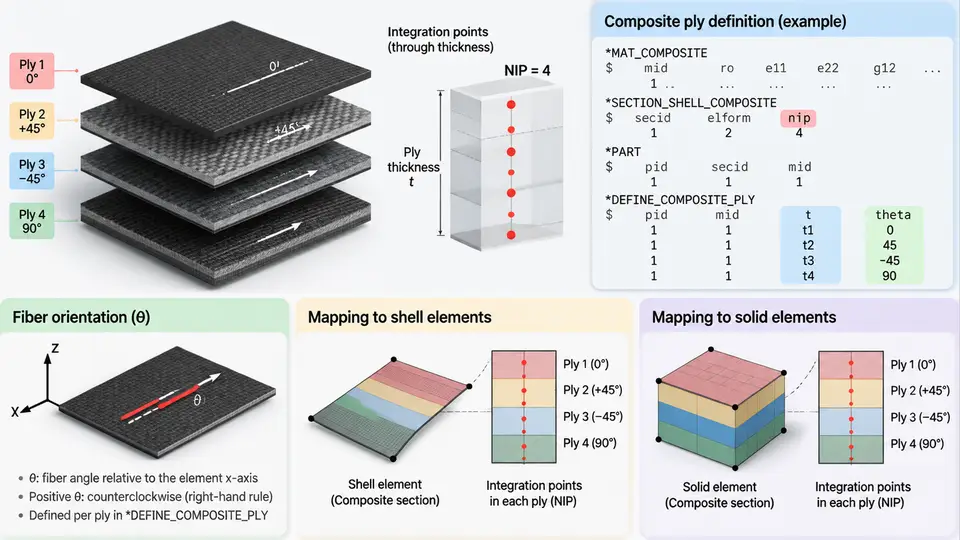
A composite ply definition in LS-DYNA is not a single keyword but a coordinated set of cards that together describe the material, the stacking sequence, the through-thickness integration scheme, and the element formulation that carries the ply. Getting the ply definition right is the foundation of every downstream result: if the integration points, ply thickness, or fiber orientation are inconsistent with the element formulation, the predicted stiffness, failure initiation, and energy absorption will all be wrong — often in ways that are difficult to diagnose after the run. This chapter walks through the practical construction of a ply definition, from the material card through the integration rule to the mapping onto shell and solid element formulations.
4.1 The Four Ingredients of a Ply Definition
Every composite ply in LS-DYNA is defined by four coupled ingredients:
- Material model — typically
*MAT_ANISOTROPIC_ELASTIC(MAT_002) for linear orthotropic behavior,*MAT_ORTHOTROPIC_SIMPLIFIED_DAMAGE(MAT_054/055) for progressive damage, or*MAT_ENHANCED_COMPOSITE_DAMAGE(MAT_058) for shell-based failure with Chang-Chang or Hashin criteria. - Ply thickness — the physical thickness of each lamina, which must sum to the laminate thickness and must be consistent with the element's through-thickness discretization.
- Fiber orientation — the angle of the ply's material 1-axis relative to a reference direction, defined per integration point through the
*INTEGRATION_SHELLcard. - Integration points — the through-thickness sampling locations where stresses and strains are evaluated, and where the ply orientation and thickness are assigned.
These four ingredients are not independent. The number of integration points determines how many plies can be represented through the thickness of a single shell element; the ply thickness assigned to each integration point must match the physical layup; and the fiber orientation at each integration point must be consistent with the reference coordinate system used by the element formulation.
4.2 Integration Points and the Through-Thickness Discretization
For shell elements, the through-thickness integration is controlled by *SECTION_SHELL and *INTEGRATION_SHELL. The NIP field on *SECTION_SHELL sets the number of integration points. A common mistake is to set NIP equal to the number of plies and assume each integration point represents one ply. In LS-DYNA, integration points are sampling locations, not physical plies. If you have 8 plies and 8 integration points, each integration point sits at a Gauss or user-defined location, and the ply thickness and orientation assigned to that point represent the material in the vicinity of that location.
The *INTEGRATION_SHELL card lets you specify, for each integration point, the thickness (WF) and the material angle (ANGLE). A typical 8-ply quasi-isotropic laminate [0/45/-45/90]s with 0.125 mm per ply and 8 integration points would be written as:
*INTEGRATION_SHELL
$  NIP  ESOP  FAILOPT
     8     0       0
$  S     WF      ANGLE
   0.0  0.125     0.0
   0.0  0.125    45.0
   0.0  0.125   -45.0
   0.0  0.125    90.0
   0.0  0.125    90.0
   0.0  0.125   -45.0
   0.0  0.125    45.0
   0.0  0.125     0.0
Here S is the distance from the mid-surface (0.0 means the point is placed automatically by LS-DYNA according to the integration rule), WF is the thickness weight, and ANGLE is the fiber orientation in degrees. The sum of WF must equal the total shell thickness defined on *SECTION_SHELL. If the sum does not match, LS-DYNA will either rescale or issue a warning depending on the version — always verify the sum explicitly.
NIP too low (e.g., 2 or 3) for a thick laminate collapses multiple plies into a single integration point. Bending stiffness and interlaminar stress gradients will be poorly resolved, and failure indices will be smeared. As a rule of thumb, use at least one integration point per ply, and more if the ply is thick or if bending-dominated behavior is expected.
4.3 Ply Thickness and the Reference Surface
Ply thickness enters the definition in two places: the WF field on *INTEGRATION_SHELL and the total thickness T1 on *SECTION_SHELL. The reference surface for a shell is the mid-surface by default. If your laminate is not symmetric, the mid-surface is not the geometric mid-plane of the physical part, and you must either offset the shell nodes or use the ELFORM offset options. For most vehicle crash models, symmetric or near-symmetric layups are used precisely to avoid this complication.
For solid elements, ply thickness is not a separate input — it is encoded in the element geometry. A single solid element through the thickness represents one or more plies, and the material orientation is assigned per element or per integration point via *MAT_ORTHOTROPIC with a defined local coordinate system. This is a critical difference: shells carry the layup in the section definition, while solids carry it in the mesh and material orientation.
4.4 Fiber Orientation and the Reference Coordinate System
Fiber orientation is defined relative to a reference direction. For shells, the reference is the element's local 1-axis, which is derived from the node ordering and the *ELEMENT_SHELL connectivity. The ANGLE on *INTEGRATION_SHELL rotates the material 1-axis counterclockwise from the element 1-axis when viewed from the positive element normal. This convention must be stated explicitly and held consistent throughout the model.
For solids, orientation is defined through *DEFINE_COORDINATE_SYSTEM or *DEFINE_COORDINATE_VECTOR, and the material axes are assigned via the AOPT field on the material card. A common approach for a curved vehicle panel is to define a cylindrical or spherical coordinate system aligned with the panel curvature, so that the fiber direction follows the surface.
4.5 Mapping to Shell and Solid Element Formulations
The choice of element formulation determines how the ply definition is interpreted. The table below summarizes the mapping for the most common formulations used in vehicle composite crash simulation.
| Formulation | Keyword | Ply definition carrier | Typical use |
|---|---|---|---|
| Belytschko-Tsay shell | ELFORM=2 |
*INTEGRATION_SHELL with NIP |
Thin panels, large models, default choice |
| Fully integrated shell | ELFORM=16 |
*INTEGRATION_SHELL with NIP |
Bending-dominated regions, avoids hourglassing |
| Solid element | ELFORM=1 |
Mesh geometry + material orientation | Thick sections, delamination, contact |
| TS shell (thick) | ELFORM=-16 |
*INTEGRATION_SHELL with NIP |
Thick laminates, transverse shear |
For shell formulations, the ply definition is carried entirely by the section and integration cards. For solid formulations, the ply definition is carried by the mesh: each element through the thickness represents a ply or a group of plies, and the material orientation is assigned via the coordinate system. This means that a solid model of a 16-ply laminate requires at least 16 elements through the thickness if each ply is to be resolved individually — a significant meshing cost that must be weighed against the improved delamination and contact behavior.
4.6 A Worked Example: 8-Ply CFRP Door Panel
Consider a carbon fiber reinforced polymer (CFRP) door panel with a [0/45/-45/90]s layup, 0.125 mm per ply, total thickness 1.0 mm. The panel is modeled with Belytschko-Tsay shells (ELFORM=2) and 8 integration points. The material is MAT_054 with the following elastic properties: EA=135 GPa, EB=10 GPa, EC=10 GPa, PRBA=0.3, GAB=5 GPa. The section card is:
*SECTION_SHELL
$  SECID  ELFORM  SHRF  NIP  PROPT  QR/IRID  ICOMP  SETYP
       1       2   1.0    8     0.0      0.0      0      1
$  T1     T2     T3     T4     NLOC
   1.0    1.0    1.0    1.0      0.0
The *INTEGRATION_SHELL card follows the pattern shown in Section 4.2. After the run, verify the following:
- The sum of
WFequals 1.0 mm. - The first and last integration points have angle 0.0, matching the outer 0° plies.
- The mid-surface integration points (4 and 5) have angle 90.0, matching the central 90° plies.
- The predicted axial modulus from a single-element test matches the CLT value of approximately 54 GPa for this layup.
If the axial modulus is significantly lower, check for an orientation error — a common cause is that the element 1-axis does not align with the intended 0° direction. If the bending stiffness is too low, check the number of integration points and the WF distribution.
4.7 Verification and Troubleshooting
After building the ply definition, run a verification pass before committing to a full crash simulation. The most efficient check is a single-element or small-panel test with a known load case. For a 0° uniaxial tension test, the predicted modulus should match EA from the material card. For a 90° test, it should match EB. For a [45/-45]s laminate, the predicted shear modulus should match the CLT value.
Typical failure symptoms and their causes:
- Axial modulus too low: Fiber orientation is rotated relative to the load axis. Check the element 1-axis direction and the
ANGLEvalues. - Bending stiffness too low: Too few integration points, or the
WFdistribution does not match the physical layup. IncreaseNIPor correct theWFvalues. - Asymmetric response: The layup is not symmetric about the mid-surface, or the reference surface is offset. Verify the ply sequence and the section offset.
- Failure index not reaching 1.0: The failure criterion on the material card is not active, or the integration point stresses are being averaged. Check
FAILOPTon*INTEGRATION_SHELLand the material's failure flags.
Once the ply definition passes these checks, it can be confidently used in the full vehicle model. The next chapter builds on this foundation by addressing how these ply definitions interact with contact, failure, and energy absorption during impact.