4. LS-DYNA keyword fundamentals for seat im
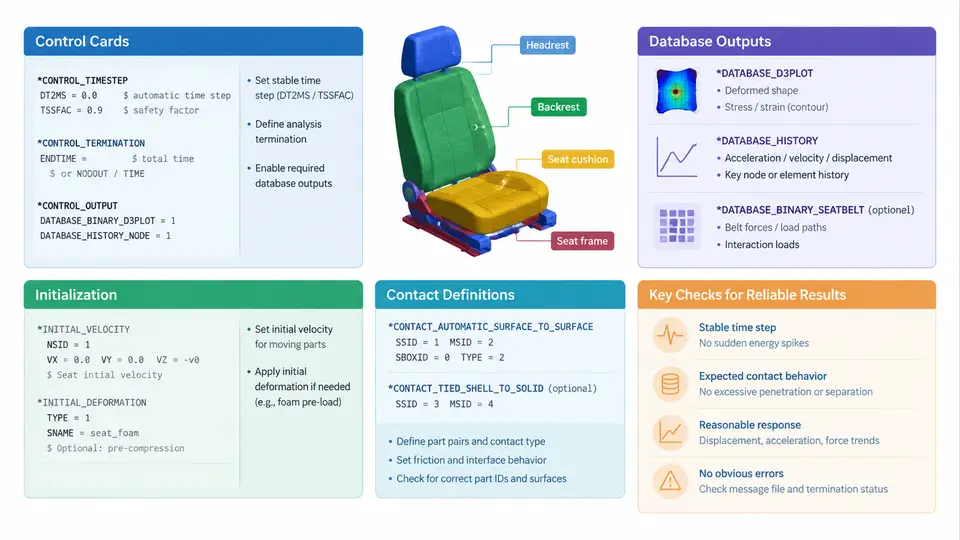
An automotive seat impact model is only as reliable as the keyword deck that drives it. Before any result contour can be trusted, the analyst must assemble a consistent set of control cards, database requests, contact definitions, and initialization data that together define how LS-DYNA advances time, what it writes to disk, how components interact, and what initial state the solver starts from. This section walks through the four keyword families that dominate a seat sled or full-vehicle seat model, using a representative frontal sled case as the working example.
Control cards: governing the explicit run
Control cards live under the *CONTROL keyword family and set global solver behavior. For a seat impact run, the most consequential entries are *CONTROL_TERMINATION, *CONTROL_TIMESTEP, *CONTROL_ENERGY, and *CONTROL_SHELL.
*CONTROL_TERMINATION defines ENDTIM, the physical end time of the simulation. A frontal sled pulse typically lasts 100–150 ms, so ENDTIM = 0.15 (seconds) is a reasonable starting value. Setting it too short truncates the rebound phase; setting it too long wastes CPU on a settled structure.
*CONTROL_TIMESTEP controls the critical time step. The explicit solver is conditionally stable, and the stable step is proportional to the smallest element characteristic length divided by the sound speed. Two parameters matter most: DTINIT (initial time step) and TSSFAC (time step scale factor, default 0.9). Leaving DTINIT at 0 lets LS-DYNA compute it automatically. If a single distorted solid element forces a tiny step, mass scaling via DT2MS can be applied, but the added mass must be monitored through *CONTROL_ENERGY or the results become physically meaningless.
*CONTROL_ENERGY activates energy accounting. Setting HGEN = 2 and RWEN = 2 writes hourglass and rigid-wall energy to the output, which is essential for judging whether the model is behaving. A seat model where hourglass energy exceeds roughly 5% of internal energy usually indicates under-integrated shell behavior that needs attention.
*CONTROL_SHELL selects the shell formulation and, critically, the ELFORM value. For seat frames and sheet-metal components, ELFORM = 2 (Belytschko-Tsay) is the common default, while ELFORM = 16 is preferred when warping or large rotations dominate. The NIP parameter sets through-thickness integration points, typically 5 for elastic-plastic shells.
d3hsp file after the first few cycles. If the reported step is far below DTINIT, a single small element is controlling the run and should be identified before proceeding.Database outputs: what the solver writes and when
Database cards determine which result files are produced. The two workhorses are *DATABASE_BINARY_D3PLOT and *DATABASE_BINARY_D3THDT, supplemented by *DATABASE_ASCII_option cards for time-history data.
*DATABASE_BINARY_D3PLOT writes the state database used for contour animation. Its DT field sets the output interval. For a 150 ms event, DT = 0.002 yields 75 states, which is usually sufficient to resolve occupant kinematics without producing an unwieldy file. The LCDT field can restrict output to a cycle interval instead.
*DATABASE_BINARY_D3THDT writes the time-history database at a finer interval, often DT = 0.0001, and is the source for force-displacement and acceleration curves. For seat impact, the quantities of interest are typically the seat cushion vertical acceleration, the seatback moment, and the lap and shoulder belt forces.
ASCII output is requested through cards such as *DATABASE_ASCII_ELOUT (element stresses and strains), *DATABASE_ASCII_NODOUT (nodal displacements and velocities), and *DATABASE_ASCII_RCFORC (contact interface forces). The RCFORC file is particularly valuable because it reports the resultant force on each contact surface, allowing the analyst to verify that the seat-to-floor attachment loads are physically plausible.
*DATABASE_BINARY_D3PLOT
$#      dt      lcdt      beam       nplt       psid
     2.0e-3       0.0       0.0       0.0         0
*DATABASE_BINARY_D3THDT
$#      dt      lcdt
     1.0e-4       0.0
*DATABASE_ASCII_RCFORC
$#      dt
     1.0e-4
Contact definitions: making components interact
Contact in LS-DYNA is defined by a *CONTACT keyword plus one or more *SET_PART or *SET_SEGMENT cards that identify the participating surfaces. For a seat model, three contact types dominate.
*CONTACT_AUTOMATIC_SINGLE_SURFACE is the standard choice for self-contact within a single part or a group of parts, such as the seat frame folding onto itself during collapse. It requires only a part set and handles the search internally.
*CONTACT_AUTOMATIC_SURFACE_TO_SURFACE is used when two distinct bodies interact, for example the occupant dummy against the seat cushion or the seat against the floor pan. The card requires a slave set and a master set; the convention is to assign the finer mesh as slave.
*CONTACT_AUTOMATIC_NODES_TO_SURFACE is appropriate when a set of nodes (such as belt nodes) slides over a surface. This is common for seatbelt routing over the seatback and cushion.
Key parameters on the contact card include FS and FD (static and dynamic friction coefficients), SOFT (soft constraint formulation, often set to 1 or 2 for seat foam), and DEPTH (search depth). For foam-to-dummy contact, SOFT = 1 with FS = 0.3 and FD = 0.3 is a reasonable starting point, though these values should be calibrated against component tests.
d3hsp file reports negative sliding interface energy or the animation shows the dummy passing through the seatback, increase DEPTH or switch to a segment-based contact with a smaller SLSFAC.Initialization: setting the starting state
Initialization cards establish the conditions at time zero. The most important for seat impact are *INITIAL_VELOCITY, *INITIAL_VELOCITY_GENERATION, *LOAD_BODY, and *DEFINE_CURVE.
In a sled simulation, the entire model is given an initial velocity equal to the sled impact speed, typically 50 km/h (about 13.9 m/s) for a frontal crash. *INITIAL_VELOCITY_GENERATION applies this to a part set or the whole model, with the direction defined by VX, VY, VZ. The sign convention must be consistent: if the vehicle travels in the positive X direction, the initial velocity is positive, and the deceleration pulse is applied as a negative acceleration.
The deceleration pulse itself is applied through *LOAD_BODY_X (or the appropriate axis) referencing a *DEFINE_CURVE that contains the time-acceleration history. The curve is typically derived from a sled test accelerometer trace, filtered and integrated to ensure the velocity change matches the target delta-V.
*INITIAL_VELOCITY_GENERATION
$#     sid      styp     phase        vx        vy        vz
         1         0         0     -13.9       0.0       0.0
*LOAD_BODY_X
$#    lcidd      sf        lciddr
         100     1.0           0
*DEFINE_CURVE
$#    lcid      sidr       sfa       sfo      offa      offo
       100         0       1.0       1.0       0.0       0.0
$#                 abscissa                ordinate
                   0.000                   0.0
                   0.010                -150.0
                   0.050                -350.0
                   0.100                -200.0
                   0.150                   0.0
Gravity is applied through *LOAD_BODY_Z with a constant curve of -9.81 m/s² if the seat is modeled in its installed orientation. This ensures the occupant settles onto the cushion before the pulse begins, which is important for realistic belt loading.
Putting it together: a minimal working deck
The four keyword families are not independent. The time step from *CONTROL_TIMESTEP determines how many cycles fit in ENDTIM; the contact stiffness affects the stable step; the database interval must be fine enough to capture the pulse but coarse enough to keep files manageable; and the initialization must be consistent with the coordinate system used by the contact and load cards.
A practical workflow is to build the deck in this order: define parts and materials, add contact, add control cards, add initialization and loading, then add database requests last. Run a short ENDTIM = 0.001 initialization check first to confirm the model starts cleanly, then extend to the full event. Inspect the d3hsp file for warnings about initial penetration, negative volumes, or mass scaling, and only then proceed to full analysis.
| Keyword | Key parameter | Typical seat-impact value | What to verify |
|---|---|---|---|
*CONTROL_TERMINATION |
ENDTIM |
0.15 s | Rebound completed |
*CONTROL_TIMESTEP |
TSSFAC |
0.9 | Reported step in d3hsp |
*DATABASE_BINARY_D3PLOT |
DT |
2.0e-3 s | 75 states for 150 ms |
*CONTACT_AUTOMATIC_SURFACE_TO_SURFACE |
FS, FD |
0.3, 0.3 | No penetration in animation |
*INITIAL_VELOCITY_GENERATION |
VX |
-13.9 m/s | Delta-V matches target |
Once these four families are consistent, the seat impact model is ready for the solver. The next step is to interpret the output: confirm that the seat structure absorbs energy as intended, that the occupant remains restrained, and that no numerical artifacts contaminate the physical response.