1. 爬取天气API数据并解析JSON
任务说明
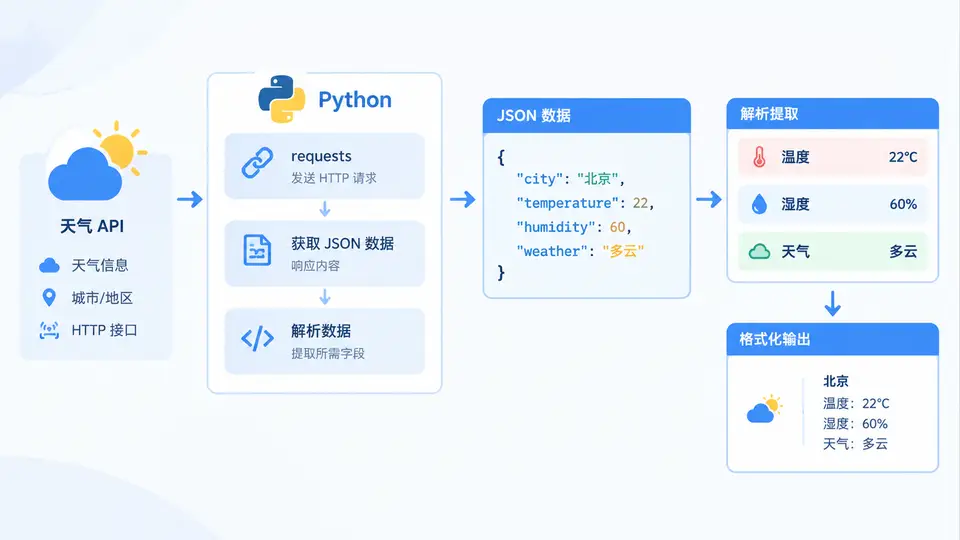
调用公开天气API(以Open-Meteo为例,无需),获取指定城市的实时天气数据,解析JSON响应,提取温度、湿度、风速等关键字段,并以可读格式输出。
实现方案
使用requests库发送HTTP GET请求,通过URL参数指定城市经纬度及所需气象变量。Open-Meteo返回标准JSON结构,使用Python内置json模块解析响应,提取所需字段并格式化展示。
代码实现
import requests
import json

def fetch_weather(latitude, longitude):
    """调用Open-Meteo API获取实时天气数据"""
    url = "https://api.open-meteo.com/v1/forecast"
    params = {
        "latitude": latitude,
        "longitude": longitude,
        "current_weather": "true",
        "hourly": "temperature_2m,relative_humidity_2m,wind_speed_10m",
        "timezone": "Asia/Shanghai"
    }

    try:
        response = requests.get(url, params=params, timeout=10)
        response.raise_for_status()  # 非200状态码抛出异常
        return response.json()
    except requests.exceptions.RequestException as e:
        print(f"请求失败: {e}")
        return None

def parse_weather(data):
    """从JSON数据中提取关键天气信息"""
    if not data:
        return None

    current = data.get("current_weather", {})
    hourly = data.get("hourly", {})

    # 提取当前天气数据
    weather_info = {
        "温度": current.get("temperature"),
        "风速": current.get("windspeed"),
        "风向": current.get("winddirection"),
        "天气代码": current.get("weathercode"),
        "观测时间": current.get("time")
    }

    # 提取当前小时的湿度(从hourly数组中取第一个值)
    if hourly.get("time"):
        current_time = current.get("time", "")
        time_list = hourly.get("time", [])
        if current_time in time_list:
            idx = time_list.index(current_time)
            weather_info["湿度"] = hourly["relative_humidity_2m"][idx]

    return weather_info

def format_output(weather_info):
    """格式化输出天气信息"""
    if not weather_info:
        print("未获取到有效天气数据")
        return

    print("=" * 40)
    print("实时天气信息")
    print("=" * 40)
    print(f"观测时间: {weather_info.get('观测时间', 'N/A')}")
    print(f"温度: {weather_info.get('温度', 'N/A')}°C")
    print(f"湿度: {weather_info.get('湿度', 'N/A')}%")
    print(f"风速: {weather_info.get('风速', 'N/A')} km/h")
    print(f"风向: {weather_info.get('风向', 'N/A')}°")
    print(f"天气代码: {weather_info.get('天气代码', 'N/A')}")
    print("=" * 40)

# 北京坐标
LATITUDE = 39.9042
LONGITUDE = 116.4074

# 主流程
if __name__ == "__main__":
    weather_data = fetch_weather(LATITUDE, LONGITUDE)
    parsed = parse_weather(weather_data)
    format_output(parsed)
运行方式
- 安装依赖:
pip install requests - 保存代码为
weather_api.py - 执行:
python weather_api.py
验证方法
运行程序后,观察输出是否包含以下内容:
- 观测时间为当前日期时间(格式如2025-01-15T14:00)
- 温度字段为合理数值(如-10~40之间的数字)
- 湿度字段为0~100之间的整数
- 风速字段为非负数值
若输出包含上述字段且数值在合理范围内,则判定案例通过。若网络不可用,程序会打印"请求失败"提示,此时需检查网络连接后重试。