3. 经典蓝牙聊天
任务说明
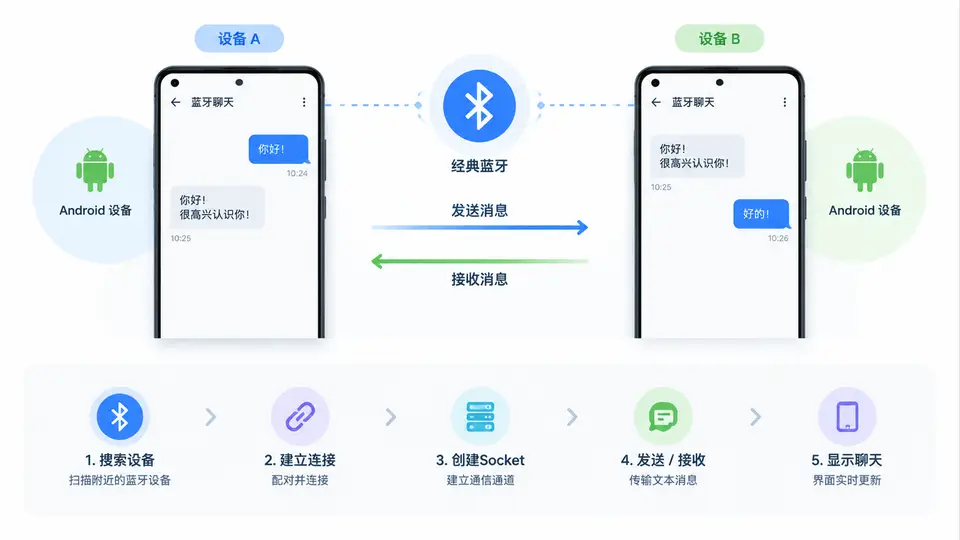
本案例实现两台Android设备之间通过经典蓝牙(Bluetooth Classic)进行文本消息互发的聊天应用。应用包含设备发现与配对、建立RFCOMM连接、消息收发三个核心环节。完成本案例后,用户可在两台真机上安装APK,一台作为服务端等待连接,另一台作为客户端发起连接,连接成功后即可双向发送文本消息。
实现方案
采用Android原生Bluetooth API,服务端通过BluetoothServerSocket监听连接,客户端通过BluetoothDevice.createRfcommSocketToServiceRecord()发起连接。消息传输使用独立线程管理输入/输出流,UI层通过Handler接收消息并刷新聊天界面。应用需要申请蓝牙权限(旧版本还需定位权限用于设备发现),并在运行时动态请求。
代码实现
// AndroidManifest.xml 关键权限
<uses-permission android:name="android.permission.BLUETOOTH" />
<uses-permission android:name="android.permission.BLUETOOTH_ADMIN" />
<uses-permission android:name="android.permission.ACCESS_FINE_LOCATION" />
<uses-permission android:name="android.permission.ACCESS_COARSE_LOCATION" />
<uses-permission android:name="android.permission.BLUETOOTH_CONNECT" />
<uses-permission android:name="android.permission.BLUETOOTH_SCAN" />

// ChatService.java - 蓝牙连接与消息收发核心
public class ChatService {
    private static final String APP_NAME = "BT_CHAT";
    private static final UUID MY_UUID = UUID.fromString("00001101-0000-1000-8000-00805F9B34FB");
    private final BluetoothAdapter adapter;
    private final Handler handler;
    private AcceptThread acceptThread;
    private ConnectThread connectThread;
    private ConnectedThread connectedThread;
    private int state;

    public static final int STATE_NONE = 0;
    public static final int STATE_LISTEN = 1;
    public static final int STATE_CONNECTING = 2;
    public static final int STATE_CONNECTED = 3;

    public ChatService(Handler handler) {
        this.adapter = BluetoothAdapter.getDefaultAdapter();
        this.handler = handler;
        this.state = STATE_NONE;
    }

    // 开始监听(服务端)
    public synchronized void start() {
        if (connectThread != null) { connectThread.cancel(); connectThread = null; }
        if (connectedThread != null) { connectedThread.cancel(); connectedThread = null; }
        if (acceptThread == null) {
            acceptThread = new AcceptThread();
            acceptThread.start();
        }
        setState(STATE_LISTEN);
    }

    // 发起连接(客户端)
    public synchronized void connect(BluetoothDevice device) {
        if (state == STATE_CONNECTING && connectThread != null) {
            connectThread.cancel(); connectThread = null;
        }
        if (connectedThread != null) { connectedThread.cancel(); connectedThread = null; }
        connectThread = new ConnectThread(device);
        connectThread.start();
        setState(STATE_CONNECTING);
    }

    // 发送消息
    public void write(byte[] out) {
        ConnectedThread r = connectedThread;
        if (r != null) { r.write(out); }
    }

    private synchronized void setState(int state) {
        this.state = state;
        handler.obtainMessage(MainActivity.MESSAGE_STATE_CHANGE, state, -1).sendToTarget();
    }

    private synchronized void connectionSuccess(BluetoothSocket socket, BluetoothDevice device) {
        if (connectThread != null) { connectThread.cancel(); connectThread = null; }
        if (connectedThread != null) { connectedThread.cancel(); connectedThread = null; }
        if (acceptThread != null) { acceptThread.cancel(); acceptThread = null; }
        connectedThread = new ConnectedThread(socket);
        connectedThread.start();
        handler.obtainMessage(MainActivity.MESSAGE_DEVICE_NAME, -1, -1, device.getName()).sendToTarget();
        setState(STATE_CONNECTED);
    }

    private void connectionFailed() {
        setState(STATE_LISTEN);
        handler.obtainMessage(MainActivity.MESSAGE_TOAST, -1, -1, "无法连接设备").sendToTarget();
    }

    // 服务端监听线程
    private class AcceptThread extends Thread {
        private final BluetoothServerSocket serverSocket;

        public AcceptThread() {
            BluetoothServerSocket tmp = null;
            try {
                tmp = adapter.listenUsingRfcommWithServiceRecord(APP_NAME, MY_UUID);
            } catch (IOException e) { }
            serverSocket = tmp;
        }

        public void run() {
            BluetoothSocket socket;
            while (state != STATE_CONNECTED) {
                try {
                    socket = serverSocket.accept();
                } catch (IOException e) { break; }
                if (socket != null) {
                    synchronized (ChatService.this) {
                        switch (state) {
                            case STATE_LISTEN:
                            case STATE_CONNECTING:
                                connectionSuccess(socket, socket.getRemoteDevice());
                                break;
                            case STATE_NONE:
                            case STATE_CONNECTED:
                                try { socket.close(); } catch (IOException e) { }
                                break;
                        }
                    }
                }
            }
        }

        public void cancel() {
            try { serverSocket.close(); } catch (IOException e) { }
        }
    }

    // 客户端连接线程
    private class ConnectThread extends Thread {
        private final BluetoothSocket socket;
        private final BluetoothDevice device;

        public ConnectThread(BluetoothDevice device) {
            this.device = device;
            BluetoothSocket tmp = null;
            try {
                tmp = device.createRfcommSocketToServiceRecord(MY_UUID);
            } catch (IOException e) { }
            socket = tmp;
        }

        public void run() {
            adapter.cancelDiscovery();
            try {
                socket.connect();
                synchronized (ChatService.this) {
                    connectThread = null;
                    connectionSuccess(socket, device);
                }
            } catch (IOException e) {
                connectionFailed();
                try { socket.close(); } catch (IOException e2) { }
            }
        }

        public void cancel() {
            try { socket.close(); } catch (IOException e) { }
        }
    }

    // 已连接数据收发线程
    private class ConnectedThread extends Thread {
        private final BluetoothSocket socket;
        private final InputStream inStream;
        private final OutputStream outStream;

        public ConnectedThread(BluetoothSocket socket) {
            this.socket = socket;
            InputStream tmpIn = null;
            OutputStream tmpOut = null;
            try {
                tmpIn = socket.getInputStream();
                tmpOut = socket.getOutputStream();
            } catch (IOException e) { }
            inStream = tmpIn;
            outStream = tmpOut;
        }

        public void run() {
            byte[] buffer = new byte[1024];
            int bytes;
            while (true) {
                try {
                    bytes = inStream.read(buffer);
                    handler.obtainMessage(MainActivity.MESSAGE_READ, bytes, -1, buffer).sendToTarget();
                } catch (IOException e) { break; }
            }
        }

        public void write(byte[] bytes) {
            try {
                outStream.write(bytes);
            } catch (IOException e) { }
        }

        public void cancel() {
            try { socket.close(); } catch (IOException e) { }
        }
    }
}

// MainActivity.java - UI与消息处理
public class MainActivity extends AppCompatActivity {
    public static final int MESSAGE_STATE_CHANGE = 1;
    public static final int MESSAGE_READ = 2;
    public static final int MESSAGE_DEVICE_NAME = 3;
    public static final int MESSAGE_TOAST = 4;
    private ChatService chatService;
    private BluetoothAdapter bluetoothAdapter;
    private ArrayAdapter<String> conversationAdapter;
    private EditText inputText;
    private String connectedDeviceName = null;

    private final Handler handler = new Handler(new Handler.Callback() {
        @Override
        public boolean handleMessage(Message msg) {
            switch (msg.what) {
                case MESSAGE_STATE_CHANGE:
                    updateState(msg.arg1);
                    return true;
                case MESSAGE_READ:
                    byte[] readBuf = (byte[]) msg.obj;
                    String readMessage = new String(readBuf, 0, msg.arg1);
                    conversationAdapter.add("对方: " + readMessage);
                    return true;
                case MESSAGE_DEVICE_NAME:
                    connectedDeviceName = msg.getData().getString("device_name");
                    Toast.makeText(MainActivity.this, "已连接 " + connectedDeviceName, Toast.LENGTH_SHORT).show();
                    return true;
                case MESSAGE_TOAST:
                    Toast.makeText(MainActivity.this, msg.getData().getString("toast"), Toast.LENGTH_SHORT).show();
                    return true;
            }
            return false;
        }
    });

    @Override
    protected void onCreate(Bundle savedInstanceState) {
        super.onCreate(savedInstanceState);
        setContentView(R.layout.activity_main);
        bluetoothAdapter = BluetoothAdapter.getDefaultAdapter();
        chatService = new ChatService(handler);
        conversationAdapter = new ArrayAdapter<>(this, android.R.layout.simple_list_item_1);
        ListView listView = findViewById(R.id.conversation_list);
        listView.setAdapter(conversationAdapter);
        inputText = findViewById(R.id.input_text);
        Button sendButton = findViewById(R.id.send_button);
        sendButton.setOnClickListener(v -> sendMessage());
        Button discoverableButton = findViewById(R.id.discoverable_button);
        discoverableButton.setOnClickListener(v -> ensureDiscoverable());
        Button scanButton = findViewById(R.id.scan_button);
        scanButton.setOnClickListener(v -> scanDevices());
        checkPermissions();
    }

    private void checkPermissions() {
        if (Build.VERSION.SDK_INT >= 31) {
            requestPermissions(new String[]{
                    Manifest.permission.BLUETOOTH_CONNECT,
                    Manifest.permission.BLUETOOTH_SCAN,
                    Manifest.permission.ACCESS_FINE_LOCATION}, 1);
        } else {
            requestPermissions(new String[]{
                    Manifest.permission.ACCESS_FINE_LOCATION}, 1);
        }
    }

    private void ensureDiscoverable() {
        if (bluetoothAdapter.getScanMode() != BluetoothAdapter.SCAN_MODE_CONNECTABLE_DISCOVERABLE) {
            Intent discoverableIntent = new Intent(BluetoothAdapter.ACTION_REQUEST_DISCOVERABLE);
            discoverableIntent.putExtra(BluetoothAdapter.EXTRA_DISCOVERABLE_DURATION, 300);
            startActivity(discoverableIntent);
        }
        chatService.start();
    }

    private void scanDevices() {
        if (bluetoothAdapter.isDiscovering()) bluetoothAdapter.cancelDiscovery();
        bluetoothAdapter.startDiscovery();
        IntentFilter filter = new IntentFilter(BluetoothDevice.ACTION_FOUND);
        registerReceiver(receiver, filter);
    }

    private final BroadcastReceiver receiver = new BroadcastReceiver() {
        public void onReceive(Context context, Intent intent) {
            String action = intent.getAction();
            if (BluetoothDevice.ACTION_FOUND.equals(action)) {
                BluetoothDevice device = intent.getParcelableExtra(BluetoothDevice.EXTRA_DEVICE);
                if (device != null) {
                    new AlertDialog.Builder(MainActivity.this)
                            .setTitle("发现设备")
                            .setMessage(device.getName() + "\n" + device.getAddress())
                            .setPositiveButton("连接", (dialog, which) -> {
                                chatService.connect(device);
                            })
                            .setNegativeButton("取消", null)
                            .show();
                }
            }
        }
    };

    private void sendMessage() {
        String message = inputText.getText().toString();
        if (message.length() > 0) {
            chatService.write(message.getBytes());
            conversationAdapter.add("我: " + message);
            inputText.setText("");
        }
    }

    private void updateState(int state) {
        switch (state) {
            case ChatService.STATE_LISTEN:
                setTitle("等待连接...");
                break;
            case ChatService.STATE_CONNECTING:
                setTitle("连接中...");
                break;
            case ChatService.STATE_CONNECTED:
                setTitle("已连接: " + connectedDeviceName);
                break;
        }
    }

    @Override
    protected void onDestroy() {
        super.onDestroy();
        if (chatService != null) chatService.stop();
        unregisterReceiver(receiver);
    }
}
布局文件 activity_main.xml
<LinearLayout xmlns:android="http://schemas.android.com/apk/res/android"
    android:layout_width="match_parent"
    android:layout_height="match_parent"
    android:orientation="vertical"
    android:padding="16dp">

    <ListView
        android:id="@+id/conversation_list"
        android:layout_width="match_parent"
        android:layout_height="0dp"
        android:layout_weight="1" />

    <LinearLayout
        android:layout_width="match_parent"
        android:layout_height="wrap_content"
        android:orientation="horizontal">

        <EditText
            android:id="@+id/input_text"
            android:layout_width="0dp"
            android:layout_height="wrap_content"
            android:layout_weight="1"
            android:hint="输入消息" />

        <Button
            android:id="@+id/send_button"
            android:layout_width="wrap_content"
            android:layout_height="wrap_content"
            android:text="发送" />
    </LinearLayout>

    <LinearLayout
        android:layout_width="match_parent"
        android:layout_height="wrap_content"
        android:orientation="horizontal">

        <Button
            android:id="@+id/discoverable_button"
            android:layout_width="0dp"
            android:layout_height="wrap_content"
            android:layout_weight="1"
            android:text="作为服务端" />

        <Button
            android:id="@+id/scan_button"
            android:layout_width="0dp"
            android:layout_height="wrap_content"
            android:layout_weight="1"
            android:text="扫描设备" />
    </LinearLayout>
</LinearLayout>
连接流程与消息收发时序
落地与验证
运行方式:使用Android Studio构建APK,分别安装到两台Android 6.0以上真机(需支持蓝牙)。两台设备均需开启蓝牙并授予定位权限。
操作步骤:
- 设备A点击“作为服务端”,系统弹出可被发现请求,点击允许(持续300秒);
- 设备B点击“扫描设备”,在发现列表中选择设备A并点击“连接”;
- 连接成功后,两台设备标题栏显示“已连接: 设备名称”;
- 任一方在输入框输入文字并点击“发送”,对方列表即时显示消息。
验证判定标准:
- 设备A标题栏从“等待连接”变为“已连接”,设备B标题栏从“连接中”变为“已连接”,表示RFCOMM链路建立成功;
- 设备A发送“测试消息1”,设备B聊天列表出现“对方: 测试消息1”;设备B回复“收到”,设备A列表出现“对方: 收到”,证明双向文本传输正常;
- 关闭一台设备蓝牙或远离超过10米,聊天界面不再更新,重新靠近并重连后可继续通信。
预期输出示例:当设备A发送“你好”且设备B发送“Hello”时,两台设备聊天列表均显示两行消息:我: 你好、对方: Hello(设备A视角)或我: Hello、对方: 你好(设备B视角)。