3. 过滤低分辨率图像
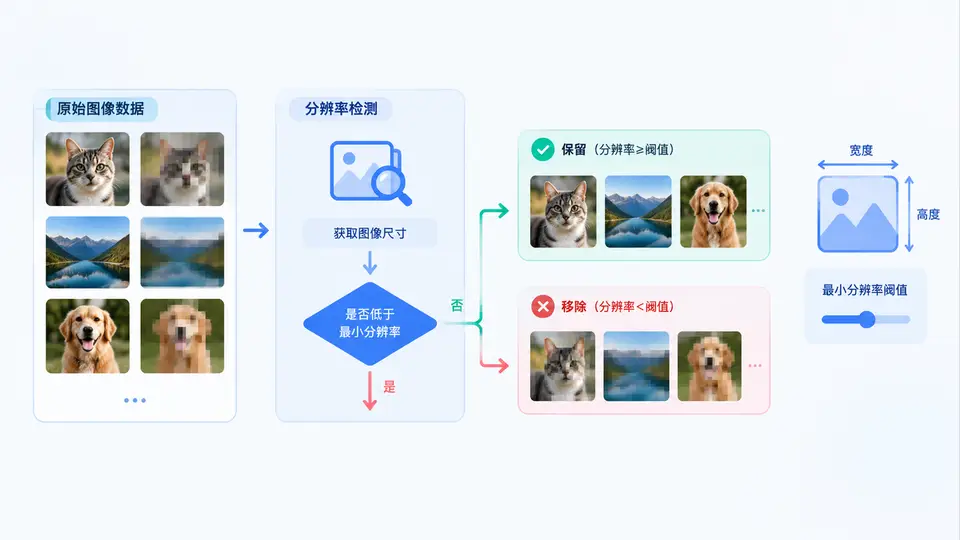
任务说明
在AI训练数据准备阶段,低分辨率图像会降低模型对细粒度特征的识别能力,并可能引发训练不稳定。本案例要求实现一个自动化脚本:给定一个图像目录,设定最小宽高阈值(例如宽≥224且高≥224像素),自动扫描目录下所有常见格式图片,将低于阈值的文件移动到独立的rejected/子目录,并在终端输出筛选统计。通过该脚本,可确保进入训练集的数据满足模型输入尺寸要求。
核心实现
import os
import shutil
from PIL import Image

def filter_low_resolution(source_dir, min_width=224, min_height=224):
    """
    扫描source_dir下所有图片,将低于最小分辨率的文件移至rejected子目录。
    返回 (保留数量, 移除数量, 错误列表)
    """
    supported_ext = {'.jpg', '.jpeg', '.png', '.bmp', '.webp'}
    rejected_dir = os.path.join(source_dir, 'rejected')
    os.makedirs(rejected_dir, exist_ok=True)

    kept_count = 0
    removed_count = 0
    errors = []

    for filename in os.listdir(source_dir):
        filepath = os.path.join(source_dir, filename)
        if not os.path.isfile(filepath):
            continue
        ext = os.path.splitext(filename)[1].lower()
        if ext not in supported_ext:
            continue

        try:
            with Image.open(filepath) as img:
                width, height = img.size
        except Exception as e:
            errors.append((filename, f"无法读取: {e}"))
            continue

        if width < min_width or height < min_height:
            dest = os.path.join(rejected_dir, filename)
            shutil.move(filepath, dest)
            removed_count += 1
            print(f"[移除] {filename} ({width}x{height})")
        else:
            kept_count += 1

    return kept_count, removed_count, errors

if __name__ == "__main__":
    # 使用示例:扫描当前目录下的 images 文件夹
    kept, removed, errors = filter_low_resolution("images", 224, 224)
    print(f"\n保留: {kept} 张, 移除: {removed} 张")
    if errors:
        print("以下文件处理失败:")
        for name, msg in errors:
            print(f"  {name}: {msg}")
运行与验证
依赖安装:需要Python 3.6+及Pillow库,执行pip install Pillow。
准备测试数据:在脚本同目录创建images/文件夹,放入至少3张图片,其中包含一张宽或高小于224像素的图片(例如150×300),其余为合规尺寸(如400×300)。
执行:运行python filter_images.py,观察终端输出。
判定标准:
- 终端打印的
[移除]行中列出了所有低于224×224的图片文件名及其实际尺寸; images/rejected/目录下出现被移除的文件,原目录中不再存在这些文件;- 合规图片仍保留在
images/目录中未被移动; - 最终统计行中“保留+移除”数量等于目录中图片总数(不含rejected子目录)。
关键说明
脚本使用Pillow库的Image.open()读取图片头部信息获取尺寸,不加载完整像素数据,因此对内存占用极小。对于损坏或格式不支持的文件,脚本将其记录在错误列表中而不中断整体流程。阈值参数min_width和min_height可根据模型实际输入尺寸调整(如ResNet常用224,ViT常用384)。被移除的图片集中在rejected/目录,便于人工复核或后续进行超分辨率处理后再评估是否可用。