1. PHM平台数据采集接口设计
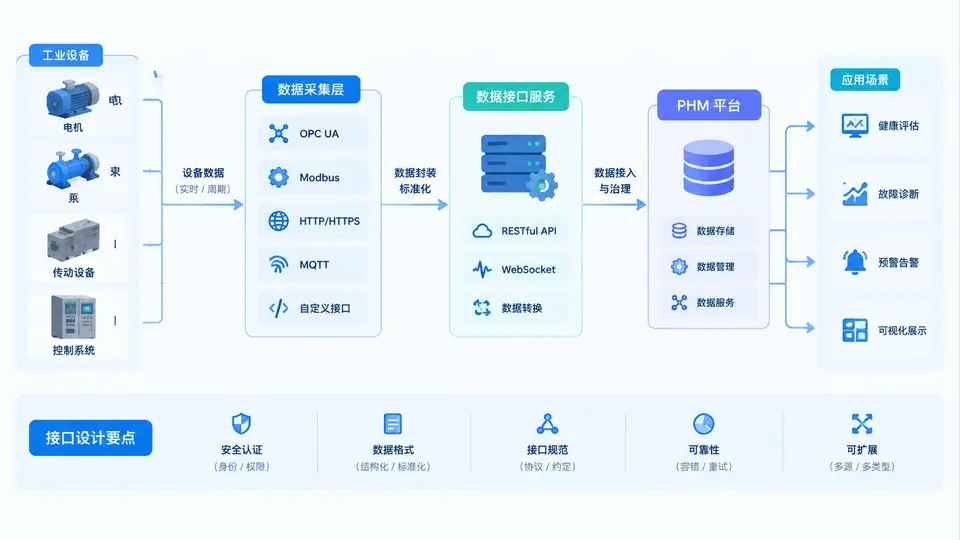
任务说明
设计并实现一个PHM(设备健康管理)平台的数据采集接口,该接口负责接收来自不同工业设备(如振动传感器、温度传感器、PLC控制器)的监测数据,完成数据格式解析、基础质量校验,并输出统一结构化的JSON数据供下游存储与分析模块使用。本案例聚焦于接口的输入解析与标准化输出,不涉及数据持久化与前端展示。
接口协议定义
设备数据通过HTTP POST请求以JSON格式上报,请求路径为/api/v1/telemetry。每种设备类型上报的数据字段不同,接口需根据device_type字段自动选择对应的解析与校验逻辑。统一输出格式包含设备标识、时间戳、数据类型及经过标准化后的指标键值对。
核心实现
以下Python代码使用Flask框架实现采集接口。代码包含三种设备类型的解析器、通用校验函数及统一响应封装。输入样例覆盖三种设备类型,可直接运行验证。
# app.py
from flask import Flask, request, jsonify
from datetime import datetime
import re

app = Flask(__name__)

# ---------- 设备类型解析器 ----------
def parse_vibration(data):
    """振动数据: {device_id, ts, rms, peak}"""
    required = ['device_id', 'ts', 'rms', 'peak']
    if not all(k in data for k in required):
        return None, 'missing_field'
    try:
        rms = float(data['rms'])
        peak = float(data['peak'])
    except (TypeError, ValueError):
        return None, 'invalid_number'
    if rms < 0 or peak < 0 or peak < rms:
        return None, 'invalid_range'
    return {
        'device_id': str(data['device_id']),
        'ts': int(data['ts']),
        'type': 'vibration',
        'values': {'rms': rms, 'peak': peak}
    }, None

def parse_temperature(data):
    """温度数据: {device_id, ts, temp_c}"""
    required = ['device_id', 'ts', 'temp_c']
    if not all(k in data for k in required):
        return None, 'missing_field'
    try:
        temp = float(data['temp_c'])
    except (TypeError, ValueError):
        return None, 'invalid_number'
    if temp < -50 or temp > 200:
        return None, 'out_of_range'
    return {
        'device_id': str(data['device_id']),
        'ts': int(data['ts']),
        'type': 'temperature',
        'values': {'temp_c': temp}
    }, None

def parse_plc(data):
    """PLC数据: {device_id, ts, current_a, voltage_v}"""
    required = ['device_id', 'ts', 'current_a', 'voltage_v']
    if not all(k in data for k in required):
        return None, 'missing_field'
    try:
        current = float(data['current_a'])
        voltage = float(data['voltage_v'])
    except (TypeError, ValueError):
        return None, 'invalid_number'
    if current < 0 or voltage < 0:
        return None, 'out_of_range'
    return {
        'device_id': str(data['device_id']),
        'ts': int(data['ts']),
        'type': 'plc',
        'values': {'current_a': current, 'voltage_v': voltage}
    }, None

# 解析器注册表
PARSERS = {
    'vib': parse_vibration,
    'temp': parse_temperature,
    'plc': parse_plc
}

# ---------- 时间戳校验 ----------
def validate_ts(ts):
    """时间戳需为10位秒级Unix时间戳,且不晚于当前时间+5分钟"""
    if ts < 10**9 or ts > 10**10:
        return False
    if ts > datetime.now().timestamp() + 300:
        return False
    return True

# ---------- 路由 ----------
@app.route('/api/v1/telemetry', methods=['POST'])
def telemetry():
    data = request.get_json(silent=True)
    if not data or not isinstance(data, dict):
        return jsonify({'error': 'invalid_json'}), 400

    device_type = data.get('device_type')
    if device_type not in PARSERS:
        return jsonify({'error': 'unsupported_device_type'}), 400

    parser = PARSERS[device_type]
    parsed, err = parser(data)
    if err:
        return jsonify({'error': err}), 400

    if not validate_ts(parsed['ts']):
        return jsonify({'error': 'invalid_timestamp'}), 400

    return jsonify(parsed), 200

if __name__ == '__main__':
    app.run(host='0.0.0.0', port=5000, debug=True)
运行与验证
依赖安装:
pip install flask启动服务:
python app.py验证用例:使用curl发送三种设备类型的请求,观察返回结果。
# 1. 正常振动数据
curl -X POST http://localhost:5000/api/v1/telemetry \
  -H "Content-Type: application/json" \
  -d '{"device_type":"vib","device_id":"VIB-001","ts":1710000000,"rms":2.3,"peak":5.1}'

# 预期输出: {"device_id":"VIB-001","ts":1710000000,"type":"vibration","values":{"rms":2.3,"peak":5.1}}

# 2. 温度数据超范围
curl -X POST http://localhost:5000/api/v1/telemetry \
  -H "Content-Type: application/json" \
  -d '{"device_type":"temp","device_id":"TMP-002","ts":1710000000,"temp_c":250}'

# 预期输出: {"error":"out_of_range"}

# 3. PLC数据缺少字段
curl -X POST http://localhost:5000/api/v1/telemetry \
  -H "Content-Type: application/json" \
  -d '{"device_type":"plc","device_id":"PLC-003","ts":1710000000,"current_a":5.5}'

# 预期输出: {"error":"missing_field"}

# 4. 不支持的设备类型
curl -X POST http://localhost:5000/api/v1/telemetry \
  -H "Content-Type: application/json" \
  -d '{"device_type":"sound","device_id":"SND-001","ts":1710000000}'

# 预期输出: {"error":"unsupported_device_type"}
判定标准:
- 正常数据请求返回HTTP 200且JSON结构包含
device_id、ts、type、values四个字段; - 字段缺失、数值非法、范围越界、时间戳异常分别返回对应的错误码与HTTP 400;
- 所有校验逻辑均在上述代码中实现,无外部依赖。